Genjutsu vs Lockstep: Which Recast Model Keeps the Take
Genjutsu Motion Transfer and Lockstep take the same inputs. Lockstep keeps the take and costs almost 75% less per second.
By Eftal Yurtseven · Nov 2, 2026 · 8 min read
Two motion transfer models, one brief. Both take a video and a handful of reference photos. Both hand back a clip where your characters perform the moves from the source. Read the input fields side by side and you'd think you were choosing between twins.
You aren't. Genjutsu Motion Transfer and Lockstep agree on the inputs and disagree on what they promise to keep, and on what they charge for it. In a recast, what the model keeps is the whole job. A new face on a broken take is not a result. It's a reshoot you didn't plan for.
Both run on each::labs through the same API, so this Genjutsu vs Lockstep comparison isn't about loyalty. It's about which one to reach for first, what each one costs you per clip, and why we built Lockstep the way we did.
Genjutsu vs Lockstep: The Short Answer
Pick Lockstep when the take itself is the asset: a dance trend that lives on the beat, a music clip where the lips have to land on the lyric, a handheld shot whose shake is part of the feel, an ad you want to recast for five markets. It's our own recast model. It holds motion, lip sync and camera from the source, and at 720p it costs almost 75% less per second than Genjutsu Motion Transfer.
Genjutsu Motion Transfer is a reasonable pick for a handful of short-form motion experiments, where you're exploring a look more than protecting a take. If you're not sure which camp your brief is in, it's probably the first one. Most recast work is, and most recast work runs at volume, where the price gap does the deciding for you.
What Lockstep Actually Is
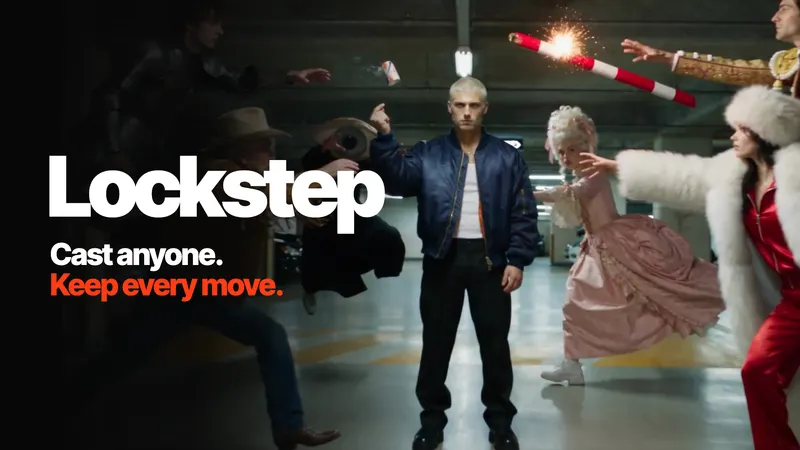
Lockstep is the frontier recast model made by the each::labs team. It swaps the people in any video for your own characters, from one photo each, and keeps the original take intact: same length, same timing, same camera. Only what you ask for changes.
The inputs are a source video, one to eight reference images, an optional prompt and a resolution of 480p, 720p or 1080p. In the prompt you tag your cast as @Image1, @Image2 and so on, which is how a whole group gets swapped in one run without anyone ending up in the wrong place. Identity (face, hair, skin tone, outfit) comes from the photos and holds from the first frame to the last. Background, lighting and framing stay as filmed unless you ask for a new scene. It works on pets, mascots and stylized characters too. For the full tour, read our Lockstep spotlight.
What Genjutsu Motion Transfer Actually Is
Genjutsu Motion Transfer creates videos from source motion and reference images. A source video supplies the movement, and the reference images guide what the result looks like. You give it a source video, one to eight reference images and an optional prompt where you can tag each reference. It's built for guiding short-form video edits, and it sits in a small family on each::labs alongside a lighter motion transfer variant, a restyle model and object swap models, all under video-to-video.
The model's own guidance on each::labs is useful: describe one coherent shot before adding complex action, and state the subject, movement, camera behavior and setting separately. That's sensible advice, and it shows where the work sits. With Genjutsu, the prompt does more of the steering. With Lockstep, the source video does.
Side by Side: The Inputs That Decide It
On paper the two look close. Both take a video URL, both take one to eight reference images, both accept an optional prompt. The differences are in the details, and the details are where recasts succeed or fail.
Casting. A tie. Both take up to eight reference images and let you tag them in the prompt, so you can say exactly who replaces the drummer, and both can recast a whole group in one run. The difference shows up in everything you didn't tag.
What's preserved. This is the big one. Lockstep is built around a stated contract: motion, lip sync and camera carry over from the source, and only the tagged characters change. Genjutsu's model page describes its job as transferring source motion onto a new appearance, with the prompt guiding the edit. Both put a new appearance on the source motion. Lockstep is the one that promises to leave everything else as filmed.
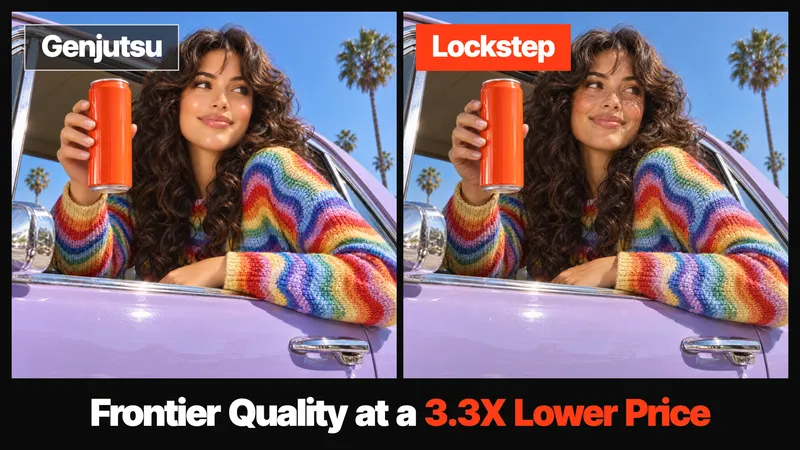
Price. Both bill per second of output video, and this is where the gap is widest. At 720p, Genjutsu Motion Transfer costs about 3.8x what Lockstep does for the same clip. At 480p it's about 3.3x. The next section shows what that means for a real budget.
Same clip. About a quarter of the bill.
Price: Lockstep Costs Almost 75% Less
This is the part of the comparison that doesn't need a trained eye. Both models are priced per output second, and Lockstep's rate is a fraction of Genjutsu's at every resolution they share.
- At 720p, Lockstep costs almost 75% less per second than Genjutsu Motion Transfer. Put the other way, Genjutsu charges about 3.8x as much for the same clip.
- At 480p, Lockstep costs about 70% less.
- At 1080p, Lockstep still costs roughly half of what Genjutsu charges for 720p. That's more than twice the pixels for about half the price.
Take a 10-second recast, the length of a typical trend clip. On Genjutsu Motion Transfer at 720p, those 10 seconds cost close to four times what they cost on Lockstep. Same clip, same length, same moves. The meter just runs a lot slower.
Scale that up and it stops being a rounding error. A trend template that gets run ten thousand times, an ad recast for twelve markets, an AI influencer account that posts every day: each of those pays the per-second rate over and over. On Lockstep, that bill is about a quarter of what it would be on Genjutsu. For the budget of one 720p Genjutsu clip, you can render almost four with Lockstep.
The unusual part is that the cheaper option isn't the weaker one here. In our side-by-side runs against other recast models, Lockstep kept more of the original take while costing less, which is why we're comfortable calling it the best recast model on the market at the best price. Every run on each::labs shows its cost before it starts, so you can check the difference yourself before you spend anything.
The shake is part of the shot.
What Lockstep Is Built to Keep
Lip sync comes first. Lockstep keeps mouth shapes following the original take, so singing and dialogue stay in sync after the swap. That's the difference between a usable music trend and a clip where the new singer looks dubbed. Superstar Pet and Concert Main Character, two of the each::labs trend flows, only work because of it.
Camera is the second. Handheld shake, pans and fast moves carry over untouched, which matters more than it sounds. The camera is half the emotion of a handheld selfie or a chase. Smooth it out and the clip reads as generated.
Busy scenes are the third. When several people move fast and overlap, a recast model has to keep every character in its own lane. Max (@MaxVOAO on X) put Lockstep through a full fight scene, every character swapped from a reference image, timing and camera exactly where they were.
We also ran Lockstep against other recast models with the same videos and the same photos, nothing retouched. Some outputs ended with a less realistic face, others dropped details from the reference, and those runs cost between 2.4x and 3.3x the price of the Lockstep run. Lockstep kept every detail. Watch it till the end.
More runs are on the Lockstep page: a dance with a dog, a handheld selfie and a jam session. That's where our claim comes from. We think Lockstep is the best recast model on the market right now, and we'd rather you watch the evidence than take the sentence on faith.
Where Genjutsu Motion Transfer Fits
There's a real use for a model that leans on the prompt. If you're not protecting a take at all, and you just want a movement study applied to a character concept to see what it feels like, Genjutsu's "describe the shot" approach is a fine way to sketch, as long as the run count stays small enough that the higher per-second rate doesn't matter. Its sibling models on each::labs (restyle and object swap) also make sense when the job is changing a look or a prop rather than the cast.
The simplest way to put it: Genjutsu is a motion transfer tool, and Lockstep is a recast tool. When the person in the video is what you're changing and the performance is what you're keeping, you want the recast tool. When you're doing it at volume, you want the one that costs about a quarter as much.
Run the same clip. Let the output argue.
One Clip, Two Models: How to Test Them
Don't decide from a feature table. Run both on the same clip, which each::labs makes easy since they share one API. Pick a source with the things that usually break: a beat, a mouth and a moving camera. A ten-second singing selfie is perfect.
For Lockstep, keep the prompt to what changes and let the video carry the rest:
Replace the singer with @Image1. Keep the room as filmed.
For Genjutsu, follow its own guidance and spell out the shot:
A young woman sings into her phone camera in a dim bedroom. Handheld selfie framing, slight shake, string lights in the background. Use the reference image for her appearance.
Then scrub both outputs at the moments that matter: the first lyric, the fastest move, the moment the camera swings. Those three frames will tell you more than the first frame ever will. And look at the cost line next to each run. On a 10-second test at 720p, one of them costs close to four times the other.
When to Pick Which
Choose Lockstep for trend templates where users add a selfie and star in the clip, for music and dialogue where lip sync can't drift, for multi-character scenes and group dances, for pets and mascots that need to hit the choreography, for ad recasts across markets where you need the same counter, the same light and the same timing, and for anything you'll run at volume, where paying almost 75% less per second adds up fast.
Choose Genjutsu Motion Transfer for a few quick motion sketches where the prompt describes the shot and preserving the original performance isn't the goal.
Here's the gap on a single viral trend, with the cost of each run on screen: other models charged up to 3.8x more for the exact same clip.
Run Lockstep on each::labs
Open Lockstep in the playground, upload a video, add your cast photos, tag them in a one-line prompt and run it at 480p while you test. Render the keeper at 720p or 1080p. In the API it's the same prediction call as every other model: model set to lockstep, with video_url, image_urls, an optional prompt and resolution in the input.
If you want a head start, the trend flows in AI flows already chain an image edit into Lockstep: try Concert Main Character or Dancing Pet Trend. And if you're comparing motion models more broadly, our Kling 3 Motion Control guide covers a different approach to copying a move.
Frequently Asked Questions
Genjutsu vs Lockstep: which is better for recasting a video?
For recasting, Lockstep. It's built to keep motion, lip sync and camera from the source and change only the characters you tag, and it costs almost 75% less per second at 720p. Genjutsu Motion Transfer is better thought of as a prompt-guided motion transfer tool.
Is Lockstep cheaper than Genjutsu Motion Transfer?
Yes, by a wide margin. At 720p, Lockstep costs almost 75% less per output second, so Genjutsu Motion Transfer charges about 3.8x as much for the same clip. At 480p Lockstep is about 70% cheaper, and even Lockstep at 1080p costs roughly half of Genjutsu at 720p.
Do Lockstep and Genjutsu take the same inputs?
Yes. Both take a source video URL, one to eight reference images and an optional prompt, and both let you tag those references in the prompt. The difference is in the output: what each one keeps from the source, and what it costs per second.
Can I run both models on each::labs?
Yes. Both are on each::labs and use the same prediction API, so running the same clip through each is a matter of changing the model name and the input fields.
Does Lockstep keep lip sync in a recast?
Yes. Mouth shapes follow the original take, so singing and dialogue stay in sync after the swap, which is why it powers music trends like Superstar Pet and Concert Main Character.