Lockstep: Cast Anyone, Keep Every Move
Lockstep, our own recast model, swaps anyone in a video from one photo each and keeps motion, lip sync and camera, for almost 75% less than other recast models.
By Eftal Yurtseven · Nov 2, 2026 · 9 min read
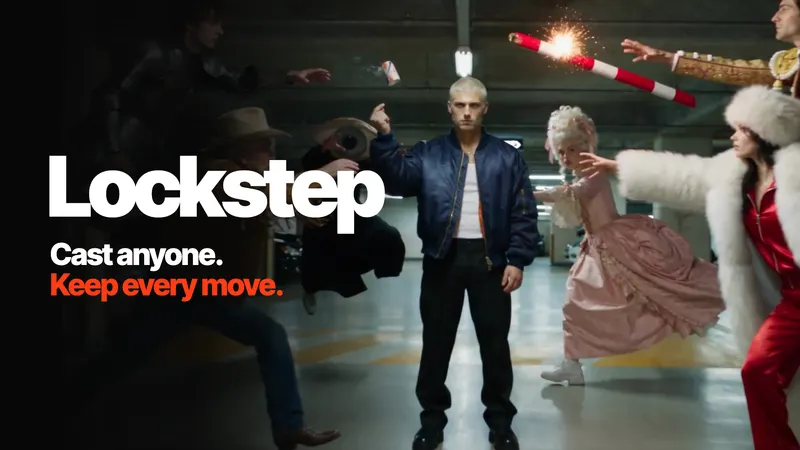
Making a video with a new face in it is easy now. Making that video move like the original is the hard part. Swap the dancer in a trend clip and the new dancer lands half a beat late. Swap the singer and the mouth drifts off the lyric. Swap the lead in a handheld shot and the camera suddenly forgets it was handheld. The face changed, and so did everything you liked about the take.
That's the gap Lockstep was built to close. It's our own frontier recast model, made by the each::labs team, and its whole job fits in one line: cast anyone, keep every move. You hand it a video and one photo of each character, and the new cast hits the same marks as the original take, frame for frame. We think it's the best recast model on the market right now, and the best priced one too: Lockstep costs almost 75% less than the other recast models we put it next to. We ran them side by side on the same inputs to back up both claims. More on that below.
Why Recasting Breaks the Take
Most of what makes a clip work isn't the person in it. It's the timing. A dance trend lives or dies on the beat. A stunt is choreography and a camera move that somebody planned for an afternoon. An ad is a counter, a light and a rhythm the editor already cut to. When a recast model rebuilds the scene around a new face, it rebuilds those things too, and it rarely rebuilds them as well as they were shot.
So the usual recast result looks fine as a still and wrong in motion. The steps soften. A spin turns into a sway. Lips open on the wrong syllable. The handheld shake gets smoothed into a drone glide nobody asked for. You end up with a clip that technically has your character in it and emotionally has nothing.
Here's the question that matters before you pick a recast model: does it treat the original take as a suggestion, or as the script?
Same marks. New cast.
What Lockstep Actually Is
Lockstep is a video-to-video model that swaps the people in any video for your own characters, from one photo each. It takes a source video, between one and eight reference images, an optional prompt, and an output resolution of 480p, 720p or 1080p. It returns a video with the same length, the same timing and the same camera as the source. Only what you ask for changes.
Three things carry over from the original take, and they're the three things other recasts tend to lose. Motion: every step, spin and gesture lands on the same beat. Lip sync: mouth shapes follow the original performance, so singing and dialogue stay in sync. Camera: handheld shake, pans and fast moves come through untouched.
It's live now on each::labs, in the playground and the API, and inside workflows. That's the same model in three places, so a test you run by hand behaves like the batch you run at volume. And because it's our own model, we got to decide what it costs. We made it a fraction of what other recast models charge for the same clip, which we'll get to in a minute.
The lyric lands where it landed.
Bring the Moves, Bring the Cast
The brief is short on purpose. Lockstep needs two things from you: a reference video and one clear photo of each character.
The video can be almost anything that moves. A dance trend, an ad you already shot, a stunt, a scene from your film. The photos become your cast, and you point at them by tag in the prompt: the first image is @Image1, the second is @Image2, and so on. That tagging is what lets you swap a whole group in a single run and keep every character where it belongs, instead of hoping the model guesses who replaces whom.
The prompt is optional, and it's where you steer. Leave it empty and Lockstep swaps the characters and keeps the scene. Write a line and you can ask for more. These are the kinds of prompts the each::labs team uses:
Replace the runner with @Image1. Set the scene in a school hallway.
Swap the dancers for @Image1 and @Image2 in a supermarket aisle.
Keep the prompt about what changes. The motion, the beat and the camera are already in the video, so you don't need to describe them. Spending words on "she spins twice and points at the camera" just gives the model a second, weaker version of the instructions it already has.
Every Character Holds, Even in a Fight
Identity is the other half of a good recast. Lockstep takes the face, hair, skin tone and outfit from your photo and keeps them the same from the first frame to the last. And it only changes the characters you tag: background, lighting and framing stay as filmed unless your prompt asks otherwise.
The hardest test for that is a scene where several people move fast and overlap. Max (@MaxVOAO on X) ran exactly that: a full fight scene, every character swapped from a reference image, with the timing and the camera left exactly where they were.
Notice what doesn't happen. The punches don't slow down to give the new faces time to render. Nobody swaps places. The camera doesn't calm itself. That's what "every move stays locked" looks like when the moves are hard.
It isn't only people, either. Pets, mascots and stylized characters pick up the motion the same way, which is why some of the most fun results come from a dog that suddenly knows the choreography.
Every detail kept. A fraction of the price.
We Tested It Against Other Recast Models
Calling something the best recast model on the market is a bold claim. We know. So we gave Lockstep and other recast models the exact same videos and the exact same photos, and published the results without retouching anything. Watch it till the end.
Look past the first frame. A still can flatter any model; the differences show up in motion, where some outputs end with a less realistic face and others lose details the reference take had. In our runs, Lockstep's output kept every detail of the reference. The other models charged between 2.4x and 3.3x the price of the Lockstep run for those same clips, and still kept less.
The Lockstep page has three of those runs side by side: a dance with a dog, a handheld selfie and a jam session. Judge it yourself. That's exactly why we put them next to each other.
If you want the head to head with a specific model, price per second included, we wrote one: Genjutsu vs Lockstep goes through inputs, resolution, cost and when each one fits.
The Best Recast Model at the Best Price
Quality is half the claim. Price is the other half, and it's the half your finance team will notice first.
Recasting is a volume game. One trend becomes a template, one template becomes thousands of user runs, one ad becomes a version for every market. At that scale the price per second isn't a detail. It's the business model. So we built Lockstep to cost almost 75% less than the recast models it competes with, without trading down on the output.
Here's what that looks like in practice. We ran the same four trend videos through Lockstep and through other recast models. The other models charged up to 3.8x more for the same clips, and some of them still couldn't keep the moves together. Across all four videos, Lockstep came out nearly 75% cheaper.
Put it in terms of a single run. A 10-second recast that costs close to four times as much on another model costs about a quarter of that on Lockstep. Same 10 seconds, same moves, a much slower meter.
And if you're already spending thousands a month on recasts, as a lot of AI influencer accounts and content studios are, the math is short: switch the model, keep the output, and pay roughly a quarter of what you pay now. Every run shows its cost before it starts, so pricing stays transparent and predictable at volume.
Turn Every Trend Into a Template
Lockstep is coming for every trend on your feed. The each::labs team already built a set of two-step AI flows on top of it: the first step edits your photo into the scene, the second hands that image and the trend video to Lockstep, which carries every move over.
A few you can run today: Concert Main Character puts you in an arena full of phone lights, singing along. Dancing Pet Trend and Superstar Pet give your pet the moves and the microphone. Cinematic Power Walk, Luxury Car Exit and Luxury Sunset Drive are the main-character trio. Autumn Vibes Trend, Making Coffee Together and Spinning Chair Mood cover the softer, cozier corner of the feed.
For apps and platforms, this is the real use. Turn a trend into a template, let your users add a selfie, and they star in it while the trend is still trending. Speed matters more than polish on a feed, and a two-step flow is about as short as the path from photo to post can get. The price matters here too: when a template runs thousands of times, paying about a quarter per run is the difference between a feature that pays for itself and one you quietly turn off.
Shoot it once. Recast it for every market.
Shoot Once, Cast Anyone
Trends are the loud use case. The quiet one might be bigger.
Take an ad. You shoot it once: same counter, same light, same timing. Then you recast it for every market, audience and season, with a new lead in every version and none of the reshoots. Five cast photos, one ad, five spots that all cut to the same edit. For agencies and in-house teams, that turns a single production day into a localization plan.
Film and VFX teams get the same trick at a different scale. Shoot a stunt once, then put any actor in it: same choreography, same camera, no reshoot. And creators get the simplest version of all. Drop yourself, a friend or a mascot into any scene and keep every beat of the original.
AI influencers might be the clearest case of all. A virtual creator who posts every day lives on recasts, and that bill grows with every trend. Lockstep keeps the character the same across all of them for roughly a quarter of what other recast models charge.
Run Lockstep on each::labs
The fastest way to feel it is the playground. Open Lockstep, upload a source video, add your cast photos, write a one-line prompt if you need one, pick a resolution and run it. Start at 480p while you're finding the right clip and photos, then render the keeper at 720p or 1080p.
When it's time to build, it's a standard each::labs prediction call. You post to the prediction endpoint with the model set to lockstep, and the input carries a video_url, a list of image_urls, an optional prompt and a resolution. Media goes in as accessible URLs rather than inline data. Pass a webhook URL if you'd rather be called back than poll.
{
  "model": "lockstep",
  "version": "1.0.0",
  "input": {
    "video_url": "https://your-cdn.com/dance-trend.mp4",
    "image_urls": ["https://your-cdn.com/guard.jpg", "https://your-cdn.com/matador.jpg"],
    "prompt": "Swap the dancers for @Image1 and @Image2.",
    "resolution": "720p"
  },
  "webhook_url": "https://your-app.com/hooks/lockstep"
}
Same inputs, same result, at any volume. If you're chaining it with other steps, Lockstep sits naturally after an image edit (like the trend flows) and before the finishing work in the Video API: captions, reframing, loudness. And if your problem is keeping one character steady across many separate shots rather than recasting one take, our guide to character consistency across AI video shots is the better starting point.
Frequently Asked Questions
What does the Lockstep recast model actually change in a video?
Only the characters you tag, plus anything your prompt asks for. Face, hair, skin tone and outfit come from your photos. Motion, lip sync, camera movement, length and timing come from the source video, and background, lighting and framing stay as filmed by default.
How much cheaper is Lockstep than other recast models?
Almost 75% cheaper in our tests. On the same four trend videos, other recast models charged up to 3.8x more than Lockstep, and a 10-second recast on Lockstep costs about a quarter of what it costs on the other models we compared. Every run shows its cost before it starts.
How many characters can Lockstep swap at once?
Up to eight reference images go into a single run, and you tag each one in the prompt as @Image1, @Image2 and so on. That's how a whole group gets recast in one pass with every character staying in its own place.
Does Lockstep work with pets and mascots?
Yes. Pets, mascots and stylized characters pick up the motion the same way people do. The Dancing Pet Trend and Superstar Pet flows on each::labs are built exactly for that.
Which resolution should I use with Lockstep?
Treat 480p as your drafting setting while you test clips and photos, then render the final at 720p or 1080p. The motion and timing don't change with resolution, so a draft you like is a reliable preview of the final.