





















Alibaba AI Models on each::labs
Alibaba Cloud stands as a global leader in cloud computing and AI innovation, powering advanced models through its DashScope platform and Model Studio. Specializing in multimodal AI capabilities like text-to-video, image-to-video, and AI image editing, Alibaba leverages cutting-edge technologies such as Wan and Qwen to deliver high-quality generative tools for creative and enterprise applications. On each::labs, developers and creators gain seamless API access to Alibaba's full suite of models, enabling rapid integration without managing separate credentials or regional endpoints.
Renowned for its scalable infrastructure, Alibaba powers millions of AI inferences daily, with strengths in video generation, image synthesis, and language processing. Its Qwen series excels in open-source LLMs, while Wan models push boundaries in cinematic video creation. This positions Alibaba as a top choice for enterprises and creators seeking reliable, high-fidelity AI outputs, now unified through each::labs for effortless deployment.
What Can You Build with Alibaba?
Alibaba on each::labs offers robust categories including Image to Video, Text to Video, Image to Image, Video to Video, and Text to Image, powered by model families like Wan v2.6, Wan 2.5, Qwen, IDM-VTON, LatentSync, Echomimic, Hunyuan-3D, and Hunyuan-Image.
- Image to Video: Transform static images into dynamic videos with models like Wan v2.6 Image to Video Flash or Echomimic V3. Ideal for animating product photos into marketing clips—e.g., turn a fashion image into a walking model video.
- Text to Video: Generate videos from descriptions using Wan v2.6 Text to Video or Wan 2.1 1.3B. Perfect for storyboarding ads, like prompting "A futuristic cityscape at dusk with flying cars zooming between neon skyscrapers" to create a 720P promotional reel.
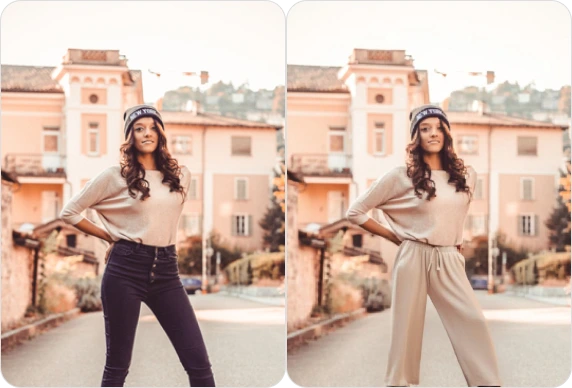
- Image to Image: Edit and stylize images via Qwen Image Edit, IDM VTON, or Wan v2.6 Image to Image. Use for virtual try-ons, such as uploading a photo and editing "Change outfit to red evening gown, multiple angles" with Qwen Image Edit 2511 Multiple Angles.
- Video to Video: Enhance or modify footage with LatentSync, Audio Based Lip Synchronization, or Wan v2.2 Animate Replace. Great for dubbing, like syncing a speaker's audio to a new face in training videos.
- Text to Image: Create visuals from text prompts using Qwen Image, Wan v2.6 Text to Image, or Hunyuan-Image. Suited for concept art, generating "A serene mountain lake reflecting aurora lights in hyper-realistic style."
Concrete Scenario: A content creator builds social media reels. Using Wan v2.6 Reference to Video, input a reference image of a dancer and prompt: "Animate this dancer performing hip-hop in a vibrant urban street at night, smooth 480P motion, 5 seconds." The output delivers fluid, professional video ready for TikTok, showcasing Alibaba's speed and realism for viral creative projects.
Hunyuan-3D adds 3D modeling from images, while Video-Retalking enables realistic lip-sync for personalized avatars. These tools target developers building apps for e-commerce visuals, film pre-production, and interactive media.
Why Use Alibaba Through each::labs?
each::labs serves as the premier platform for Alibaba models, offering a unified API that simplifies access to over 150 AI models from top providers. No need to juggle Alibaba's regional API keys (Singapore, US Virginia, Beijing) or DashScope endpoints—each::labs handles authentication, scaling, and compatibility seamlessly.
Key advantages include OpenAI-compatible interfaces for quick migration, plus SDK support in Python, Node.js, and more, mirroring Alibaba's DashScope protocols. Test in the interactive Playground environment before scaling to production-ready APIs with usage tracking and cost optimization. Developers save time on setup, focusing on innovation with Alibaba's Wan cinematic quality and Qwen editing precision, all under one dashboard at eachlabs.ai.
Getting Started with Alibaba on each::labs
Sign up at eachlabs.ai, navigate to the Alibaba provider page, and explore models in the Playground for instant testing with sample prompts. Integrate via the documented API or SDK—generate a key, copy code snippets, and deploy in minutes for projects like video generation workflows. Dive into Alibaba capabilities today and elevate your AI creations with each::labs simplicity.