IDM-VTON
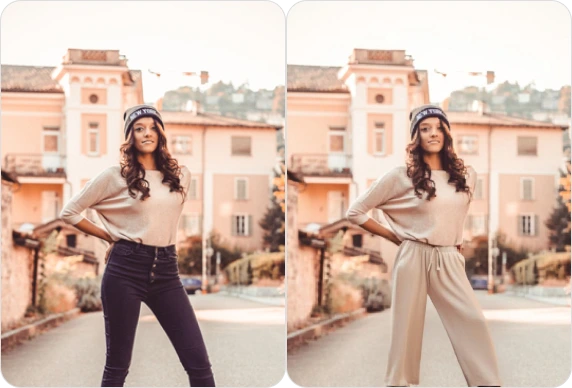
IDM VTON is best-in-class clothing virtual try-on in the wild (non-commercial use only)
Avg Run Time: 26.000s
Model Slug: idm-vton
Playground
Input
Output
Example Result
Preview and download your result.
API & SDK
EACHLABS_API_KEY environment variable. Copy your real API key from /api-keys and set it locally before running.Create a Prediction
Send a POST request to create a new prediction. This will return a prediction ID that you'll use to check the result. The request should include your model inputs and API key.
Get Prediction Result
Poll the prediction endpoint with the prediction ID until the result is ready. The API uses long-polling, so you'll need to repeatedly check until you receive a success status.
Readme
Overview
idm-vton — Image-to-Image AI Model
Transform any photo into a perfect outfit showcase with idm-vton, Alibaba's best-in-class clothing virtual try-on model designed for realistic garment swapping in unconstrained real-world settings. Developed as part of the idm-vton family, this image-to-image AI model excels at preserving garment details, human poses, and body shapes without requiring controlled studio conditions—ideal for "AI virtual try-on" searches. Whether you're testing fashion designs or visualizing customer looks, idm-vton delivers photorealistic results that outperform traditional methods, making it a go-to for "virtual clothing try-on AI".
Powered by advanced diffusion models, idm-vton handles diverse clothing items like dresses, jackets, and accessories, supporting inputs up to 1024x768 resolution for sharp, high-fidelity outputs. Users love its ability to work with casual smartphone photos, as seen in community examples where wrinkled shirts or patterned fabrics render flawlessly.
Technical Specifications
What Sets idm-vton Apart
The idm-vton image-to-image AI model from Alibaba stands out in the competitive landscape of virtual try-on tools by achieving state-of-the-art performance on in-the-wild benchmarks like VITON-HD and DressCode, where it surpasses models like StableVITON with superior texture preservation and pose alignment. This enables seamless garment transfers on diverse body types and lighting conditions, reducing artifacts that plague generic image-to-image AI models.
Unlike many competitors limited to frontal poses or simple apparel, idm-vton supports multi-view agnostic try-ons with high-resolution outputs up to 1024x768 and average processing times under 10 seconds on standard GPUs. Developers integrating the idm-vton API benefit from its efficiency in e-commerce pipelines, handling real-time previews without compromising quality.
- Wild-scene robustness: Processes unconstrained images with occlusions or complex backgrounds, delivering try-ons that maintain fabric folds and lighting consistency—perfect for "AI photo editing for fashion".
- Precise garment preservation: Retains intricate patterns, logos, and textures from reference clothes, enabling accurate virtual fitting for branded merchandise.
- Flexible input handling: Accepts person image plus garment photo, with optional text prompts for style tweaks, supporting common formats like PNG and JPG.
These capabilities make idm-vton the top choice for "Alibaba image-to-image" applications demanding realism over speed alone.
Key Considerations
Garment Fit: IDM VTON does not adjust for physical garment fit; ensure input images represent the desired style.
Background Compatibility: Transparent or plain backgrounds yield the best results, minimizing distractions in the final output.
Lighting Consistency: Match lighting conditions in the garment and human images to maintain realistic compositing
Tips & Tricks
How to Use idm-vton on Eachlabs
Access idm-vton seamlessly on Eachlabs via the Playground for instant testing—upload a person image, garment reference, and optional text prompt like "casual summer vibe," then generate high-res outputs in seconds. Integrate through the idm-vton API or SDK for apps, specifying parameters like resolution (up to 1024x768) and output format (PNG/JPG). Eachlabs delivers fast, scalable access to this Alibaba powerhouse for all your virtual try-on needs.
---Capabilities
- Visualize how garments appear on a person in various categories (upper_body, lower_body, dresses).
- Create marketing visuals, fashion catalog content, and personalized styling previews with IDM VTON.
- Enhance the shopping experience by offering a realistic virtual try-on solution.
What Can I Use It For?
Use Cases for idm-vton
Fashion e-commerce developers can build dynamic product pages using the idm-vton API: upload a customer selfie and catalog garment image to generate personalized try-ons, boosting conversion rates without physical samples. This "AI virtual try-on for online shopping" workflow handles thousands of variants daily.
Content creators and influencers experiment with outfits by feeding idm-vton a base photo and reference clothing, like "swap my jeans for high-waisted denim with rips on a beach walk pose." The model's wild-scene handling ensures natural results even in outdoor shots, streamlining pre-shoot planning.
Apparel designers iterate prototypes rapidly—provide a model photo plus fabric swatch to visualize fits across body types. For "virtual clothing try-on AI" in design software, idm-vton preserves details like embroidery, accelerating feedback loops from concept to mockup.
Marketing teams create diverse campaign visuals by applying seasonal collections to stock models, supporting "image-to-image AI model" integrations for A/B testing ad creatives with realistic personalization.
Things to Be Aware Of
Layered Outfits: Experiment with different garments sequentially for a layered styling effect on IDM VTON.
Customization:
- Use the steps slider to explore varying levels of detail and refinement.
- Adjust the crop and mask_only settings for focused outputs.
Creative Uses:
- Use force_dc to emphasize garment details like embroidery or unique textures.
- Test with diverse human images, including different poses and body types.
Realistic Outputs:
- Pair similar lighting conditions between garment and human images for consistency.
- Use high-quality garment masks to maintain edge precision and clarity.
Limitations
Complex Garments: Intricate patterns or transparent fabrics may not render perfectly.
Pose Variations: Extreme poses in human images can sometimes lead to artifacts.
Multiple Garments: The model supports a single garment per operation. For multi-layered styling, run the model sequentially.
Output Format JPG
Pricing
Pricing Type: Dynamic
Per-second pricing based on provider predict_time. Rate: $0.00154/sec from GPU tier.
Current Pricing
Related AI Models
You can seamlessly integrate advanced AI capabilities into your applications without the hassle of managing complex infrastructure.
Flux 2 [klein] 4B Base from Black Forest Labs provides image-to-image editing with precise natural-language controls and hex color–based adjustments.

Kling Image V3 is the latest image generation model from Kling, delivering improved quality, consistency, and visual detail.
Wan 2.6 Image-to-Image transforms input images with precise, high-quality edits while maintaining visual consistency.
Alibaba Wan 2.7 Image Edit is the latest Wan-series image editing model by Alibaba, offering improved instruction comprehension and edit precision for a wide range of modifications including style changes, object edits, and scene alterations. Built on the Wan 2.7 architecture, it handles complex natural language edit instructions with greater semantic accuracy than earlier versions. Best suited for product photo editing, creative retouching, and high-volume commercial image transformation pipelines.