Seedream 5.0 Lite vs Seedream 4.5: Choosing the Right Model
In our previous blog post we talked about what Seedream 5.0 Lite can do its strong points and showed real examples of how it works, like making sure characters look the same and designing posters and user interfaces. We also said that as of February 24 Seedream 5.0 Lite is available, on Eachlabs so people can try it out and see how it works in situations. Then you might wonder, what if we used Seedream 4.5 instead of Seedream 5.0 Lite? How would the results be different? Would you even notice t
In our previous blog post we talked about what Seedream 5.0 Lite can do its strong points and showed real examples of how it works, like making sure characters look the same and designing posters and user interfaces. We also said that as of February 24 Seedream 5.0 Lite is available, on Eachlabs so people can try it out and see how it works in situations.
Then you might wonder, what if we used Seedream 4.5 instead of Seedream 5.0 Lite? How would the results be different? Would you even notice the difference? Are there times when Seedream 4.5's still the better option?. When is Seedream 5.0 Lite really better?
In this blog post we will try to answer these questions by looking at real examples. We will compare Seedream 4.5 and Seedream 5.0 Lite to see how they do in terms of designing things editing precisely keeping characters consistent and creating structured layouts. We will see where the differences are small and where they really matter. If you want to try this out for yourself you can go to Eachlabs.
Technical Differences Between Seedream 5.0 Lite and Seedream 4.5
Before we start talking about how to use these two models we need to look at the differences between them.
Resolution and Output Options
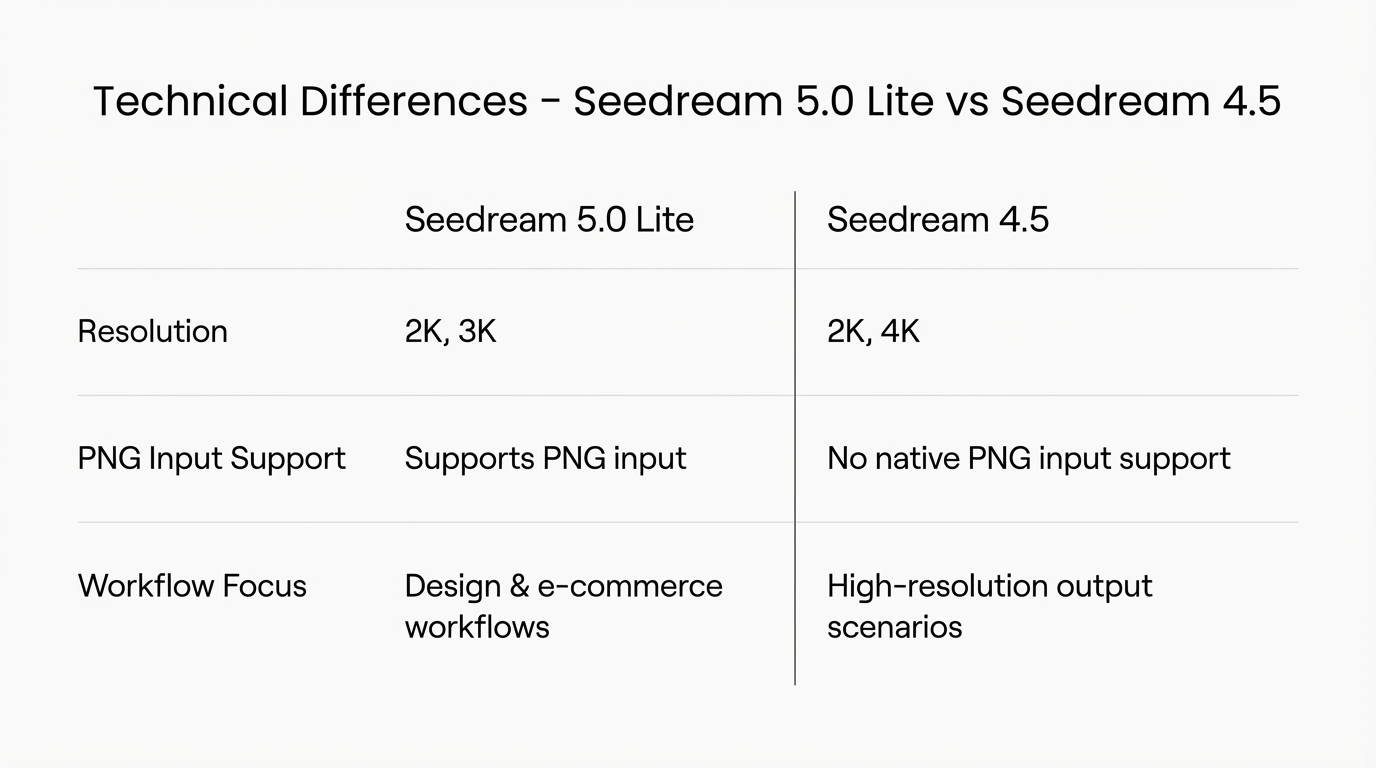
One of the things you will notice is the difference in resolution.
Seedream 5.0 Lite can produce output in 2K. 3K.
Seedream 4.5 can produce output in 2K and 4K.
For many things we do like making user interface elements, social media posts, posters and stories 2K and 3K are good enough. The difference really matters when we need high resolution images or very big pictures.
Another important difference is the type of files they can use as input.
Seedream 5.0 Lite can accept PNG files as input, whereas Seedream 4.5 cannot use PNG files as input in the same way. This may sound like a small technical detail, but in practice it makes a significant difference.
If you are a designer and you need to work with assets that have transparent backgrounds, this becomes a decisive factor. In that kind of workflow, you immediately realize that you should be using Seedream 5.0 Lite. The ability to accept PNG inputs allows you to maintain clean layers, isolate elements, and build structured compositions without unnecessary preprocessing.
Also when we look at the overall strengths of the models, we can clearly see that Seedream 5.0 Lite performs better in e-commerce and design-oriented scenarios. In fact, we could say that this difference is already reflected in the way the models handle input formats. The flexibility of input acceptance is not just a technical specification. It can be a signal where the model is positioned and which types of professional workflows it is optimized for.
Core Capability Enhancements in Seedream 5.0 Lite
An important point to clarify is that Seedream 5.0 Lite is not simply a linear upgrade of Seedream 4.5, but rather a model optimized for specific professional scenarios with targeted improvements.
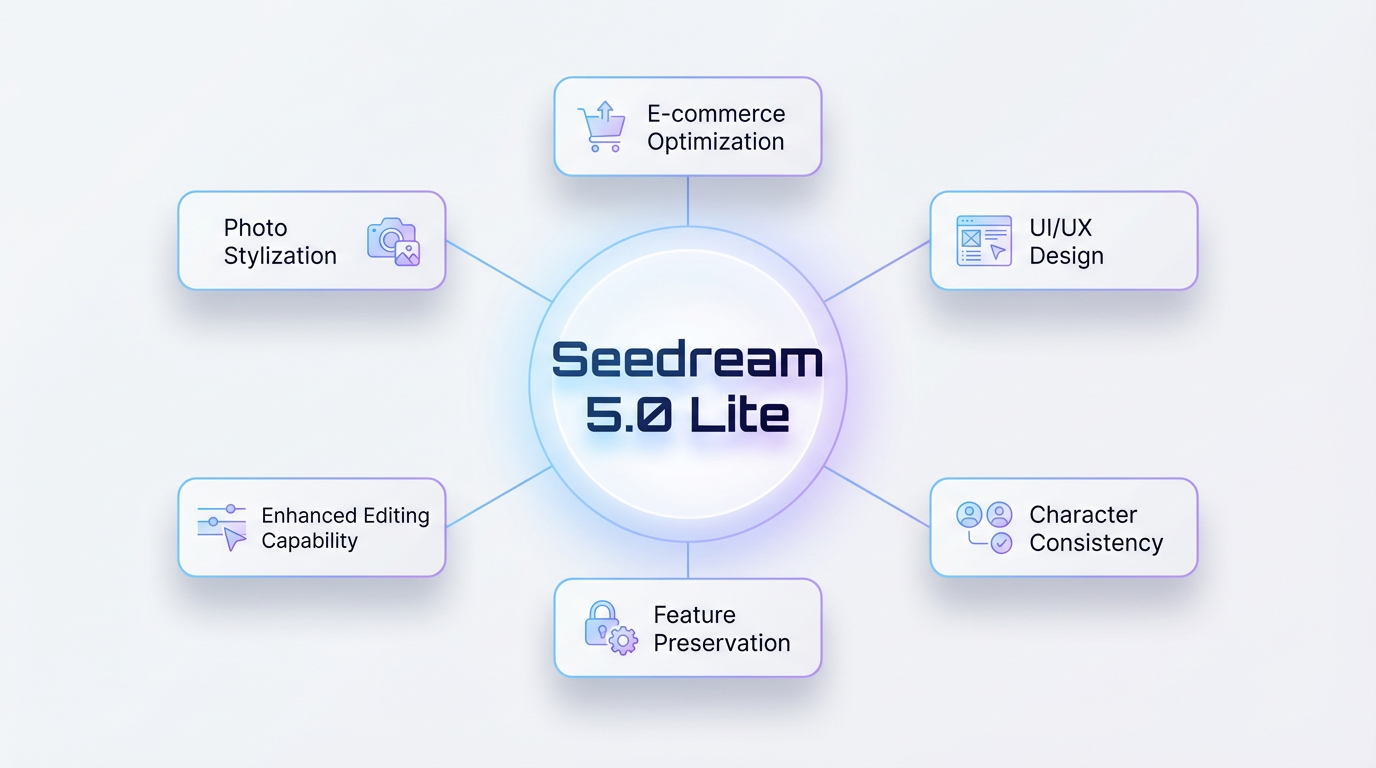
Seedream 5.0 Lite focuses on targeted breakthroughs in three areas:
- Better character consistency and feature preservation
- Stronger understanding of complex intent and structured expansion
- More precise editing with improved typography handling
What makes the positioning of Seedream 5.0 Lite important is that Seedream 5.0 Lite is not trying to do everything at the time. It is clearly made for production realities. So the improvements in Seedream 5.0 Lite are not about getting better benchmark numbers. They actually show up in the workflows that matter.
Seedream 5.0 Lite handles skin tone preservation across lighting conditions much more reliably. When you generate the character in daylight or studio light or warmer indoor scenes the characters identity does not change. The tone of the characters skin stays the same. Along with that the stability of the characters proportions has improved. The distance between the eyes the curve of the jawline the overall structure of the face stays the same across many generations. Small details on the face, which used to get blurry or distorted when making images are now kept clear.
Another big difference is in image stability. When you work with reference images or generate many images the results feel more consistent. Seedream 5.0 Lite behaves less like it is making images and more like it understands how they should work together.
Also as I mentioned Seedream 5.0 Lite is better at understanding the layout of designs. In user interface designs posters with text blocks or visuals that look like infographics the composition feels more thoughtful. The elements are placed in an order. The space between them is more controlled. It feels less random and more structured.
In addition Seedream 5.0 Lite handles data visualization better. When you ask for charts, structured slides or visuals with a lot of information the results look more organized and easier to read. The typography is also noticeably better especially when making text and keeping the typography consistent. The alignment of the text the clarity and the balance of the composition feel more ready for production.
These are not just changes to make images look a little better. They directly affect how reliable Seedream 5.0 Lite is, in real-world production. When you are building a product running campaigns or generating many structured assets these improvements mean you have to make fewer corrections do less manual cleanup and get more predictable results.
What Remains the Similar Between the Two Models
Even though Seedream 5.0 Lite introduces meaningful improvements, it is important to emphasize that Seedream 4.5 remains a highly capable model. This comparison is not about positioning one as obsolete and the other as superior in every dimension.
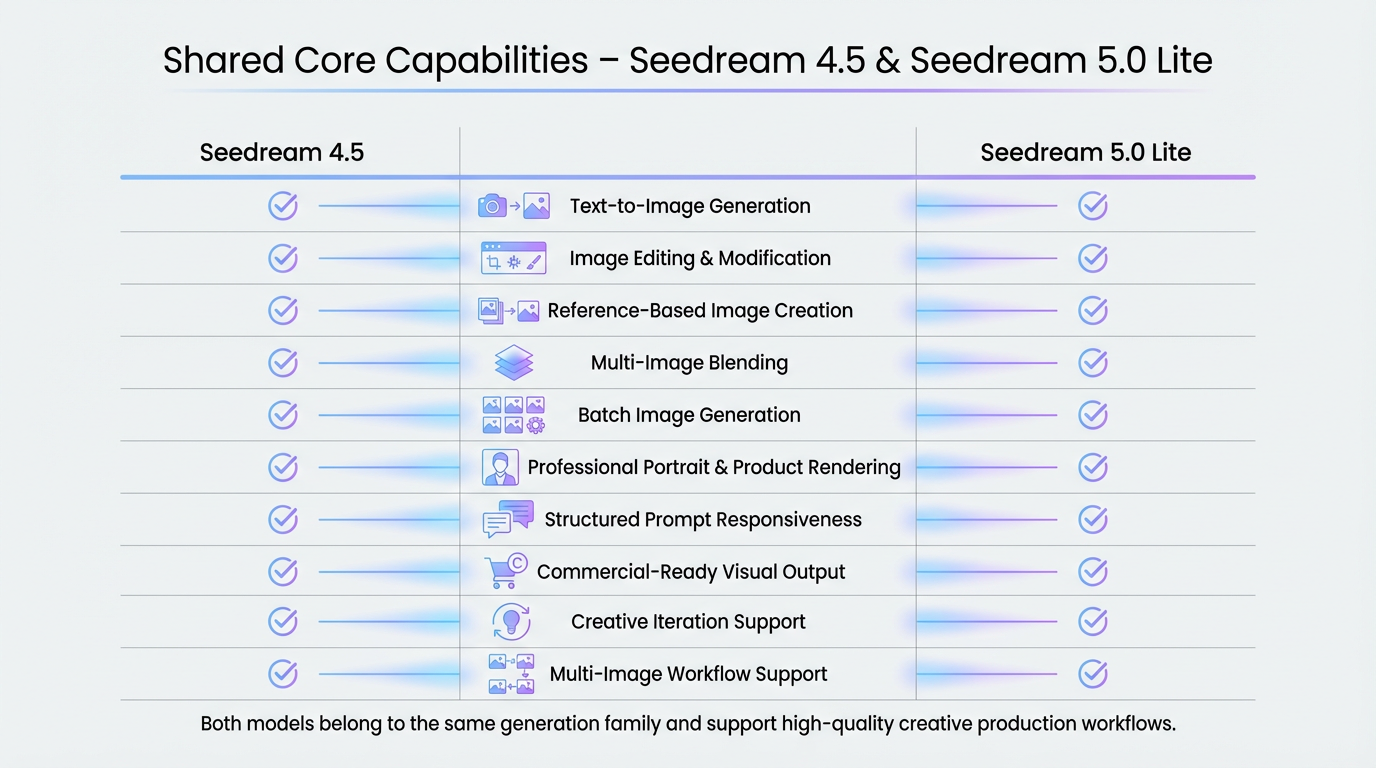
At the level both models do the same things when it comes to creating images. They can make images from text edit one image use images as references make many images at once and change images based on what you tell them to do. Both models can make images that look professional, like portraits and pictures of products that can be used for marketing. They work in the way when it comes to being creative.
They are also similar in the way they respond to structured prompts. If you describe a scene clearly, define the subject, environment, lighting, and style, both Seedream 4.5 and Seedream 5.0 Lite are capable of translating that into a coherent visual result. In straightforward generation tasks where the goal is simply to produce a clean, aesthetically pleasing image, the output quality can feel close.
Both models support multi-image workflows, meaning you can provide reference visuals and expect the model to blend elements together in a reasonably controlled way. They can both handle batch generation scenarios, allowing you to create multiple variations of a concept without rewriting your entire prompt. In creative production environments where speed and flexibility matter, both models remain practical tools.
So at their core, they belong to the same generation family. They both enable creative production, commercial-ready visuals, and iterative design exploration. The real difference does not appear in basic generation capability, but rather in how consistently and precisely they handle more demanding, structured, and production-oriented scenarios.
When Should You Choose Seedream 4.5?
You should choose Seedream 4.5 when you specifically need 4K resolution output. Seedream 5.0 Lite supports up to 3K resolution, so if your workflow depends on ultra-high-resolution assets for situations where maximum pixel is critical, Seedream 4.5 becomes the more suitable option.
If we look at the other scenarios, there are many cases where Seedream 4.5 simply makes more sense.
For illustration, painting, and stylized creative work, Seedream 4.5 feels very natural. If your goal is expressive visuals, concept art, comics, or character design for games, you should choose Seedream 4.5.
The same applies to general photo editing. But, if you are working on tasks where posture must remain stable, skin tone needs to be preserved , and facial consistency is critical across multiple outputs, then you should use Seedream 5.0 Lite.
When it comes to creating stories making character merchandise, stickers and memes or doing creative things Seedream 4.5 is a good option. This is because these projects are about using your imagination and being flexible not just about following a set plan so Seedream 4.5 is really good choice for tasks that need imagination and flexibility.
So if the work you do is more about being artistic and not much, about following a system and you do not need all the advanced features that come with Seedream 5.0 Lite then Seedream 4.5 is still a good choice. You can use Seedream 4.5. It will work just fine for your artistic work.
Real Use Case Comparison
Now of talking about ideas let us look at this by using real production scenarios. We are going to see how things really work in production scenarios. This will give us an understanding of real production scenarios.
Skin Preservation
Reference images:
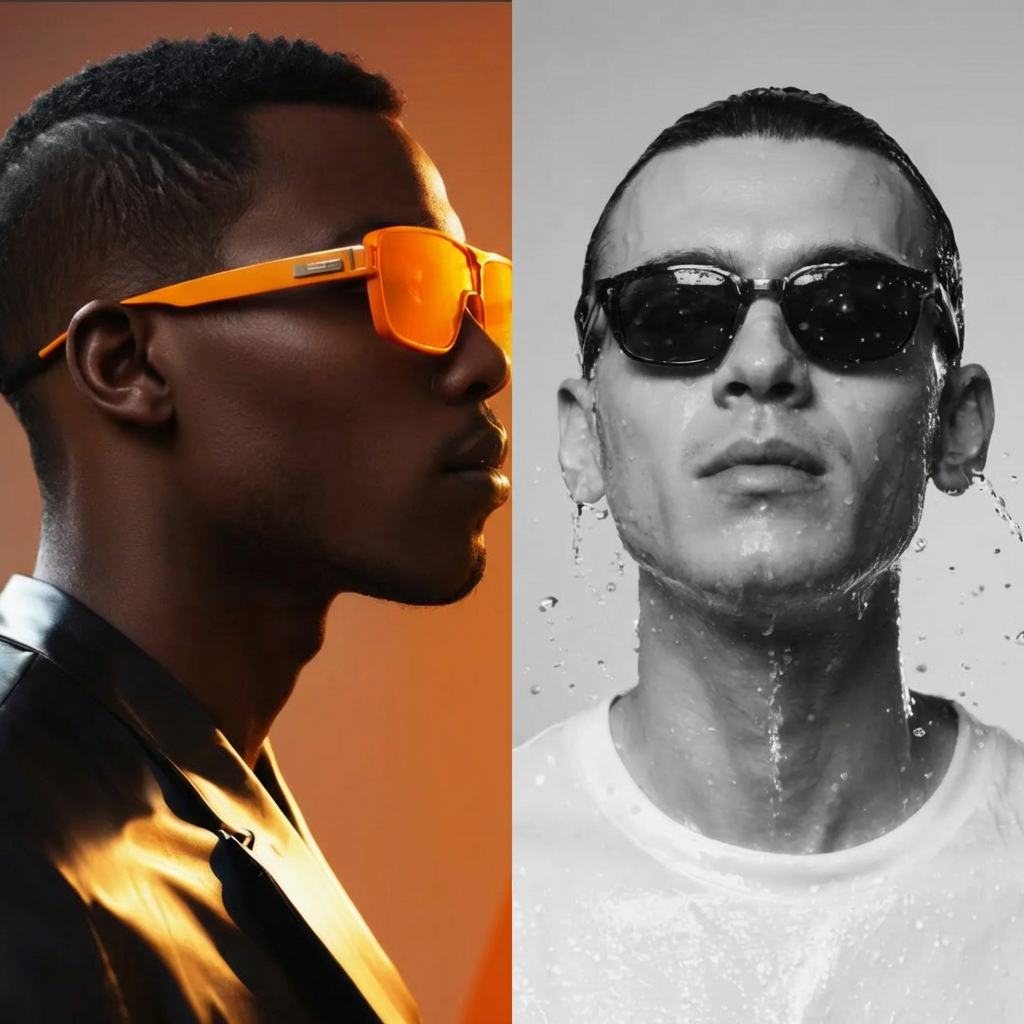
When we look at the reference images, we see two very different people. On the left, there is a model with warm lighting and bold orange sunglasses. On the right, there is a model in a more black-and-white setup with water drops on his face. The important point here is that both reference images represent distinct identities. These images show us that preserving the identity of the models is essential.
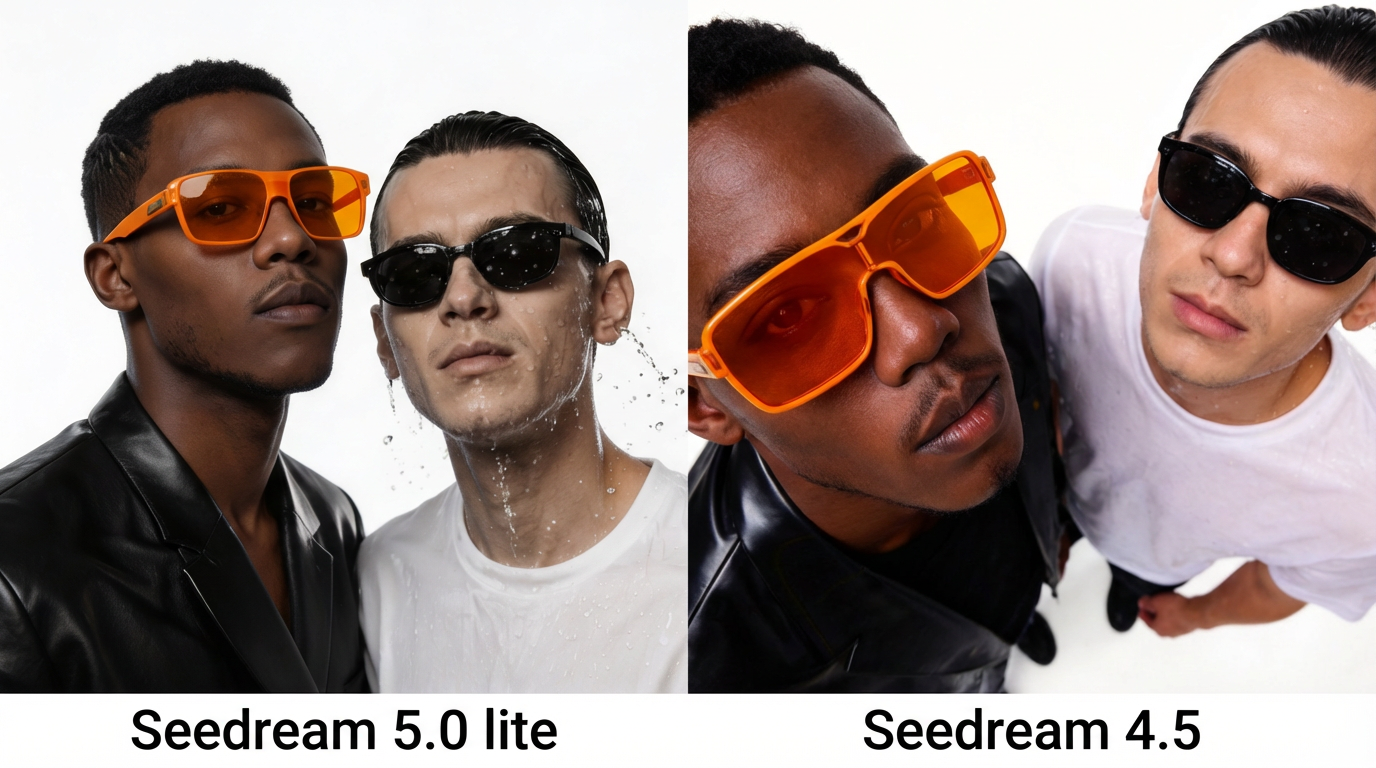
Now let's look at the outputs:
On the Seedream 5.0 Lite side, the outputs stay very close to the original facial structure. Face proportions, jawline, nose shape, and overall identity remain stable. Skin tone transitions are controlled, and key details stay consistent.
On the Seedream 4.5 output, the facial details appear slightly less sharp and defined compared to Seedream 5.0 Lite. But, when we look at the angle and composition, Seedream 4.5 approaches the scene from a more creative perspective, that feels closer to an editorial magazine cover aesthetic.
Overall, if you need strict and highly detailed facial consistency, you should choose Seedream 5.0 Lite.
If you are looking for something more creative style, then Seedream 4.5 is a strong choice.
Editing Capabilities
Reference images:

When we look at the reference images we see that the main thing is to keep her identity the same.
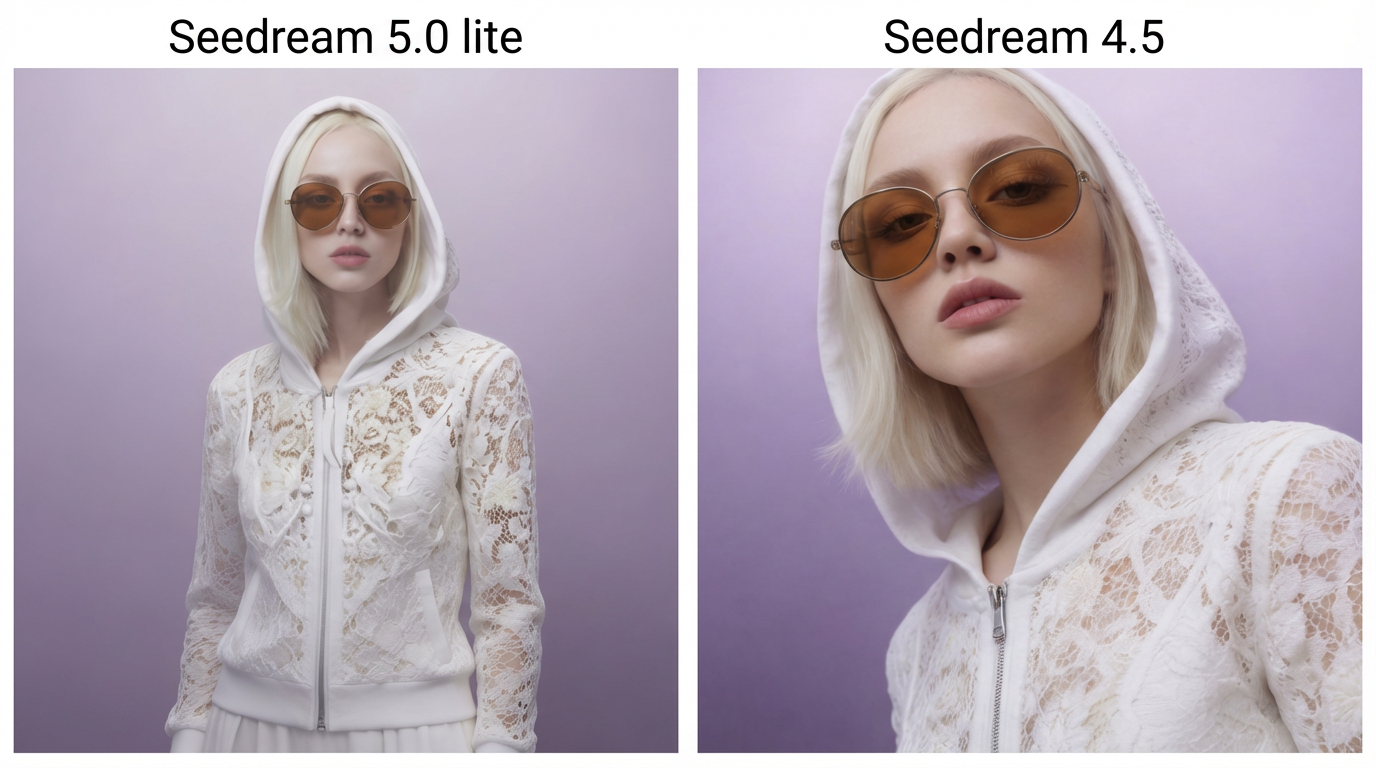
When we look at how well these models can edit we do not see a huge difference between them. Seedream 4.5 does a job, with editing mainly because it was made to work well in this area.
So in this comparison Seedream 4.5's output looks a bit more refined and confident especially when it comes to composition and overall visual balance.
Both models do a job of keeping the overall look the same. They both keep the details of the outfit the color tones, the background mood and the general atmosphere. This means that either model can handle this kind of editing job without any problems.
Complex design and data visualization
When we talk about design and data visualization tasks we already know that Seedream 5.0 Lite is the stronger option.. It is more helpful to look at the difference in a real situation and understand why Seedream 5.0 Lite performs better.
To make this comparison easier to understand let’s use an example from science: Schrödinger’s Cat. We asked models to create a diagram of the experiment like a drawing with a clear structure from left, to right.
By doing this we can see not just how good the pictures look but how well they are organized how clear the structure is, how the words are written and how logical it all is.
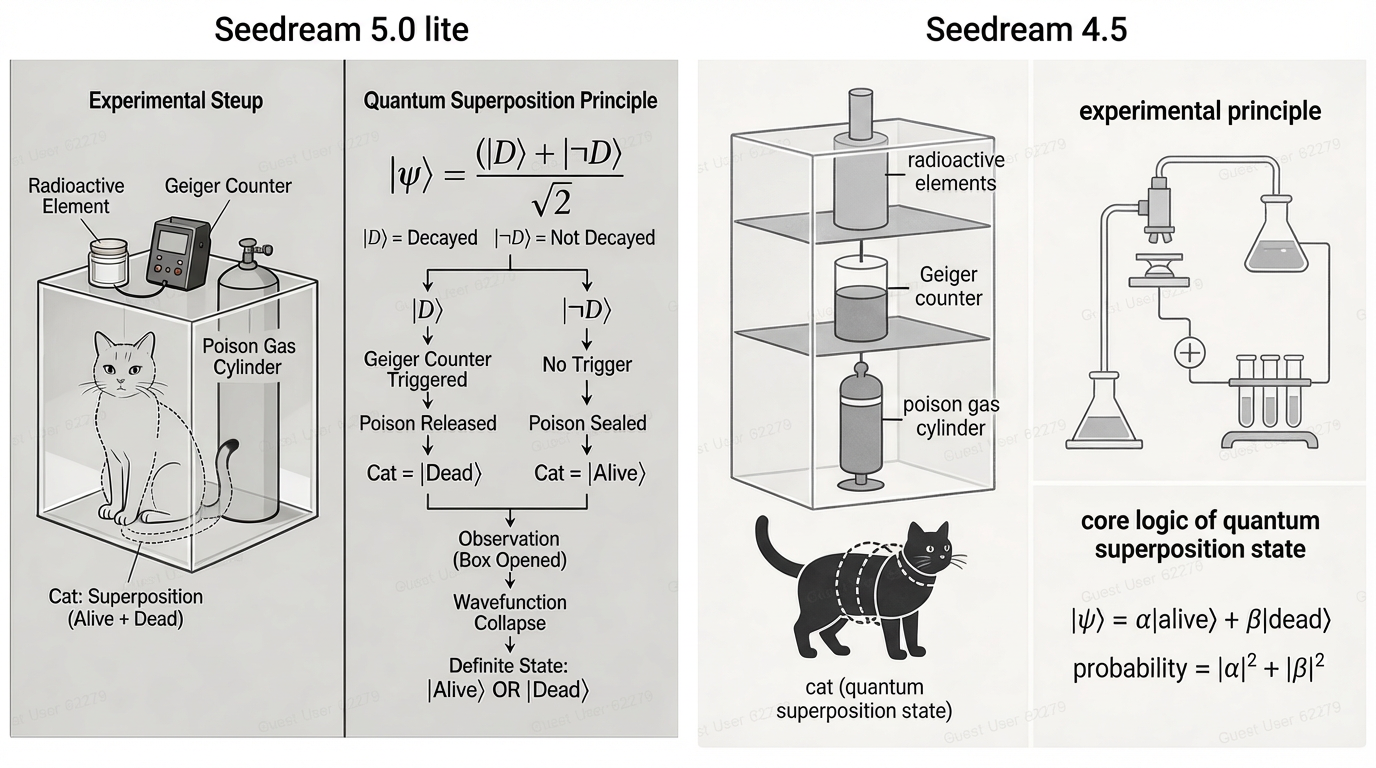
We can clearly see that Seedream 5.0 Lite is a good choice for complex design and data visualization tasks. This is because Seedream 5.0 Lite handles structure in a deliberate and systematic way. The layout of Seedream 5.0 Lite is not just about how it looks. It is about following a logical order.
Seedream 5.0 Lite puts titles and formulas and arrows and explanations in a structural order. This makes the information easier to read and follow.
In comparison Seedream 4.5 makes clean and easy to understand visuals. It is more about pictures than structure.
With these real use case comparisons, we have evaluated the models in a practical way. This clearly shows that each model has areas where it performs particularly well. What truly matters here is understanding the strengths of each model and making the right decision about which one to use based on your specific needs.
FAQ
1. Are both Seedream 4.5 and Seedream 5.0 Lite available on Eachlabs?
Yes. Seedream 4.5 is currently available on Eachlabs. As for Seedream 5.0 Lite, it will be available for use on Eachlabs starting February 24. This means you can already use Seedream 4.5 today, and you will be able to test and compare Seedream 5.0 Lite directly on Eachlabs as of its release date.
2. When should I choose Seedream 5.0 Lite over Seedream 4.5?
You should choose Seedream 5.0 Lite when identity consistency, skin tone preservation, facial stability across angles, structured layouts, typography control, or PNG input support are critical to your workflow. It is particularly strong in multi-image consistency, UI-related design tasks, and production-level reliability where precision matters.
3. When is Seedream 4.5 still a better choice?
Seedream 4.5 is still an excellent option for illustration, commercial photography-style outputs, creative compositions, and scenarios where artistic flexibility is more important than strict structural consistency. It also supports 4K output, which makes it the better choice when ultra-high-resolution export is required.