We Tested Seedance 2.0 Before It Hits Eachlabs Here's What Happened
0:00 /0:10 1× We've been testing Seedance 2.0 for about two weeks now, ahead of its February 24 launch on Eachlabs. What follows is less of a feature breakdown and more of an honest account of what it was like to actually use this thing what surprised us, what annoyed us, and whether the output is something you'd realistically put in front of users or clients. Short version: it's not perfect. But it's the first AI video model that made us think about p
Seedance 2.0 AI video output showing character consistency across camera angle changes
We've been testing Seedance 2.0 for about two weeks now, ahead of its February 24 launch on Eachlabs. What follows is less of a feature breakdown and more of an honest account of what it was like to actually use this thing what surprised us, what annoyed us, and whether the output is something you'd realistically put in front of users or clients.
Short version: it's not perfect. But it's the first AI video model that made us think about production workflows instead of just cool demos.
The Thing That Made Us Stop Scrolling
We should probably start with what actually got our attention, because it wasn't the spec sheet. 2K resolution, 15-second clips those numbers are fine but they're not the story.
The story is that we generated a clip of a woman walking through a market, the camera tracked from a medium shot to a close-up, and when we paused at the last frame... it was the same woman. Same bone structure, same hair, same earrings (the earrings didn't always survive in our later tests, but in this first one they did). Anyone who's used AI video models before knows why that's remarkable normally by frame 90 you're looking at a completely different person wearing different clothes in slightly different lighting.
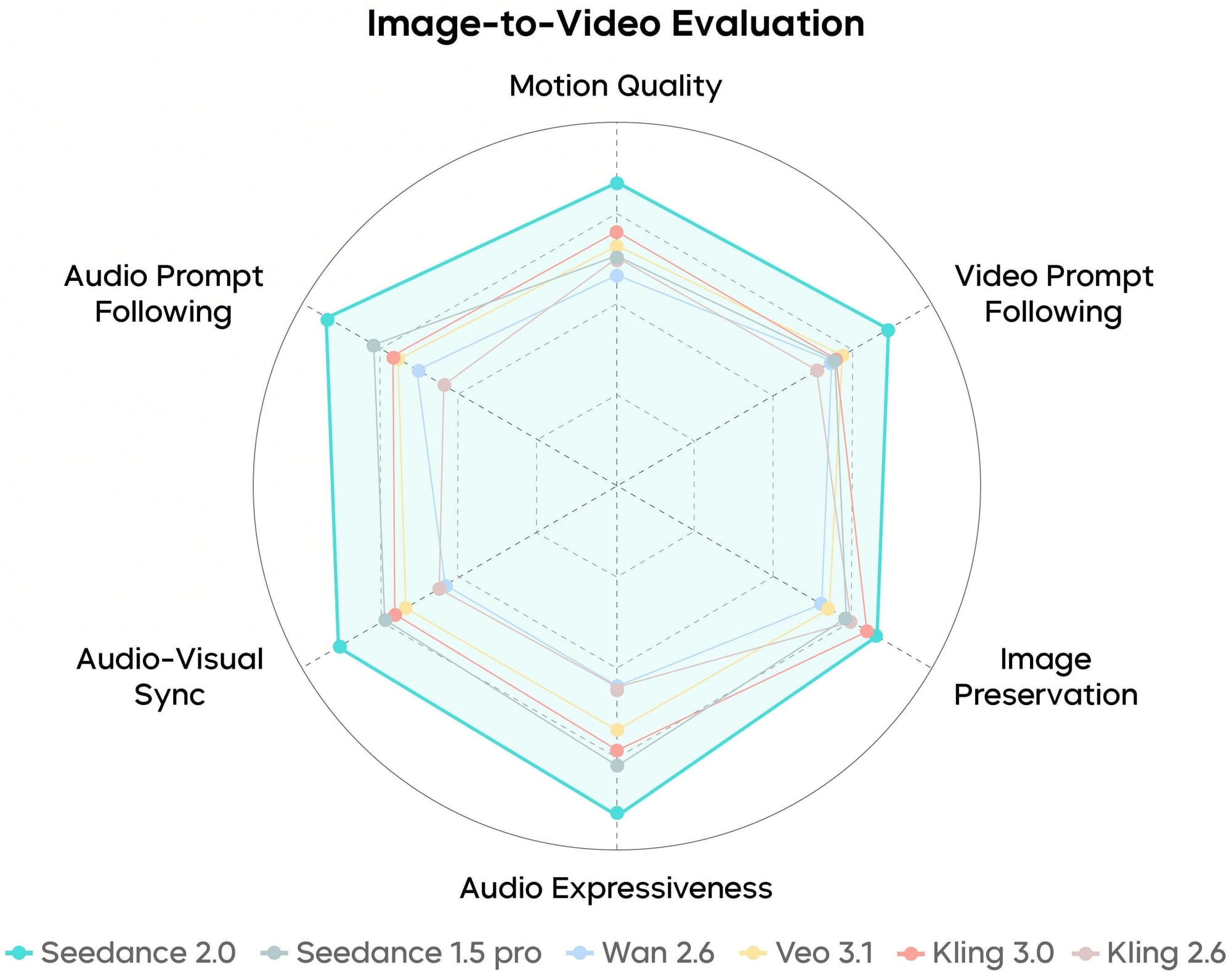
We ended up running maybe 40 or 50 generations over the first few days (not exactly a controlled study, but enough to form an impression) and the identity hold rate was noticeably higher than anything else we've worked with. Not 100% a couple of times accessories changed or disappeared, and one generation randomly added a scarf that wasn't in the prompt but the face, the hair, the core clothing stayed put in the vast majority of outputs. For anyone building apps around AI-generated characters, that's the difference between a feature you can ship and a feature you have to keep apologizing for.
Motion That Feels Like It Has Mass
The other thing we kept coming back to was how physical the movement looked. There's a quality to older AI video that we've started calling "the hover" characters look like they're sliding across the floor rather than walking on it, arms move but without any sense of weight behind the gesture, and everything has this underwater smoothness that reads as deeply fake even when the visuals are otherwise good.
Seedance 2.0 doesn't have the hover. Or at least, it has way less of it. We generated a jogging clip and there was this slight forward lean in the body the kind of thing you see in actual running footage where gravity is pulling someone forward and their legs are catching up. Nobody prompted for that lean. The model just... knew what jogging looks like, at a physical level.
Feet contact the ground with what feels like impact rather than just appearing in a new position. When a character raises their hand, the acceleration going up and the deceleration coming down are slightly different speeds, which is how real arms work but not how AI arms usually work. None of this is stuff you'd consciously notice watching a clip at full speed but it's exactly the kind of thing your brain registers unconsciously as "real" or "fake."
The camera work deserves a mention here too, though it's less dramatic. Light comes from a consistent direction through the entire clip, which sounds basic but is something AI video has historically been bad at. The depth of field corresponds to the shot type shallow on close-ups, deeper on wides which again, should be obvious, but we've spent enough time fighting models that put bokeh on a landscape shot that we noticed when it was done right.
The @ Mention System (Where We Spent Most of Our Testing Time)
This is the feature we ended up spending the most time with, and honestly it's the one that has us most excited for what people will build on top of it.
The concept: you upload reference assets (photos, video clips, audio tracks) and then tag them directly in your prompt using @ mentions @image1, @video1, @audio1, etc. with instructions for how each one should be used. So instead of writing a text description of your character's face and hoping the model creates something close to what you imagined, you show it a photo and say "this is the face, don't change it." Instead of describing a walk cycle in words (which in our experience always gets misinterpreted in some subtle way), you upload a clip of the movement you want and say "apply this motion to the character."
Prompt: Time lapse transformation of raw concrete living room from @image1 to fully renovated. Final shot: lights switch on instantly, synced to @audio1.
We had a moment early in testing that kind of crystallized why this matters. We'd generated a clip and the motion wasn't what we wanted too fast, wrong energy so we swapped @video1 for a different reference clip. With every other model we've used, changing anything in the input scrambles the whole output. Different face, different clothes, different everything. But with the @ mention system, the face stayed because @image1 hadn't changed. The outfit stayed because @image2 was still pointing at the same reference. Only the motion changed, which was exactly and only what we wanted to change.
That modularity seems like a small thing when you describe it, but in practice it completely changes the feedback loop. You can iterate on one dimension of the video without losing progress on all the others. For our team, that cut the number of generations we needed per usable clip by roughly half which, at per-generation pricing, adds up fast.
We tested a few specific use cases that we think will resonate with other developers and content creators:
Character consistency across shots was the obvious first test. We uploaded three photos of a face front, profile, and three-quarter angle and told the model to keep the identity locked. Three angles turned out to be the magic number for us; one angle produced okay results, two was noticeably better, and three was where it clicked. Going to four or five didn't seem to improve things further. In the prompt, we were very explicit about what shouldn't change "facial structure from @image1 remains identical, hair length and color remain identical, black jacket stays on" and the repetition, which felt silly while typing it, seemed to genuinely help the model hold things together.
Motion transfer from a reference clip worked better than we expected for straightforward movements. We had a slow-walk clip we liked and assigned it as @video1 while keeping our character as @image1 the model basically animated our character with the referenced motion, and the result looked natural for walks, jogs, and basic gestures. Fast hand movements (we tried a waving motion) came out blurry and weird, though, so there's clearly a complexity ceiling.
Audio synchronization was the most hit-or-miss feature. We uploaded a music track as @audio1 and included timestamps in the prompt "camera switch at 8.0 seconds, pull back starts at 12.0 seconds." About half the time the sync was close enough to feel like deliberate editing. The other half it was off by a second or so. Writing exact timestamps ("8.0 seconds") worked better than descriptive cues ("when the beat drops"), which makes sense when you think about how the model processes audio versus how we hear it.
Time-segmented shot lists ended up being our favorite workflow. Instead of generating one continuous 15-second clip and hoping for the best, we broke it into blocks:
0-3s: Close-up, character facing forward, warm light
Face from @image1
4-8s: Medium, walking on wet pavement at night
Motion from @video1
9-12s: Wide static, full environment
13-15s: Character half-turns to camera
Timed to @audio1 at 13.2s
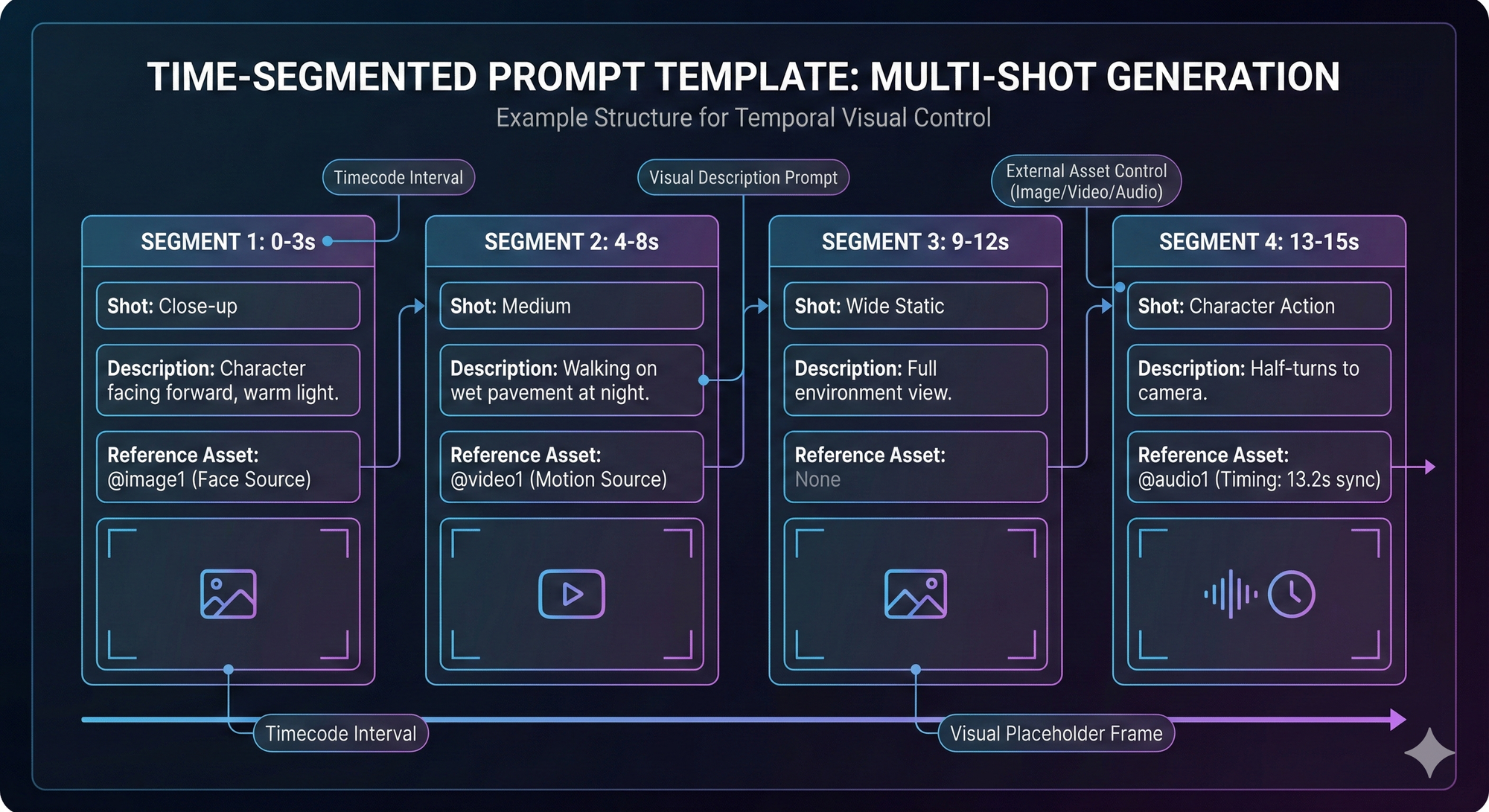
Writing prompts this way felt like writing a shot list on an actual production familiar territory for anyone who's been on a set and the results were more predictable than anything we got from unstructured prompts. Not every detail landed exactly as described (the wide shot timing sometimes slipped a second or two) but having the structure meant we knew which segment to fix instead of rerolling the whole thing.
→ If you want to try any of this yourself: Seedance 2.0 goes live on Eachlabs February 24
What We Learned About Prompting (the Expensive Way)
A few things that would've saved us a bunch of credits if someone had told us upfront.
Camera terminology makes an enormous difference. We started out writing things like "cinematic" and "dramatic" in our prompts and getting output that was fine but never matched what we had in mind, because those words don't actually tell the model what to do with the camera. The day we switched to specific terms "tripod shot, slow dolly forward, shallow depth of field" was the day the output started consistently matching our intent. If you don't already speak camera, it's worth learning the basics before you burn through credits on vague prompts; a 20-minute skim of a cinematography terms page will genuinely change your results.
We also had a persistent problem with one character who was supposed to be wearing a pendant necklace. The model kept either dropping the necklace entirely or replacing it with some generic blob. What fixed it was uploading a separate close-up photo of just the necklace as an additional reference. The model seemed to hold onto details it had seen in isolation much better than details buried inside a full-body shot. We've since made it standard practice to upload dedicated close-ups of any accessory or detail that matters to the prompt.
On motion: less is more. We wrote one extremely detailed motion prompt early on something about foot placement angles and weight transfer and the output was genuinely confusing, like the model tried to execute every instruction simultaneously and got tangled. "Slow heavy steps" outperformed our paragraph of biomechanics. And handing the model a @video1 reference clip outperformed any text description, no matter how carefully we wrote it.
About the 15 Second Clips
We were skeptical about the duration limit, and after testing we're... partially converted. 15 seconds is plenty for social content, ad spots, and product demos especially because Seedance 2.0 clips tend to have a density to them that most AI video lacks. There's a sense of progression even in short clips, where the first few seconds establish something and the last few seconds pay it off, rather than just being 15 seconds of the same pretty shot with slight movement. That pacing matters a lot if you're making content where every second needs to carry weight.
Prompt: Women's volleyball match set in @image1. Blue and green teams rally until green misses, match action from @video1. Cut to close-up of the coach from @image2 lowering her head in frustration. Entire scene synced to the energetic track, crowd cheers, and whistle from @audio1.
We also put some clips into a pitch deck recently and they held up at full size on a projector, which was a first for us with AI video output. The 2K resolution actually means something when you're projecting, not just when you're watching on a phone.
But 15 seconds is still 15 seconds, and for longer-form storytelling even a 60-second brand video you'd need to stitch multiple generations together and deal with whatever continuity issues arise at the seams. That's doable with the @ mention system anchoring the character, but it's a workflow, not a one-click solution.
What We Think Comes Next
The identity consistency in Seedance 2.0 is real, and the @ mention control system is genuinely new ground, but let's not pretend AI video has arrived at its final form.
The gap that remains is emotional performance. A Seedance 2.0 character can walk, turn, and hold their appearance across 15 seconds of output. What they can't do yet is hesitate before making a decision, or shift their eyes in a way that tells you something the dialogue doesn't. That kind of subtlety the stuff that separates animation from performance is probably the hardest remaining problem in AI video, and we don't expect it to be solved quickly.
Duration will extend over time; going from 15 seconds to a few minutes of stable output feels like an engineering challenge rather than a fundamental barrier. But believable micro-expressions? That's a different kind of problem entirely.
In the nearer term, we think the most interesting applications are AI video as a production layer rather than a standalone output. Directors pre-visualizing complex shots before committing to a shoot day. Startups making product videos that would've cost $15,000 from a production house. App developers shipping AI video features that are actually reliable enough for paying users. All of that is possible right now with Seedance 2.0. None of it requires AI to replace anything it just needs to be good enough to be useful, which is a lower and more interesting bar.
Where to Try It
Seedance 2.0 goes live on Eachlabs on February 24. We run our testing through Eachlabs because it gives us access to a large catalog of AI models under one API and one billing system when we want to compare Seedance output against a different video model, we don't need a separate integration, just a different model parameter in the same API call.
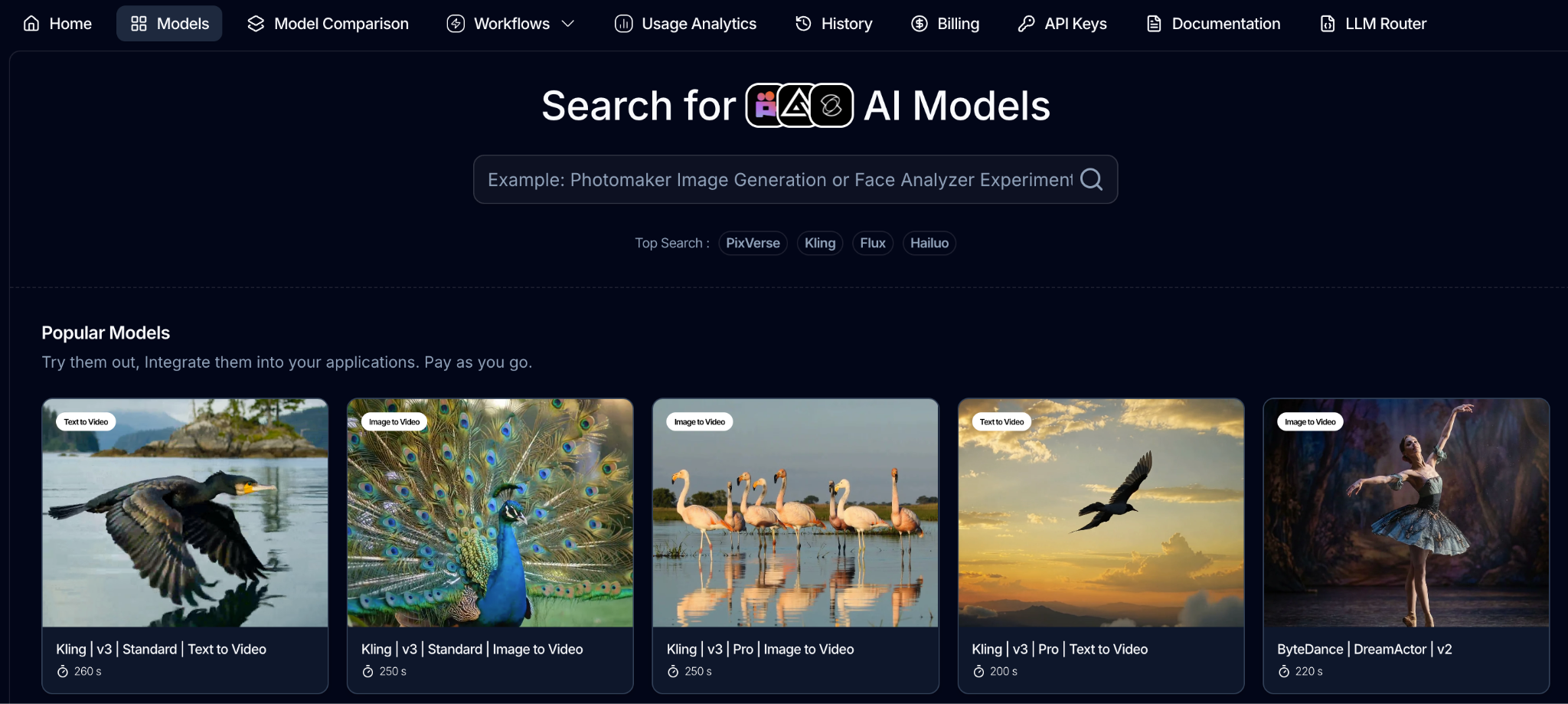
If you're a developer or a startup, the practical benefit is that you can start generating on February 24 without setting up any ML infrastructure. Sign up, get a key, call the API. The pricing is per-generation with no subscription lock-in, so you can experiment without committing to a monthly bill while you're still figuring out whether the model fits your use case.
A Note on What You Build With It
These videos are getting realistic enough that the question of responsible use is becoming less theoretical. Don't use real people's faces without their permission. Don't recreate characters you don't own the rights to. And if you're building a product that generates video for end users, think about what kind of review process makes sense for your context not because someone is making you, but because a tool this capable deserves that kind of care.
FAQ
When does Seedance 2.0 go live? February 24 on Eachlabs, accessible through API.
Can it handle multi-shot scenes with consistent characters? That's what the @ mention system is designed for anchor the character with @image1, break the prompt into timed segments. We covered the specifics with examples earlier in this post.
What's the max resolution and duration? 2K resolution, 15-second clips.
How do the @ mentions actually work? Upload assets (photos, video clips, audio files), reference them in the prompt with @ tags, and tell the model what role each asset plays. @image1 might be the character face, @video1 the motion reference, @audio1 the timing source. Full walkthrough with our test results is above.
Is the output production-ready? It's the best we've tested from any API-accessible video model in terms of consistency and control. Whether it meets the bar for your specific project depends on the project only way to find out is to run your own tests.
How much does it cost? Pay-as-you-go pricing, no subscription required. Current per-generation rates are listed on eachlabs.ai.