Pruna | P Image | Try On
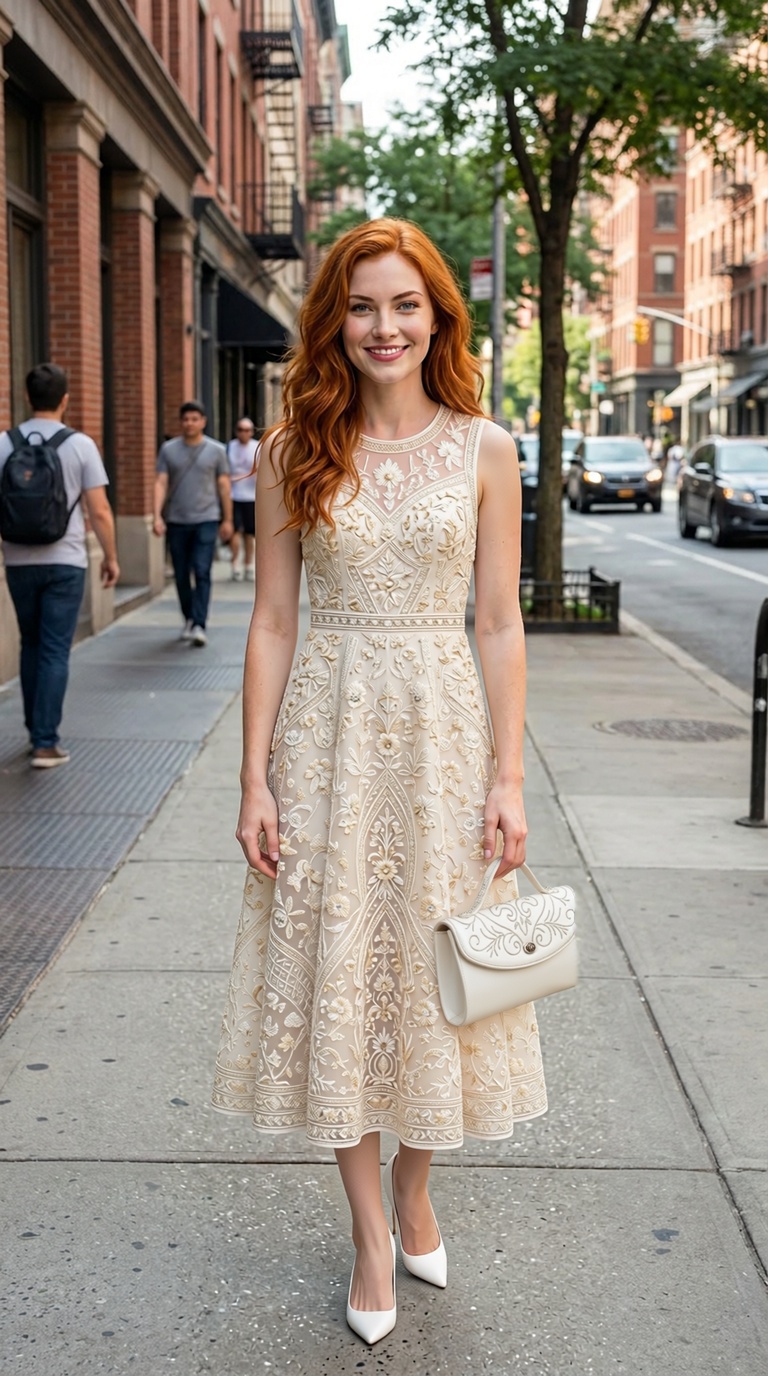
P-Image Try-On places any garment onto a photo of a person, generating realistic virtual try-on images for online fashion, e-commerce, and product pages.
- Runtime (p50)
- 8s
- Estimated price
- $0.015 per image
Overview
Pruna p-image-try-on Overview
Pruna p-image-try-on is an image-to-image virtual try-on model from Pruna AI’s P-Image family, designed to transform an input photo into a realistic clothing try-on or appearance variation. Built for integration via the Pruna p-image-try-on API and platforms like each::labs, it focuses on preserving the subject’s identity while changing garments or styling elements. This model is particularly useful for ecommerce, fashion experiments, and creative concept visualization, where users need fast, photorealistic previews instead of manual photo shoots. Within the Pruna AI image-to-image ecosystem, Pruna p-image-try-on stands out for its targeted workflow around try-on scenarios rather than generic image editing, making it easier to get consistent results across product catalogs and lookbooks.
Capabilities
Capabilities
- Applies virtual clothing try-on to a person image, replacing visible garments with a reference item while keeping body pose and identity.
- Supports image-conditioned styling, using a garment or look reference image to guide color, pattern, and basic silhouette.
- Preserves facial features and overall likeness of the subject, which is critical for influencer and model reuse scenarios.
- Handles a variety of casual and fashion photography styles, including studio shots and lifestyle photos, when the subject is clearly visible.
- Integrates into workflows through the Pruna p-image-try-on API, making it suitable for automated ecommerce and catalog tools.
- Provides controllable output via prompt or parameter settings (when exposed by the integration), enabling gentle restyling or stronger garment replacement.
- Works as part of the broader Pruna AI image-to-image toolset, allowing chaining with other image enhancement or background-editing models.
Use cases
Use Cases for Pruna p-image-try-on
Fashion ecommerce teams can generate multiple product views on different body types without organizing separate photo shoots. For example: "Render this floral summer dress on the same model from our base portrait."
Content creators and influencers can preview outfits for sponsored campaigns and social posts while keeping their personal look consistent. Example: "Try on the brand’s green bomber jacket from the reference photo while keeping my pose."
Designers and stylists can quickly test silhouettes or colorways on a single fit model, using Pruna AI image-to-image capabilities to iterate faster. Example: "Swap current top for the beige knit sweater reference, maintain lighting and background."
Developers building virtual fitting rooms can integrate the Pruna p-image-try-on API behind web or mobile interfaces to offer interactive try-on experiences. Example: "Apply user-selected T-shirt design to the uploaded selfie, preserving face and hairstyle."
Tips & tricks
Tips and Tricks
For consistent results, start with front-facing or three-quarter views, with the subject centered and minimal occlusions. If textual conditioning is supported in your Pruna p-image-try-on API integration, use short, direct phrases that reinforce the garment or style you want, rather than long descriptive prompts. Keep background clutter low; neutral backgrounds help the model focus on the clothing region.
When reusing the same garment across many models, keep a single high-quality garment reference to maintain consistency in color and pattern. Avoid mixing conflicting guidance (for example, two very different garment references) in the same call.
Example prompts:
- "Apply this red midi dress to the person, preserving pose and lighting."
- "Virtual try-on of the blue denim jacket from the reference image."
- "Keep the model’s face and hair unchanged, replace T-shirt with the black hoodie from the product photo."
Technical spec
Technical Specifications
- Model type: Image-to-image virtual try-on model in the Pruna AI P-Image family.
- Input: Source person image plus a target garment or appearance reference (typically another image or encoded condition); optional textual guidance depending on the integration.
- Output: Single synthesized image with the subject wearing or reflecting the target style.
- Resolution: Commonly operates on standard portrait and product-photo resolutions (for example, around 512–1024px on the short side); final limits depend on hosting environment such as each::labs.
- Aspect ratios: Best results on portrait or upright product framing; extreme panoramic or very narrow crops may degrade quality.
- Formats: Typical input/output formats are JPG or PNG; exact support depends on the Pruna p-image-try-on API implementation.
- Processing time: Optimized for interactive use, usually on the order of seconds per image under normal API load.
Things to be aware of
Things to Be Aware Of
Pruna p-image-try-on relies heavily on clear garment and body visibility; heavy occlusions from bags, arms, or props can lead to warped clothing or artifacts. Extremely complex patterns or metallic, translucent fabrics may not reproduce perfectly, especially under unusual lighting. Large changes in pose between the person image and garment reference can reduce fit realism. If you combine very low-resolution inputs with high output resolutions, details may appear mushy or inconsistent. When using the Pruna p-image-try-on API at scale through each::labs, monitor latency and implement retries for occasional timeouts or overloaded periods.
Key considerations
Key Considerations
Pruna p-image-try-on works best with clear, well-lit photos where the person and clothing area are unobstructed and in focus. Users should provide high-quality reference garments or style images so fabric patterns and silhouettes are easier for the model to infer. Compared with general Pruna AI image-to-image models, this try-on variant is more specialized, making it ideal when the primary goal is wardrobe or styling changes rather than broad artistic transformations. When deploying via each::labs, teams should consider API rate limits and resolution settings to balance speed and cost. Batch processing for catalogs may require queueing logic and caching of repeated garment references.
Limitations
Limitations
Pruna p-image-try-on is not a full 3D physics simulator and cannot accurately predict fabric drape under all poses or motions. It focuses on single-frame image-to-image transforms, not video try-on or time-consistent sequences. Highly cluttered backgrounds and extreme poses can confuse garment boundaries and reduce realism. The model expects human subjects; using it on non-human characters or abstract art often leads to unpredictable results. Supported resolutions, formats, and parameter ranges ultimately depend on the specific Pruna p-image-try-on API configuration exposed by each::labs.
Related models
4 models

About Pruna | P Image | Try On
What is P-Image Try-On?
P-Image Try-On is a virtual try-on model from Pruna that places a chosen garment onto a photo of a person. You provide an image of a person and an image of the clothing, and the model generates a realistic result that follows the body pose and proportions. It is designed to show how outfits look without requiring a physical photoshoot.