Seedance 2.0 Mini: Cinematic Clips on Repeat
Most AI video still gets treated like a one-shot. You write the prompt you've been saving all week, hit generate, then sit there hoping the model hands back something usable, because running it again feels like an event. That mindset quietly shapes everything you make. You stop experimenting. You take the first result that's merely fine and tell yourself it's good enough. Seedance 2.0 Mini is built for the opposite habit. It's the lighter member of ByteDance's Seedance 2.0 line, tuned for peopl
Most AI video still gets treated like a one-shot. You write the prompt you've been saving all week, hit generate, then sit there hoping the model hands back something usable, because running it again feels like an event. That mindset quietly shapes everything you make. You stop experimenting. You take the first result that's merely fine and tell yourself it's good enough.
Seedance 2.0 Mini is built for the opposite habit. It's the lighter member of ByteDance's Seedance 2.0 line, tuned for people who want to make a lot of cinematic video and keep moving: alternate angles, second takes, a dozen variants of the same idea, instead of guarding one precious render. The interesting part isn't that it's smaller. It's what becomes easy once video stops being something you ration.
A cinematic tracking shot following a person walking through a neon-lit city street at night, camera moving smoothly alongside them, reflections on wet pavement, shallow depth of field, steady film-like motion ending on a slow push-in to their face.
The Real Problem With "Precious" Video
Here's the question that decides which tool you actually need: are you trying to produce one perfect shot, or twenty good ones you can choose from?
Those are not the same job, and most teams reach for the wrong model out of habit. The heavyweight, maximum-detail model is the right call when a single hero shot has to be flawless. But that's a small fraction of real work. Most of what creators ship is volume: daily posts, product variants, three versions of an ad to test, a rough cut to show a client before the real one exists. Treating every one of those like a one-shot masterpiece is how projects stall.
When iteration feels expensive in effort, you iterate less. You settle. The whole promise of generative video, try the idea, see it move, adjust, try again, only works if running the model again is cheap in friction. That's the gap Mini is shaped to fill.
What Seedance 2.0 Mini Actually Is
Seedance 2.0 Mini is a cinematic video model from the Seedance 2.0 family, built for everyday, high-volume creation rather than maximum-detail showcase shots. It keeps the part of Seedance that matters most for short-form work, film-like motion, real camera language, scene-to-scene consistency, in a lighter package you're meant to run often.
It takes the inputs you'd expect from a modern video model, and on Eachlabs that maps to three clean ways to drive it. You can go text to video and describe a scene from scratch. You can go image to video and hand it a still, a product shot, a frame, an illustration, to animate into a moving clip. Or you can go reference to video and feed it existing material so your own footage, look, or subject guides the result. Same model, three on-ramps, depending on what you're starting from.
How Seedance 2.0 Mini Works
The training is the boring part. What you care about is the control it hands you, and Mini gives you more than "type words, pray."
The standout is multi-shot output. Instead of returning one isolated clip, it can structure a prompt into a small sequence with actual pacing and shot direction: a wide, then a closer angle, then a beat that lands. You're describing a tiny scene, not a single frame in motion. That changes what a "generation" even is. You're roughing out a shot list, and the model fills it in.
The second control that matters is camera language. You can ask for pans, zooms, tracking shots, dynamic framing, and transitions between scenes, and Mini reads those as direction rather than decoration. More movement isn't the goal; the right movement is. A slow push-in says something different from a whip pan, and Mini lets you choose instead of accepting whatever drift the model felt like adding.
Ultra realistic modern cinematic reinterpretation of a 1920s gothic silent horror scene, tall thin vampire-like silhouette slowly climbing staircase, exaggerated shadow stretching along wall, high contrast black and white lighting, dramatic expressionist set design with distorted angles, slow cinematic push in, subtle film grain texture, eerie atmosphere,
Keep Your Character From Drifting
The thing that breaks most AI video the moment you need more than one clip is consistency. Generate a character, generate them again, and you get a cousin, not the same person. Mini is built with continuity in mind, holding a subject, a style, and a scene steadier across multiple shots and reference-guided outputs.
It's not magic, more on that below, but it's the difference between stringing together clips that feel like one story and a pile of takes that obviously came from different rolls of film. For anyone building short narratives, brand clips, or a recurring character, that steadiness is worth more than a few extra pixels of detail in any single frame.
Where People Actually Use Seedance 2.0 Mini
The model earns its place wherever volume and iteration matter more than a single polished export. Social creators use it for reels, shorts, and trend formats that need film-like motion at the speed a content calendar demands. Small shops turn product photos, menu items, and store updates into promotional clips without booking a crew. Lifestyle makers animate the everyday, food, pets, outfits, travel snapshots, into something with movement.
It's just as natural further from social. Educators and trainers rough out lesson previews and onboarding clips from simple references. Marketers and agencies explore product angles, hooks, and campaign directions, generating five variants of a concept to react to instead of arguing over one. The common thread isn't the audience. It's that all of them generate often, and a model built to be run often fits the way they actually work.
A vibrant sneaker spinning in mid-air surrounded by exploding clouds of colored powder, electric orange, pink, and blue bursting against a clean bright background, sparks of light catching the shoe, glossy and dynamic, smooth slow-motion cinematic rotation.
Seedance 2.0 Mini vs. Standard Seedance 2.0
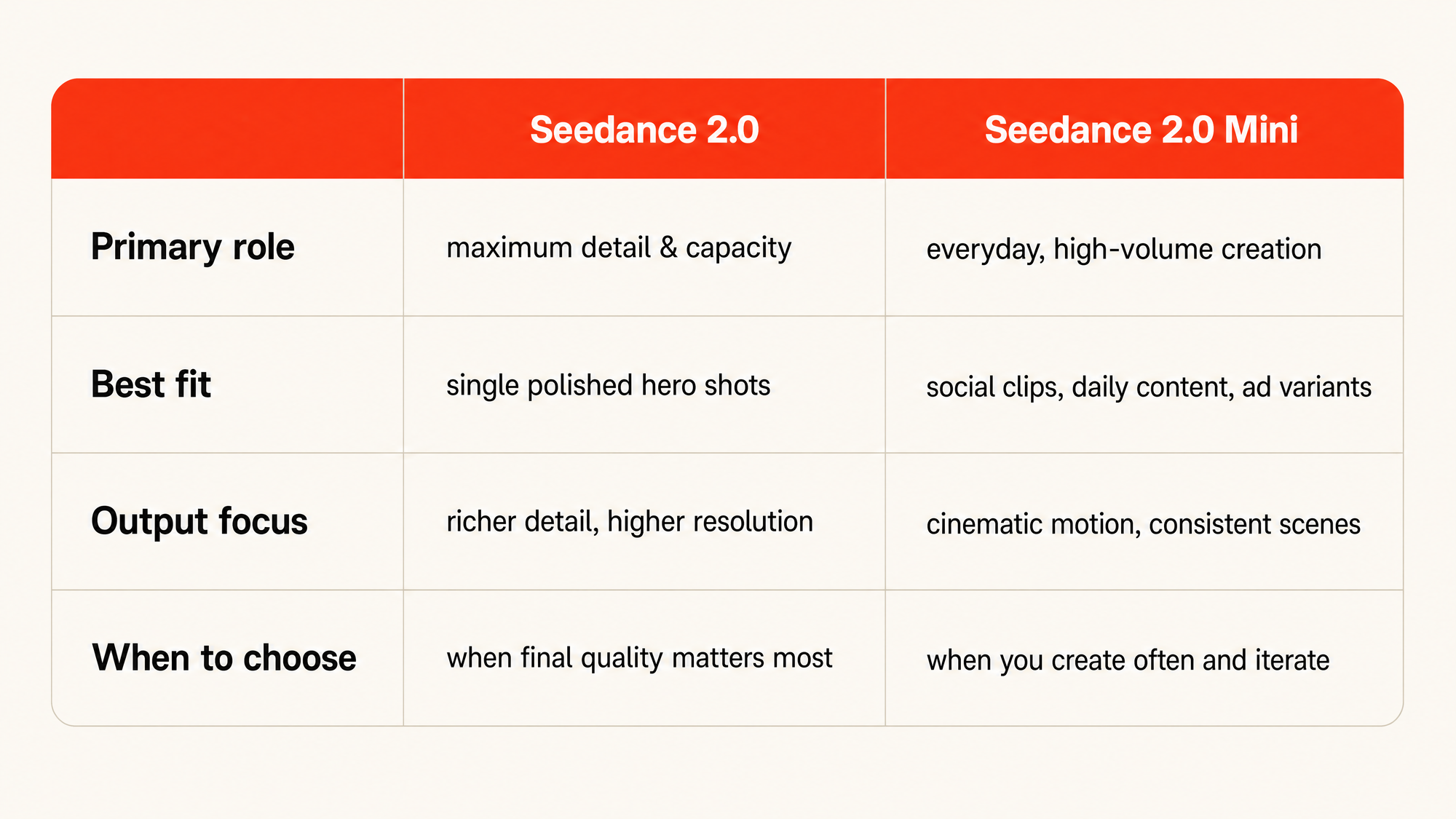
This is the comparison people get wrong, so be honest about it. Standard Seedance 2.0 reaches for richer detail and broader quality headroom, the model you want when a final shot needs maximum fidelity and every texture has to hold up. Mini trades some of that ceiling for being light enough to run constantly, with a focus on cinematic motion, consistent scenes, and practical quality.
So the choice is genuinely situational. If you're producing a single showcase piece where polish is the whole point, the standard model is the right tool. If you're producing a lot, iterating, testing, shipping short-form on a schedule, Mini is built for that rhythm. Picking Mini for a hero render, or the heavy model for daily volume, is using a screwdriver as a hammer. Both work. Neither is fun.
Using Seedance 2.0 Mini on Eachlabs
On Eachlabs the flow is the same one you'd use for any video model, which is the point. You pick the mode that matches your starting material, text, image, or reference, write your prompt and set a few options, and send the request. Because video takes time to render, you get a job back and check on it until the finished clip is ready to download, rather than holding a connection open.
The quiet advantage is that Mini sits in the same catalog and behind the same single interface as everything else. If a shot turns out to need the heavier model, or you want to compare the two on the same prompt, that's a model-id change, not a new integration. You write the call once and keep your options open.
Getting Better Results Out of Seedance 2.0 Mini
Direct the camera on purpose. Vague prompts get vague motion. Name the move you want, a slow push-in, a handheld follow, a locked-off wide, and you'll get footage that looks chosen rather than accidental.
Lean on references for consistency. If a subject or look has to stay stable across clips, give the model something to hold onto through reference to video instead of re-describing it from scratch each time and hoping it lands the same way twice.
Think in shots, not single frames. Mini's multi-shot output rewards prompts written like a tiny scene, what happens, then what happens next, far more than a single dense sentence trying to cram everything into one beat.
And generate more than you think you need. The model is made to be run often, so run it often. The best result is usually the third or fourth take, not the first.
The Honest Limitations
I don't want this to read like a brochure with the rough edges sanded off, so here's the straight version.
Mini is a practical-quality model, not a maximum-fidelity one. For a single hero shot where fine texture and resolution are the entire deliverable, you'll feel the ceiling, and the heavier Seedance model is the better choice. That's the trade you're making on purpose.
Consistency is better, not perfect. Across a few shots it holds well; across a long, complex sequence a character or style can still drift, and you'll sometimes regenerate to keep things matching. Reference inputs guide the model, they steer subject, motion, and mood, but they don't clone an asset exactly, so don't expect frame-perfect replication. And like every model in this category, prompt interpretation varies. Some takes miss what you meant. That's exactly why a model built for volume is the right answer: you're not betting everything on one pull.
The same playful girl with bright turquoise hair and a yellow raincoat shown across three connected shots: spinning under glowing paper lanterns, jumping through a splash of colorful powder, then laughing as petals swirl around her. Identical face, hair, and outfit in every shot, warm festival lighting, rich vibrant colors, joyful cinematic motion.
Wrapping Up
The shift Seedance 2.0 Mini represents is small to describe and big in practice. When generating cinematic video is something you can do constantly instead of something you ration, you stop settling for the first acceptable take and start actually directing. You try the weird idea. You keep the third version. You ship more, and better, because picking from many beats perfecting one.
If your next project is short-form, iterative, or just high-volume, Seedance 2.0 Mini is worth a real try. You can run it on Eachlabs right now: pick text, image, or reference to start, send a prompt, and see how quickly a working clip stands between you and the next idea.
Frequently Asked Questions
What is Seedance 2.0 Mini best at?
Volume and iteration. It's the Seedance 2.0 variant built to be run often, holding onto the parts that matter for short-form work, cinematic motion, real camera control, and scene consistency, so you can generate many takes of an idea instead of guarding a single render.
Can Seedance 2.0 Mini animate my own images or footage?
Yes, and that's one of its strongest uses. Image to video animates a still you provide, and reference to video lets existing material guide the subject, motion, and look of the result. Both are first-class ways to drive the model on Eachlabs, not afterthoughts to the text prompt.
Should I use Seedance 2.0 Mini or the standard Seedance 2.0?
Match the tool to the job. Reach for standard Seedance 2.0 when a single shot needs maximum detail and the highest fidelity. Reach for Seedance 2.0 Mini when you're producing a lot, testing concepts, shipping short-form on a schedule, building multi-shot scenes, and the freedom to iterate matters more than squeezing every last detail out of one frame.