Flux 3 Klein | Text to Image.
- Black Forest Labs
- Text to Image
- $0.008–$0.036 per image, depending on resolution
Flux 3 Klein Text to Image generates images from prompts for concept art, mockups, and campaign visuals, with selectable sizes and JPEG or PNG output.
What Flux 3 Klein | Text to Image is good at.
 Best for
Campaign concepts.
A marketer can make a wide hero draft before booking a shoot: “A blue enamel kettle at the left edge of a pale yellow studio scene, with the right half empty…
 Limits and tips
Start with the subject and framing, then describe light, texture, and background.
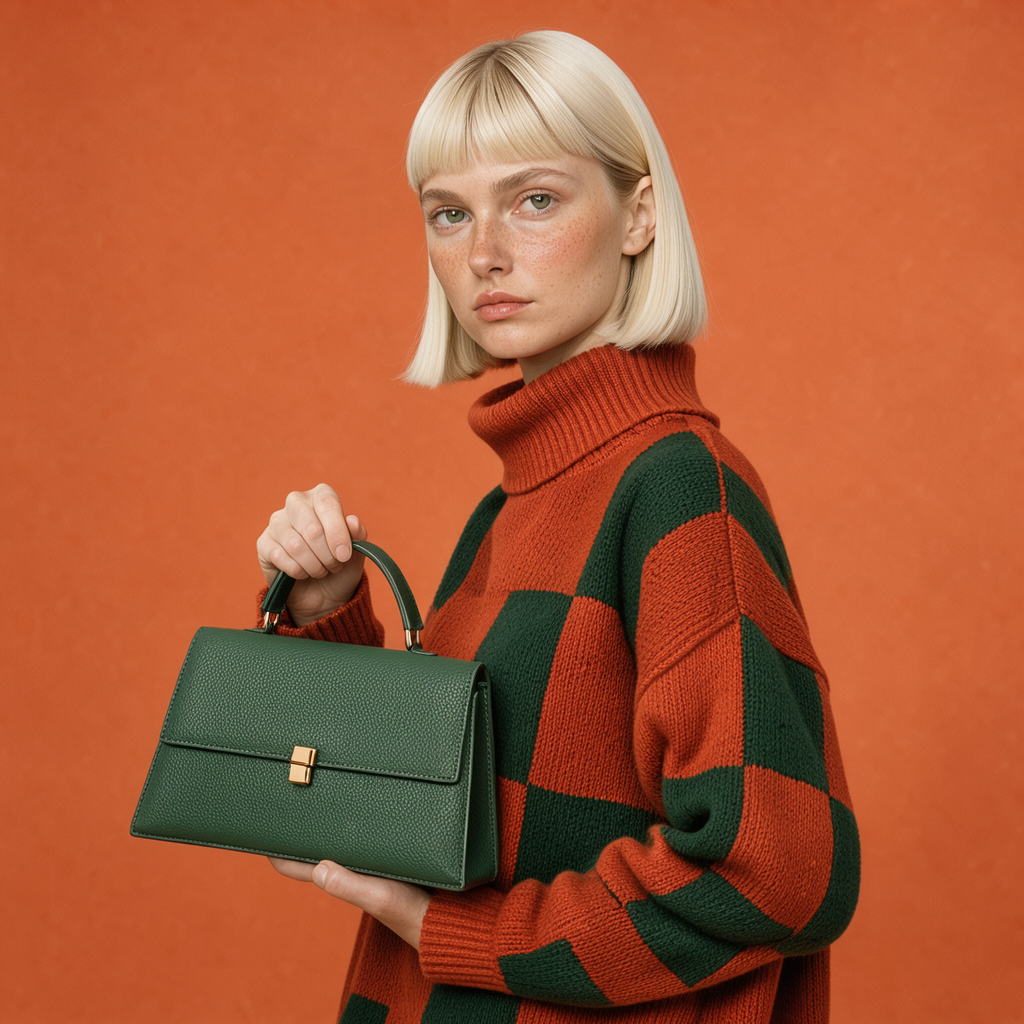
“A forest-green handbag on a burnt-orange plinth, eye-level studio photograph, soft side light, clean backdrop, no lettering.” For an environment concept, try…
 Related modelView model
KoiX-Image
Run it on the same input to compare output, speed and price.
Model documentation
About this model
Flux 3 Klein Text to Image generates images from prompts for concept art, mockups, and campaign visuals, with selectable sizes and JPEG or PNG output.
Overview
Flux 3 Klein | Text to Image Overview
Flux 3 Klein | Text to Image turns a written brief into a still image without requiring a reference photo. It uses FLUX 3 Image Klein, Black Forest Labs' compact image model. What makes it useful for design work is that you can describe the scene in plain language or add bounding boxes to guide where elements appear. Use the plain prompt for early exploration and add layout instructions once the composition starts to matter.
On each::labs, you can choose the framing, resolution, and file format independently. For example, draft a series of product concepts as square images, then test a wider version with space for campaign copy. Use the Edit model instead when an existing image should anchor the result.
Capabilities
Capabilities
- Generate a still image directly from a written brief.
- Describe visual style, materials, lighting, and camera framing in the prompt.
- Guide element placement with bounding boxes embedded in the prompt.
- Select wide, portrait, or square framing through supported aspect ratios.
- Save a seed for repeatable experiments with the same settings.
- Export directly as JPEG or PNG, at resolutions up to 4k.
Use cases
Use Cases for Flux 3 Klein | Text to Image
Campaign concepts. A marketer can make a wide hero draft before booking a shoot: “A blue enamel kettle at the left edge of a pale yellow studio scene, with the right half empty for a headline.” Add approved typography separately.
Art direction. A designer can compare treatments for the same object: “An olive-green reading lamp on a walnut bedside table, photographed in soft morning light.” Change just the light description to evaluate a mood shift.
Story development. A creator can sketch an establishing shot: “A coastal weather station on a cliff, fog lifting over the sea, seen from a low trail.”
Prototype assets. A developer can produce placeholders for a gallery: “Centered ceramic vase on a plain slate background, portrait crop.” Set a consistent aspect ratio across requests so the previews fit the same layout.
Tips & tricks
Tips and Tricks
Start with the subject and framing, then describe light, texture, and background. “A forest-green handbag on a burnt-orange plinth, eye-level studio photograph, soft side light, clean backdrop, no lettering.” For an environment concept, try “Wide shot of a bookshop after rain, warm interior light, wet pavement, space in the upper right for a title.”
Set the aspect ratio explicitly when an asset must fit a particular placement. If prose alone puts an element in the wrong region, tag it in the prompt and append a JSON list with its ID, description, and box. Coordinates use a 0–1000 grid in top, left, bottom, right order. Reuse a seed while comparing closely related prompts, and check the result after each change.
Technical spec
Technical Specifications
- Input: one nonempty text prompt. This endpoint generates from text alone and does not accept reference images.
- Output sizes: 768sq produces a 768 by 768 square; 1k, 1.5k, 2k, and 4k are approximately 1, 2, 4, and 16 megapixels respectively. The default is 1k.
- Framing: choose a supported aspect ratio or use auto, which follows the prompt and falls back to 16:9. The 768sq preset is square.
- Delivery: one JPEG by default or a PNG if requested. Generation is asynchronous; a 4k request can take several minutes.
- Model: Black Forest Labs lists 5.6 billion parameters for FLUX 3 Image Klein.
Things to be aware of
Things to Be Aware Of
The Flux 3 Klein | Text to Image API can follow explicit composition directions, but putting an exact number of objects into a crowded scene is harder to verify than placing one clear subject. Check crops, proportions, and blank space before handing an image over. Keep the seed and other settings with the prompt if you want to revisit a variation later.
Make the prompt and aspect ratio agree. For example, avoid asking for a sweeping landscape while forcing a tall crop. Provider moderation can reject a request or its output; review the brief if that happens.
Key considerations
Key Considerations
Start at 1k for a composition review. Choose 768sq when a smaller square suffices and reserve larger sizes for a confirmed crop or detail requirement. At each::labs, the default 1k costs $0.009 per image; 4k costs $0.036 per image. The higher tier buys more pixels, not a guarantee of better layout or more accurate details.
Describe the intended result before picking the size. A background that's useful for a banner needs room for copy as well as enough pixels. If an approved product photo must remain the visual reference, use the Edit endpoint rather than describing the product from scratch.
Limitations
Limitations
Flux 3 Klein | Text to Image creates one still image per request. It does not accept a reference image, produce video, or return editable layers. The endpoint does not expose arbitrary pixel dimensions. Bounding boxes guide composition rather than defining a pixel-accurate layout. Inspect generated text and small visual details before publication; for copy that must be exact, place typeset text over the finished image in a separate editing tool.
Questions about this model
The short answers. For anything specific to your setup, talk to our team.
 Talk to an engineerPlan for your expected volume.
Flux 3 Klein Text to Image turns a written prompt into a single image on each::labs. Describe the subject, composition, and visual style you want. You can choose an aspect ratio and a resolution tier to match the intended use of the image.
Use Flux 3 Klein Text to Image when you are starting with a written idea rather than an existing image. It fits tasks like sketching a campaign concept, exploring art direction, or making a visual mockup. Specify the framing in your prompt or select an aspect ratio directly.
Flux 3 Klein exports an image as JPEG or PNG, with JPEG as the default. Choose from a fixed 768-pixel square or the 1k, 1.5k, 2k, and 4k resolution tiers. When iterating on a prompt, you can provide a seed to help reproduce a result.