each::labs × PixVerse: From Approved Master to Production
PixVerse V6 creates and approves the master video. each::labs checks its file and audio for the next stage.

An AI video can be creatively approved long before it is ready for the production work that follows.
A team may approve a master video because the visual direction is right, the motion feels intentional, and the audio supports the scene. But approval does not automatically answer the next practical questions: What is in the source file? Does its audio meet the target for the campaign? Which version should later teams use for captions, reframing, localization, or delivery?
That is where each::labs and PixVerse meet.
PixVerse is where the creative master is made and approved. each::labs is where that approved master becomes easier to inspect, prepare, and carry into the next production stage. The goal is not to create every possible campaign version at once. It is to preserve one approved creative decision and make it dependable before the campaign grows around it.
Contents
- An approved master needs a clear next step
- PixVerse: create the master video
- each::labs: prepare the approved master
- One handoff, one source of truth
- Expand only when the campaign requires it
- Conclusion
- FAQ
An approved master needs a clear next step
Creative approval and production preparation are different kinds of work.
Creative approval asks whether the video communicates the right idea. Does the product, character, scene, action, and sound feel consistent with the campaign? Does the first moment hold attention? Does the shot establish a direction the team wants to build on?
Production preparation asks whether the approved source can be used clearly by everyone who needs it next. That includes the person reviewing the file, the person adding captions, the team adapting the composition for a new placement, and the team preparing the final delivery.
When those responsibilities blur together, a campaign can lose the version that was actually approved. A raw export is renamed, audio changes without context, or later teams start from a file that does not clearly represent the original decision.
A better workflow keeps the master video visible as the source of truth.
PixVerse: create the master video
PixVerse is the creative starting point.
A team can begin with a written creative brief, then use PixVerse to define the subject, sequence, action, camera movement, pace, lighting, sound, and final pack shot that make the video feel like a complete creative idea.
For example, a fragrance team might start with a written creative brief and create one 15-second, 16:9 master commercial: a woman in an emerald silk dress, a clear spray action, a fashion-led tracking shot, a stable product macro, and a final pack shot with a voice-over. The point is not to generate every format or every language immediately. It is to make one version that the creative and brand teams can approve with confidence.
PixVerse Text to Video lets teams turn a written creative brief into a directed video sequence, specifying the subject, setting, action, camera, lighting, sound, and delivery format. PixVerse V6 supports text-to-video generation, native audio, multi-shot storytelling, and up to 15-second 1080p output in supported workflows. PixVerse V6 is also available on each::labs, so readers can generate with V6 and run the Video API steps that follow using one API key.
For the workflow visual used in this article, we used PixVerse V6 in Text to Video mode at 1080p, with a 16:9 aspect ratio, a 15-second duration, and audio enabled. The master was planned as a six-beat luxury perfume commercial: a clear hero opening, spray action, fashion movement, product macro, final model shot, and final pack shot.
The prompt:
A 15-second, 16:9 luxury perfume commercial. Photorealistic, cinematic fashion film; minimalist luxury; a rich emerald environment; high-contrast lighting with elegant, soft golden accents; glossy reflections; and premium macro product cinematography.
0 to 3s, Hero Opening: Open immediately on a clearly visible woman centered in frame, striking a confident fashion pose in an emerald silk dress while holding a perfume bottle at chest level. Her face, dress, and the bottle must all be clearly visible from the first frame. The background is a rich emerald green with soft highlights. Bright, premium, and elegant. No dark shadows, gray background, empty establishing shot, or fade-in.
3 to 6s, Spray Action: Transition smoothly to a cinematic close-up. She raises the perfume bottle and sprays her neck once. A delicate perfume mist catches the golden light. She lowers the bottle and gently touches her collarbone. Keep the motion elegant and restrained, with realistic reflections and fine mist detail.
6 to 9s, Fashion in Motion: Cut to a wider shot. She turns slowly and walks forward as the camera tracks backward. Her emerald silk dress and hair move naturally. The emerald atmosphere expands around her with subtle mist and flowing ribbons of golden light.
9 to 12s, Product Highlight: Transition to a premium macro shot of the perfume bottle floating in an emerald environment. The bottle tilts slowly and catches golden highlights. Show realistic glass texture, liquid reflections, faint vapor trails, and refined amber particles. Keep the bottle's geometry perfectly stable.
12 to 13.5s, Final Model Shot: Cut back to a tight fashion shot. With a confident, elegant expression, she gently turns her head toward the camera. Her hair and the silk fabric drift softly in the air. Golden rim light outlines her silhouette.
13.5 to 15s, Final Pack Shot: Cut to a clean, premium packaging shot. Center the PERFUME bottle against a deep black background with an emerald halo and refined golden rim light. Display the text: "ELEGANCE, DISTILLED." A sophisticated female voice says clearly, "Elegance, distilled."
A 15-second luxury perfume commercial generated with PixVerse V6 Text to Video.
Before approval, teams should review the master as a whole:
- Does the opening frame clearly show the woman, emerald dress, and perfume bottle without a fade-in or empty establishing shot?
- Do the woman, perfume bottle, emerald environment, and lighting remain visually consistent across all six beats?
- Do the spray action, walking shot, product macro, and final pack shot connect as one coherent 15-second sequence?
- Does the sound support the luxury mood, and is the line "Elegance, distilled" clear in the final pack shot?
- Is this a version the team would be comfortable treating as the reference for later work?
Once the answer is yes, PixVerse has done its job: it has created the master video that gives the campaign a clear creative center.
each::labs: prepare the approved master
Once the PixVerse master is approved, each::labs takes on an equally important but different role.
The creative question has already been answered. Now the task is to make the selected source understandable and dependable for the next production stage.
each::labs Video API is built for video processing after generation. It can inspect video inputs, analyze audio, normalize loudness, create review-ready outputs, and support later operations such as captions, reframing, branding, and delivery packaging.
For an approved master video, the first steps can remain focused:
- Inspect the source file and its streams;
- Check the audio baseline;
- Normalize loudness to the agreed campaign target;
- Create a review poster and dependable output source;
- Make that prepared source the starting point for later production work.
The probe capability returns structured metadata about the file and its streams. audio_analysis measures audio characteristics such as integrated loudness and peak levels. loudnorm can standardize the video's audio toward an agreed EBU R128 loudness target. Finally, poster can produce an H.264 video output together with a JPEG review frame.
This does not replace the creative master with a new creative interpretation. It gives the approved master a reliable operational form.
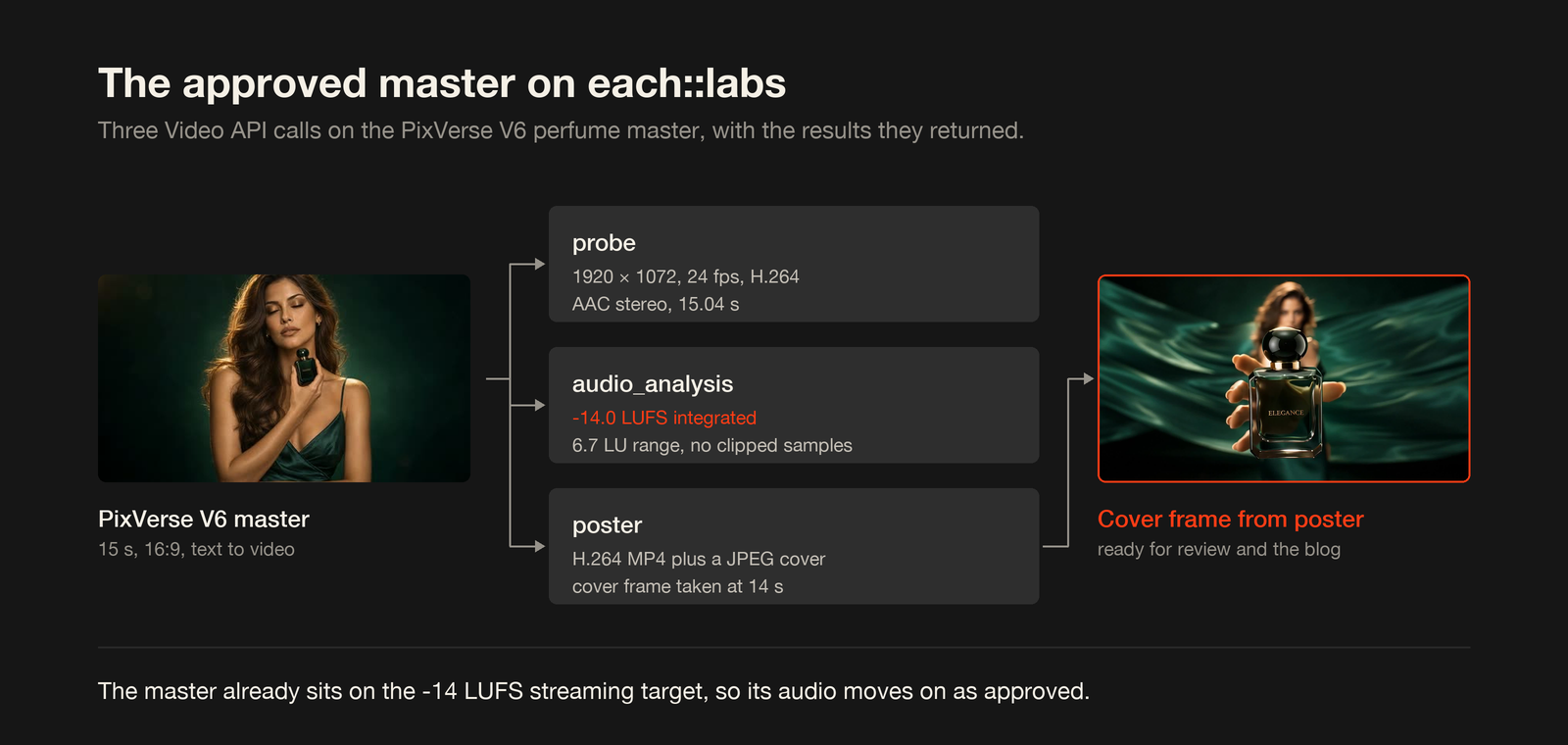
We ran three of these calls on the perfume master above. The probe call read a 15.04 second H.264 file at 1920 × 1072 and 24 fps, with AAC stereo audio. The audio_analysis call measured -14.0 LUFS integrated loudness with a 6.7 LU loudness range. That is already the -14 LUFS streaming target, so this master needed no loudness change before the next stage. The poster call returned an H.264 MP4 and a JPEG cover frame taken from the final pack shot at 14 seconds.
One handoff, one source of truth
The handoff between PixVerse and each::labs should feel straightforward.
Once the creative team approves a PixVerse master, that video becomes the reference point for the work that follows. Its creative intent, including the product presentation, movement, atmosphere, sound, and final approved version, travels with it into the next stage.
each::labs then prepares that same approved source for production use. Rather than introducing a different creative direction, it helps make the selected master easier to inspect, review, and use as the starting point for later captions, reframing, localization, or delivery.
Keeping one approved master at the center of the workflow means that every later decision can remain connected to the creative version the team originally signed off on. The result is a clearer path from first approval to final campaign delivery.
Expand only when the campaign requires it
Once a dependable production source exists, teams can decide what the campaign actually needs next.
That may mean adding subtitles, applying translated copy, adapting the framing for vertical or square placements, adding a title card, or preparing delivery packages. each::labs supports workflows for those tasks, but they should happen because the campaign needs them, not simply because the options exist.
Localization, for example, is not automatic just because a video is prepared for production. A team still needs approved translated copy. Animated captions need word-level timing data. Reframing still needs a visual check to ensure that the subject and composition remain effective.
This separation keeps the workflow honest:
PixVerse creates the approved creative master
→ each::labs prepares the approved source
→ the team decides which later versions are genuinely needed
The result is less confusion, fewer accidental creative changes, and a clearer path from first approval to final delivery.
Conclusion
A useful AI video workflow does more than generate a strong first clip. It keeps that clip clear as it enters the work that follows.
PixVerse creates the master: the visual direction, movement, sound, and creative idea that the team approves. each::labs prepares that master for the next production stage, helping teams inspect the file, standardize audio, create a preview, and establish a dependable source for later work.
Start with one approved master video. Preserve the decision behind it. Then expand only when the campaign needs to.
FAQ
What does PixVerse do in this workflow?
PixVerse is the creative-generation stage. Teams use it to create and approve the master video: the product or subject, action, camera movement, atmosphere, and sound. The output is the creative source that later production work should respect.
What does each::labs do after the master is approved?
each::labs prepares the approved master for subsequent production. It can inspect the media and audio, normalize loudness, generate a review poster, and establish a dependable output source for later captioning, reframing, localization, and delivery workflows.
Does this workflow automatically make every campaign version?
No. The workflow first establishes one trusted source. Subtitle, localization, reframing, title-card, and delivery decisions should happen later, when the campaign has a real requirement for them and the relevant copy, timing, and review criteria are available.