HappyHorse 1.0 Preview
Nobody knew who made it. No announcement, no team page, no logo. HappyHorse 1.0 just showed up on the Artificial Analysis Video Arena leaderboard in early April 2026 and went straight to number one. People in the AI space started asking questions. Is this Google? Is this a research lab? The videos looked genuinely different. Then, on April 10, Alibaba confirmed it: HappyHorse 1.0 is theirs. if the leaderboard numbers mean anything, it's worth knowing about before it arrives. What Is HappyHors
Nobody knew who made it. No announcement, no team page, no logo. HappyHorse 1.0 just showed up on the Artificial Analysis Video Arena leaderboard in early April 2026 and went straight to number one. People in the AI space started asking questions. Is this Google? Is this a research lab? The videos looked genuinely different. Then, on April 10, Alibaba confirmed it: HappyHorse 1.0 is theirs.
if the leaderboard numbers mean anything, it's worth knowing about before it arrives.
What Is HappyHorse 1.0?
Think of HappyHorse 1.0 as Alibaba's answer to the question everyone in AI video has been asking: what does a top-tier video model actually look like in 2026?
The model was built by a team inside Alibaba called the Taotian Future Life Lab. The team is led by Zhang Di, who used to run Keling one of the most well-known AI video tools out there before joining Alibaba at the end of 2025. So the people behind HappyHorse 1.0 aren't newcomers. They've built this kind of thing before, and they brought that experience with them.
What came out of it is a model that can generate videos from text descriptions or from images and it can add synchronized sound to those videos at the same time. You describe a scene, HappyHorse 1.0 generates the visuals and the audio together, in one go. No separate step for sound. No post-processing. It just works that way by default.
The community noticed the results immediately. People shared clips. A politician at a podium with camera flashes firing at the right moment. A woman walking down a rain-soaked street, footsteps landing exactly right. Full-body motion that didn't fall apart midway through the clip. Creator and researcher @Neuralithic was among the early voices sharing sample outputs, and the reaction in the comments said a lot: this didn't look like any of the other models people had been using.
An elderly man gazes through a telescope in the Sahara desert under a star-filled sky.
Why Is Everyone Talking About It?
The short answer: the leaderboard score is hard to ignore.
The Artificial Analysis Video Arena is a blind test. Real users watch two videos side by side they don't know which model made which and vote for the one they think is better. No labs influencing the results. No brand recognition playing into it. Just the videos.
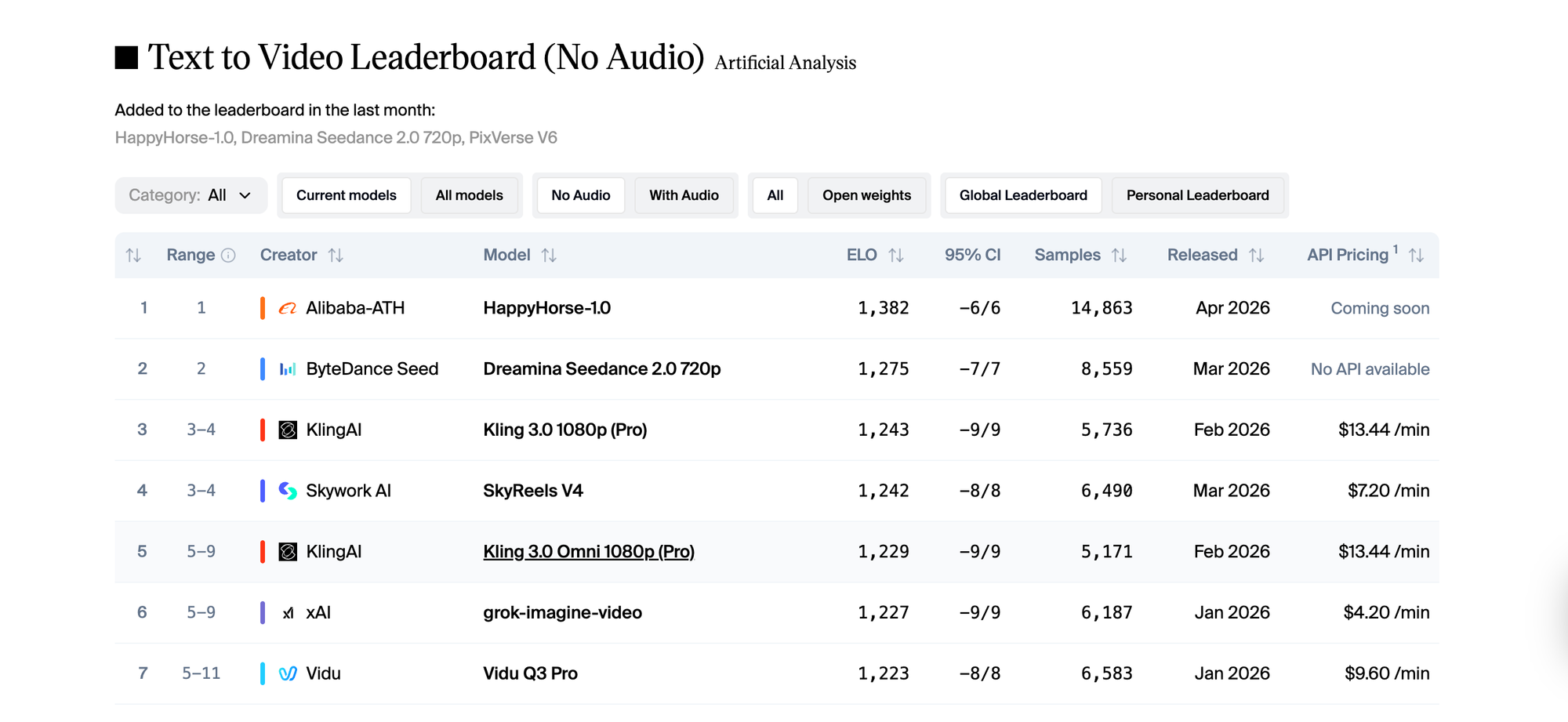
HappyHorse 1.0 entered that arena and scored 1,382 Elo in text to video. The model that held the top spot before it, Seedance 2.0, scored 1,275. That's a gap of over 100 points in a leaderboard where most top models sit within 20 or 30 points of each other. In image to video, HappyHorse 1.0 went even further, posting 1,416. The highest score ever recorded on that track.
As of mid-April 2026, it's still at number one. That matters. New models sometimes spike early and normalize when more diverse prompts enter the vote pool. HappyHorse 1.0 has held its position across nearly 15,000 blind votes. That's not a fluke.
What Can HappyHorse 1.0 Actually Do?
Generate Video From Text With Sound Already In It
You write a description. HappyHorse 1.0 generates the video. And unlike most models where audio is a separate feature you add afterward, the sound here is part of the original output. Type "a crowded café on a rainy afternoon" and you get rain on windows, ambient chatter, the clink of cups synced with what's on screen, not pasted over it.
This sounds like a small thing. It's not. Anyone who's tried to align audio to AI-generated video by hand knows how much time that takes. HappyHorse 1.0 removes that step entirely.
Pixar-style 3D animation generated by HappyHorse 1.0.
Animate Your Images
You have a photo of a person, a place, a product and you want it to move. HappyHorse 1.0's image to video mode is where the model actually scored highest, at 1,416 Elo. Feed it a source image, describe the motion you want, and it animates from there. Early users found this especially strong for faces: expressions held naturally, eyes moved with intention, and the result didn't have the unsettling drift you see in weaker models.
Handle Real People Convincingly
Most video models struggle with people. Movement gets robotic. Faces blur. Body proportions shift mid-clip. HappyHorse 1.0 was specifically built to handle human subjects well lip movement, body posture, facial expressions, the way a person shifts their weight while standing still. The community clips that went around showed this clearly. People looked like people, not like motion-captured mannequins.
Work in Multiple Languages
You don't need to write your prompts in English. HappyHorse 1.0 understands six languages natively. For teams and creators who think and work in other languages, this means you can prompt in the language you actually think in and the model responds to that directly.
What the Early Samples Showed
Before the official announcement, the AI community was already passing clips around. Creator and researcher @Neuralithic shared examples that showed what HappyHorse 1.0 can do when pushed. The outputs that got the most attention were the ones involving people close-up facial performances with natural eye movement, crowd scenes where individuals moved independently from each other, and tracking shots that maintained consistent quality from the first frame to the last.
What surprised people wasn't just the visual quality. It was the small things. A person's jacket moving as they turn. Rain that gets heavier as the camera pans. The sound of footsteps that actually match the surface being walked on. These details are where most models fall apart, and where HappyHorse 1.0 held together.
Facial emotion this convincing used to take a makeup artist and a director. @AngryTomtweets showed what HappyHorse 1.0 does with a single prompt.
Who Would Actually Use This?
HappyHorse 1.0 isn't a tool for one specific type of creator. The use cases spread pretty wide.
If you make content that features people interviews, social videos, short films, character-driven clips the model's strength with human subjects is directly relevant. You don't need to fight the model to get a believable face or a natural walk cycle.
If you work with brands and need to produce polished video content at volume, the built-in audio generation removes an entire step from the production process. Ambient sound, environmental audio, synchronized effects all of it comes with the video.
If you're a developer building video into a product or pipeline, speed matters. HappyHorse 1.0 generates 1080p clips relatively fast, which makes iterating and testing prompt variations actually practical rather than painful.
And if you're a filmmaker or visual storyteller using AI for pre visualization sketching out scenes before shooting the model's cinematic quality means the output is useful, not just approximate.
HappyHorse 1.0 vs. What Came Before
The Artificial Analysis leaderboard tells part of the story, but the community responses filled in the rest. Before HappyHorse 1.0 appeared, the top of the text to video rankings was competitive but relatively stable. Seedance 2.0 was strong. Kling 3.0 was strong. Several models were clustered within a few points of each other.
HappyHorse 1.0 didn't enter within that cluster. It cleared the top of it by over 100 Elo points.
That kind of gap, in blind voting, means users genuinely preferred the outputs not by a small margin, but consistently and decisively. The model's approach of generating video and audio together rather than separately seems to be a real differentiator. When people watch a clip where the sound just fits, without having to think about whether it fits, the overall impression of quality goes up. HappyHorse 1.0 understands that.
How to Get Ready for HappyHorse 1.0 on Eachlabs
HappyHorse 1.0 isn't live on Eachlabs yet. The API launch is expected around April 30, 2026. Once it's available, you'll be able to use both the text to video and image to video modes directly through the platform.
In the meantime, it's worth thinking about how you'd actually use it. The model responds well to prompts that are specific about people and motion not just "a woman walking in the rain" but "a woman in a light coat walking quickly through rain, glancing back over her shoulder with a slight smile." The more concrete the scene, the more the model has to work with.
For image to video, pick source images with clear subjects and good lighting. The model animates from what it's given, and a strong starting image produces a much stronger output.
Keep an eye on Eachlabs for the release update when HappyHorse 1.0 goes live, it'll be worth trying early.
Action movie scene.
Tips for When You Start Using It
Be Specific About the Person, Not Just the Scene
The model handles human subjects exceptionally well, but it needs specifics to show that off. Describe your subject's expression, posture, and movement direction. "A man looking tired, slowly closing his laptop" will produce something more interesting than "a man at a desk."
Try Image to Video First If You Have a Strong Source Image
The I2V track is where HappyHorse 1.0 scored highest globally. If you have a photo you care about a portrait, a product shot, a location image start there. Let the model animate from something real rather than building from scratch.
Let the Audio Do Its Job
Don't think of the audio as a bonus feature. It's part of the model's output from the beginning. Write prompts that include sound-relevant details the environment, the action happening, the atmosphere and the audio generation will respond to all of it.
Generate a Few Variations Before Committing
HappyHorse 1.0 is fast enough that running three or four prompt variations before picking one isn't a time cost. Treat it like iteration, not a one-shot tool. The difference between a good output and a great one is often in the second or third attempt.
Wrapping Up
HappyHorse-1.0 showed up with no announcement and immediately took the top spot on the most widely watched AI video leaderboard in the world. That kind of entrance gets people's attention and the early outputs justified it. The model generates video and audio together, handles human subjects better than most alternatives, and holds strong quality from first frame to last. It's not on Eachlabs quite yet, but once HappyHorse 1.0 lands, it'll be one of the most capable video tools on the platform. Stay close.
Frequently Asked Questions
What is HappyHorse 1.0 and who made it?
HappyHorse 1.0 is an AI video generation model built by Alibaba's Taotian Future Life Lab. The team is led by Zhang Di, who previously headed Keling Technology at Kuaishou before joining Alibaba at the end of 2025. The model entered the Artificial Analysis Video Arena anonymously in early April 2026, reached #1 almost immediately, and Alibaba confirmed ownership on April 10. It generates video from text or images and can produce synchronized audio in the same step.
Why did HappyHorse 1.0 top the leaderboard so quickly?
The Artificial Analysis Video Arena runs on blind votes real users comparing clips without knowing which model made them. HappyHorse 1.0 scored 1,382 Elo in text to video and 1,416 Elo in image to video, both category records. The gap from second place was more than 100 points, which in blind voting reflects a genuine, consistent preference across thousands of comparisons. The model's strength with human motion, facial performance, and built-in audio sync all contributed to how users responded to the outputs.
When can I try HappyHorse-1.0 on Eachlabs?
The API launch for HappyHorse 1.0 is expected around April 30, 2026. Once the model becomes available on Eachlabs, you'll be able to use it for both text to video and image-to-video generation directly through the platform. Watch the Eachlabs site for updates it'll be worth being there early.
HappyHorse 1.0 is coming to Eachlabs. Stay tuned.