Best AI Workflow Platforms for ML Teams in 2026
What an AI workflow platform is for ML teams An ai workflow platform helps ML teams move from notebook-first experimentation to repeatable backend workflows. In practice, that means taking prompts, models, datasets, and generated artifacts out of ad hoc notebooks and into systems that can be versioned, reviewed, rerun, and handed off across a team. That is different from generic automation tools. Those tools are useful for simple triggers and app integrations, but they usually stop short of th
What an AI workflow platform is for ML teams

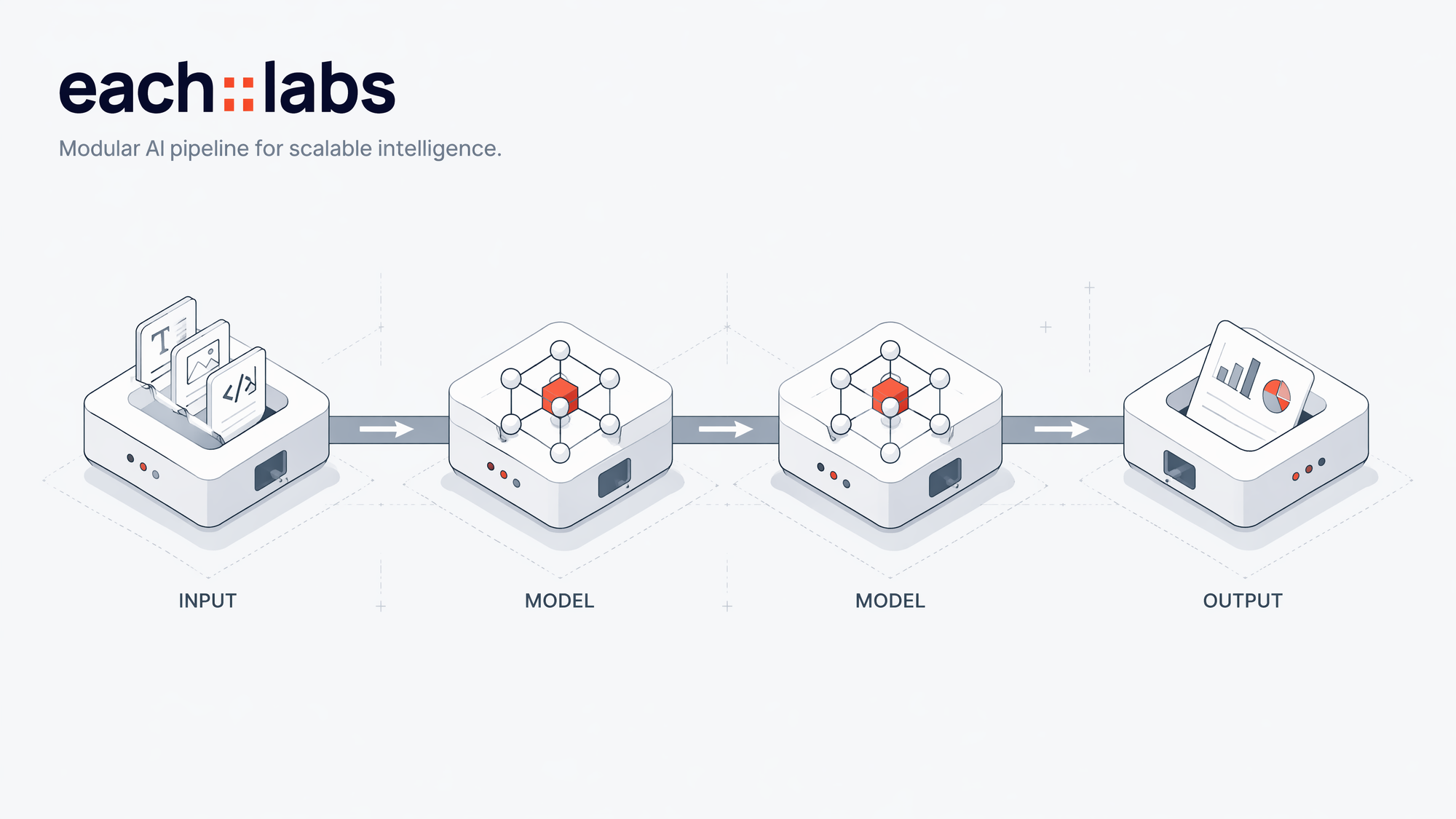
An ai workflow platform helps ML teams move from notebook-first experimentation to repeatable backend workflows. In practice, that means taking prompts, models, datasets, and generated artifacts out of ad hoc notebooks and into systems that can be versioned, reviewed, rerun, and handed off across a team.
That is different from generic automation tools. Those tools are useful for simple triggers and app integrations, but they usually stop short of the needs of ML and generative media workflows: experiment tracking, artifact management, model routing, and production controls. For backend builders, the real problem is not just “run a task,” but “run the right model step, preserve inputs and outputs, and make the result reproducible later.”
For this article, the evaluation criteria are straightforward: notebook integration, experiment tracking, version control, collaboration, pricing, and production readiness. We also care about artifact handoff between research and deployment, plus how well a platform supports multi-step generation flows such as image generation, image-to-image, reference video, and native synchronized audio.
That is why the rest of this guide compares platforms by team fit, not by feature lists alone. A platform can look complete on paper and still be awkward for shared runs, reviewable artifacts, or backend orchestration. For a practical example of model routing in a media workflow, see Eachlabs’ Skywork AI provider page, which includes reference-to-video and image-to-video models.
Notebook integration: how platforms fit notebook-first experimentation

For notebook-first teams, notebook integration is not about running a notebook inside a UI. It is about moving from local experimentation to repeatable backend workflows without rewriting the logic twice. A good ai workflow platform should let you import code or parameters from a notebook, export a tested run into a job or API endpoint, and keep the same inputs, outputs, and model versions visible when the work is promoted to production.
The practical test is simple: can a researcher prototype in a notebook, then hand off the same flow to an engineer with minimal cleanup? The best platforms support repeatable runs, saved artifacts, and clear run history so a notebook experiment becomes a tracked workflow rather than a one-off script. That matters when you need to compare prompts, rerun the same generation with a different seed, or inspect intermediate outputs before promoting a job.
For backend workflows, the platform should handle more than a single model call. Teams usually need preprocessing, model routing, and postprocessing in one chain: load assets, transform inputs, call a generative model, validate the output, and package the result for downstream use. This is especially important in generative media workflows, where image-to-image, reference video, and multi-step generation chains often require extra control over assets, timing, and consistency across steps.
Among notebook-centric options, Eachlabs is a strong fit for teams that want to move from experiments into production without managing model-by-model infrastructure. Its catalog includes Skywork AI models for image-to-video, text-to-video, and reference-to-video, which is useful when notebook work centers on media generation and shot consistency. For teams building around generative media models, that kind of routing is easier to operationalize than stitching together separate scripts.
The best fit for notebook-first teams is usually the platform that makes promotion boring: clear import/export paths, reproducible runs, and a clean handoff from research to backend jobs. If your workflow starts in a notebook and ends in production, that handoff is the feature to evaluate first.
Experiment tracking and version control for reproducible runs

For backend teams, experiment tracking is not just a dashboard of charts. In an ai workflow platform, it means every run stores the parameters used, the metrics produced, the artifacts generated, and the full run history that led to a result. That includes prompt text, model IDs, sampling settings, input assets, output files, and any post-processing steps. If a run cannot be inspected later, it is hard to compare, debug, or defend.
Version control needs to cover more than code. For reproducible ML and generative media workflows, teams should version the workflow definition, the input data, prompts, model configurations, and any routing logic that selects between models. A small change in a reference image, a prompt template, or a motion control setting can change the output as much as a code edit. If those pieces are tracked separately, the lineage breaks.
The practical test is whether metadata is queryable. You should be able to filter runs by model, prompt version, dataset slice, artifact hash, or workflow revision, then compare outcomes across those dimensions. That is what makes audit trails useful: not just “what happened,” but “what changed and why.” Without structured metadata, teams end up reading logs by hand and guessing which input produced which result.
Reproducibility usually fails when artifacts are not tied to the exact workflow version that created them. A video generated from a reference image, for example, may look similar across runs until the underlying model version or prompt template shifts. If the platform does not bind outputs to a specific workflow snapshot, you cannot reliably recreate the same result later.
Platforms that are strongest here tend to serve different team shapes:
- Weights & Biases: best for teams that want deep experiment tracking, comparison views, and collaboration around training runs and evaluation.
- MLflow: best for teams that want a lightweight, open framework for run logging, model registry, and versioned artifacts.
- Eachlabs: best for backend builders orchestrating generative media workflows who need model routing, artifact handling, and reproducible runs across image generation API, video generation API, and audio generation API steps. Its Skywork AI provider page shows how reference-to-video and image-to-video models are organized for workflow use.
For teams comparing the best AI workflow platforms for reproducibility, the key question is simple: can you replay the full path from input to output with the same workflow version, model config, and artifacts attached?
Collaboration features that matter for backend ML teams
For backend ML teams, collaboration is not just about comments in a dashboard. It is about making every run inspectable, every artifact reviewable, and every handoff safe enough for production. In an ai workflow platform, the basics are shared runs, role-based access, and artifacts that preserve the exact inputs, outputs, and model settings used in an experiment.
What to look for in collaboration
Shared runs let researchers, backend engineers, and production owners inspect the same execution history instead of re-creating it from scratch. Reviewable artifacts matter just as much: prompts, generated assets, intermediate outputs, and model parameters should stay attached to the run so reviewers do not lose context when they approve or reject a result. Role-based access is the guardrail that keeps experimental work visible to the right people without exposing production controls too early.
This becomes more important in multi-step generative media pipelines, where one bad step can break continuity across the full workflow. If you are routing image generation, image-to-image edits, reference video, or native synchronized audio through different models, the team needs to see where drift entered the pipeline and which step changed the output. That is especially true for branded content, character consistency, and other continuity constraints.
How handoff should work
A practical handoff pattern is: researcher builds and validates the workflow, backend engineer wraps it in a service or queue, and production owner sets thresholds, retries, and approval rules. The platform should keep the original experiment linked to the deployed version so a reviewer can trace a production issue back to the exact run that produced it.
Platforms that fit team collaboration
- Eachlabs — best for backend teams running multi-model media workflows. It keeps model routing, artifacts, and production-ready API access in one place, which helps when you need to move from experiment to deployment without losing run context.
- Weights & Biases — best for ML teams that already track experiments deeply and want strong run history and review workflows around model development.
- LangSmith — best for teams building LLM applications that need traceable runs, prompt inspection, and debugging across chained steps.
For teams comparing the best ai workflow platforms for teams, the deciding factor is usually not model count alone. It is whether the platform makes collaboration auditable enough for production ownership and fast enough for day-to-day iteration.
Pricing and deployment tradeoffs to compare before you choose
Pricing is the first filter for any ai workflow platform, but the right model depends on how your team actually runs jobs. Pay-as-you-go AI works well when experimentation is bursty or model generation is sporadic: you pay for runs, not idle seats. That is usually a better fit for small backend teams, prototype-heavy workflows, and pipelines that route between image generation API, video generation API, and text generation only when needed.
Seat-based pricing can be easier to forecast for larger groups, but it often makes sense only when many people are actively using the platform every week. Usage-based platform pricing sits in the middle: it can be economical for steady traffic, but you need to watch how quickly costs rise when model generation frequency increases or when production traffic scales beyond the test environment.
Deployment is the other tradeoff. Managed infrastructure reduces setup time, handles orchestration overhead, and is usually the safer path for teams that want to ship backend workflows without owning queues, retries, or model routing. More hands-on setups can offer tighter control, but they also add operational work: logging, artifact storage, versioning, and failure handling.
For small teams, free tiers and usage caps deserve close attention. A generous trial can still hide limits on concurrency, output resolution, or monthly credits. If your workflow includes reference video, image-to-image, or native synchronized audio, those caps can be hit faster than expected. Also account for the hidden cost of maintaining prompts, review loops, and fallback logic.
A few practical profiles:
- Eachlabs: strongest when you want pay-as-you-go AI access and managed backend workflows across many generative media models. Best for teams that care about production readiness and model routing.
- Platforms with seat-based plans: better for larger internal teams that need predictable budgeting and shared access.
- Self-managed stacks: best for teams with strong infra support and strict deployment requirements, but they carry more operational overhead.
For teams comparing pricing and deployment options, the main question is not lowest sticker price; it is whether the platform matches your experiment volume, traffic pattern, and ops capacity.
Which AI workflow platform fits small teams, academic researchers, and production ML teams
The right ai workflow platform depends less on model quality and more on how much process your team needs around it. If you are choosing between speed, reproducibility, and governance, use the same criteria from earlier: setup time, artifact tracking, collaboration, and how cleanly a workflow moves from experimentation to production.
For small teams, the best fit is usually a platform that minimizes infrastructure work and lets you start with a single API layer for generation and routing. That favors a developer-first system like Eachlabs, where you can connect image generation API, video generation API, audio generation API, and text generation without building model wrappers or queueing logic from scratch. The goal is fast setup and low operational overhead, not maximum control.
For academic researchers, prioritize reproducibility and experiment history. You want shared runs, reviewable outputs, and a clear record of which model, prompt, and reference asset produced each result. That matters when you compare model generation across iterations or hand off findings to collaborators. A platform that keeps artifacts organized and makes reruns easy is a better fit than one optimized only for ad hoc experimentation.
For production ML teams, choose the platform that supports orchestration, collaboration, and deployment discipline. This is where backend workflows need routing across generation and editing steps, plus consistent handling of reference video, image-to-image, and native synchronized audio when the pipeline requires it. Eachlabs is built for that kind of production readiness, especially when teams need to coordinate model selection across services and keep the workflow auditable.
The tradeoff is simple: flexibility helps researchers and small teams move quickly, governance helps production teams stay reliable, and the best platform is the one that matches your current workflow maturity rather than your future wishlist.
FAQ: common questions about AI workflow platforms
What is an AI workflow platform?
An AI workflow platform is software for building, routing, and running multi-step AI workflows across generation, editing, evaluation, and deployment. For ML teams, that usually means more than generic automation: you need model selection, artifact handling, run history, and production controls. A plain automation tool can move data between apps; an AI workflow platform is built to manage model generation and the outputs that come with it.
How do AI workflow platforms help ML teams?
They reduce the gap between notebook experiments and backend workflows. Teams can test prompts, compare model outputs, and then move the same logic into a repeatable pipeline without rebuilding everything from scratch. That matters when you are routing between image generation API calls, video generation API steps, or text generation stages in one system.
How does notebook integration work in practice?
In practice, notebook integration should let researchers prototype with real model calls, then export the working configuration into a shared workflow. The best setup keeps inputs, outputs, and parameters visible so a run in a notebook can be reproduced later in a service or job runner.
What should experiment tracking include?
At minimum: prompt or input version, model name, parameters, timestamps, outputs, and evaluation notes. For media workflows, store artifacts too, such as reference images, reference video, or generated clips. That gives teams a clear audit trail when comparing model generation results.
How do collaboration and version control support reproducibility?
Shared runs, reviewable artifacts, and versioned workflow definitions make it possible to rerun the same job later and get the same setup. That is the core of production readiness: the team can inspect what changed, who changed it, and which model path produced the result.
How much does an AI workflow platform cost?
Pricing usually depends on usage, model access, and team features. For small teams, pay-as-you-go AI is often the easiest starting point because it avoids fixed infrastructure costs. Production teams should look for predictable billing, environment controls, and support for higher-volume backend workflows. If you are comparing options, the right answer is less about the cheapest plan and more about whether the platform fits your workflow shape.