How to Build a UGC Video Factory with AI
Producing UGC ads once is not enough to succeed. What actually drives results is producing them consistently and distributing them regularly. Social media content is extremely ephemeral. If a product or brand doesn’t show up every day, it is quickly forgotten. That’s why UGC cannot be treated as a “campaign asset.” It has to be a continuously running production system. Where the Real Problem Starts at Scale Today, teams can easily: * generate scripts * create visuals * produce voiceover

Producing UGC ads once is not enough to succeed. What actually drives results is producing them consistently and distributing them regularly.
Social media content is extremely ephemeral. If a product or brand doesn’t show up every day, it is quickly forgotten.
That’s why UGC cannot be treated as a “campaign asset.” It has to be a continuously running production system.
Where the Real Problem Starts at Scale
Today, teams can easily:
- generate scripts
- create visuals
- produce voiceovers
But as scale increases, the real problems begin to surface:
- too many decisions to make
- constant switching between too many tools
- output versions that look similar but feel inconsistent
- a lack of systemization that turns production into chaos
The problem is not creating content. The problem is creating content sustainably.
What Is a UGC Video Factory?

A UGC Video Factory is not a tool. It is a production line that generates consistent, on-demand videos.
With each::sense, you define this production line without writing prompts, using only plain language.
each::sense:
- determines the required steps
- selects the appropriate models
- builds the workflow that connects the entire process
You define the system once, and then run it repeatedly.
What Does a Real UGC Factory Produce?
The output of a UGC factory is not a single video. A real factory produces:
- 10 different hooks
- 3 scripts per hook
- 5 different visual directions (background, setting, vibe)
- voiceover variations
- platform-optimized captions
- multiple aspect ratios (9:16, 1:1, 16:9)
- different persona-based sets
All of this is generated while maintaining a consistent brand voice without chaos.
The One-Sentence each::sense Instruction
With the each::sense approach, complex briefs are unnecessary. A single, clear sentence is enough:
“Build a UGC video factory for [product]. Inputs: product visuals + value propositions + persona.”
From that point on, the system decides:
- which content to produce
- which steps to follow
- which formats to generate
automatically.
UGC Factory Workflow Structure
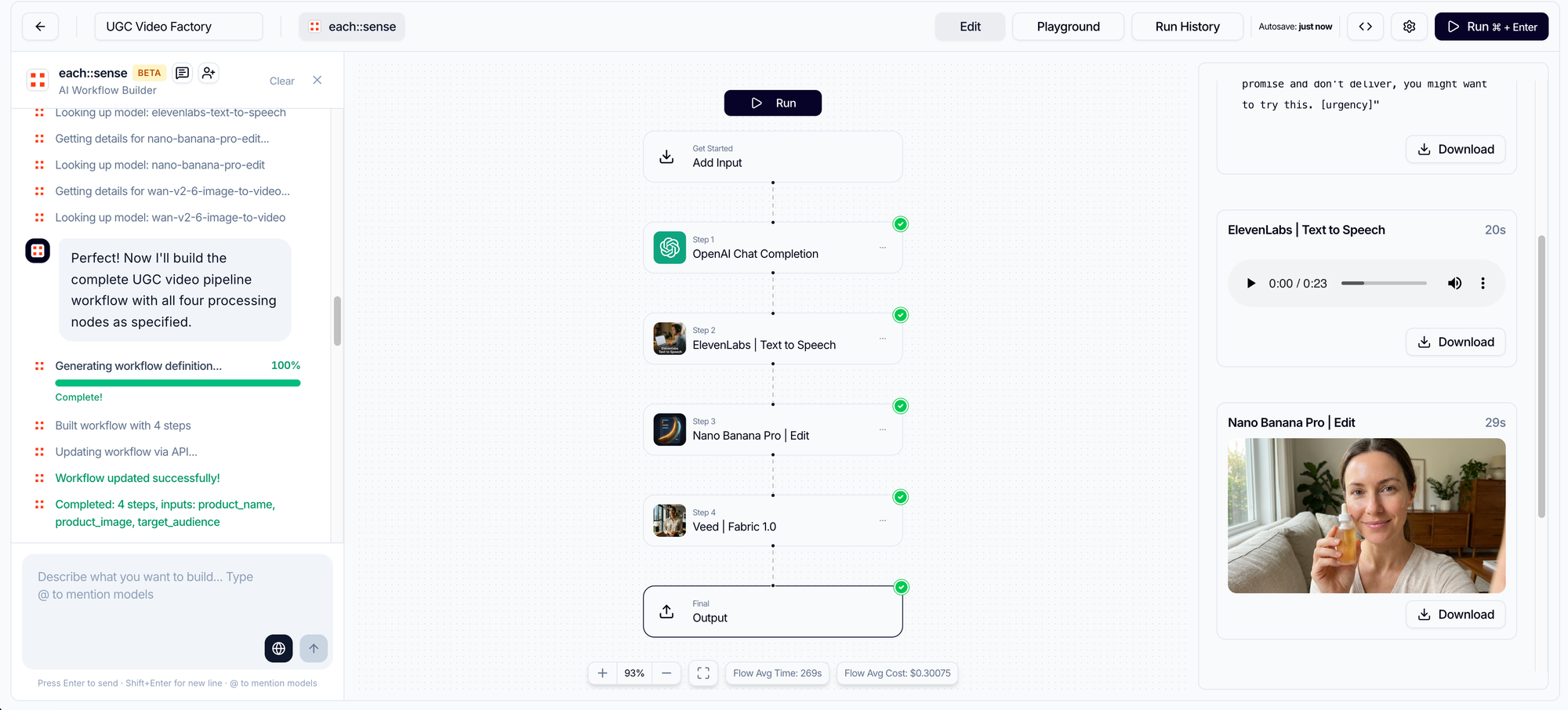
Step 1 — Inputs
The factory starts with a small set of core inputs:
- Product name
- Product image
- Target audience
These inputs become the shared reference point for all generated content.
Step 2 — Script Generation
Each video is built around a structured script:
- opening (hook)
- proof (problem / solution / benefit)
- demo (how the product works or the result it delivers)
- CTA
This ensures every video follows a performance-driven narrative.
Step 3 — Speech (Voiceover) Generation
The same structure is translated into natural spoken language:
- a conversational opening
- persuasive proof
- a clear demo explanation
- a strong but simple CTA
The goal is to sound like a real user, not a traditional ad.
Step 4 — Visual Package
A visual set is prepared to match the script and voiceover:
- lifestyle scenes
- different environments (home, office, outdoor, etc.)
- lighting and atmosphere variations
This step creates diversity within a single system, rather than repetitive-looking videos.

🔗 Try Nano Banana Pro on Eachlabs
Step 5 — Video Production
In the final stage, all components are assembled:
- lipsync
- natural motion
- clear product-focused shots
The output is a set of UGC videos that are ready to publish.
Why Call It a “Factory”?
Because with this setup, you:
- don’t have to start from scratch every time
- iterate much faster
- test more variations in parallel
- reduce decision fatigue
- maintain a consistent brand voice
This is no longer “content creation.” It’s production management.
Conclusion
UGC is not content creation. UGC is performance production.
And performance production is fundamentally a workflow problem.
With each::sense, you build a UGC video factory once then run the same system every week, or even every day.