SkyReels V4: Everything You Need to Know
SkyReels V4 is coming to Eachlabs. It's a video model, and it really depends on your needs. You can generate videos from a single prompt or you can give it reference images. What Is SkyReels V4? SkyReels V4 is a unified multimodal video foundation model that builds a comprehensive capability framework around two core dimensions: basic generative capability and multimodal understanding with precise control. On this basis, it introduces two major breakthroughs, full-modal reinforcement learnin
SkyReels V4 is coming to Eachlabs. It's a video model, and it really depends on your needs. You can generate videos from a single prompt or you can give it reference images.
What Is SkyReels V4?
SkyReels V4 is a unified multimodal video foundation model that builds a comprehensive capability framework around two core dimensions: basic generative capability and multimodal understanding with precise control.
On this basis, it introduces two major breakthroughs, full-modal reinforcement learning and advanced reference tasks, elevating the intelligence, consistency, and controllability of video generation to new industry heights.
Basic Generation Capability supports end-to-end video creation from scratch, including synchronized video and audio generation (T2V/T2VA). Multimodal Understanding and Precise Control accepts images, videos, or audio as references, truly enabling "everything as reference" to flexibly drive diverse editing and generation tasks.
The model supports outputs up to 1080p resolution (480/720), 32 FPS — higher than the common 24 FPS — and up to 15 seconds in length. It delivers cinematic-level visual quality with frame-accurate audio synchronization, covering the full video creation workflow from creative ideation to fine-grained editing.
In the Artificial Analysis Arena benchmark, SkyReels V4 ranks #1 globally among current models in the Text to Video (With Audio) domain, and also places among the top performers across other video generation tasks.
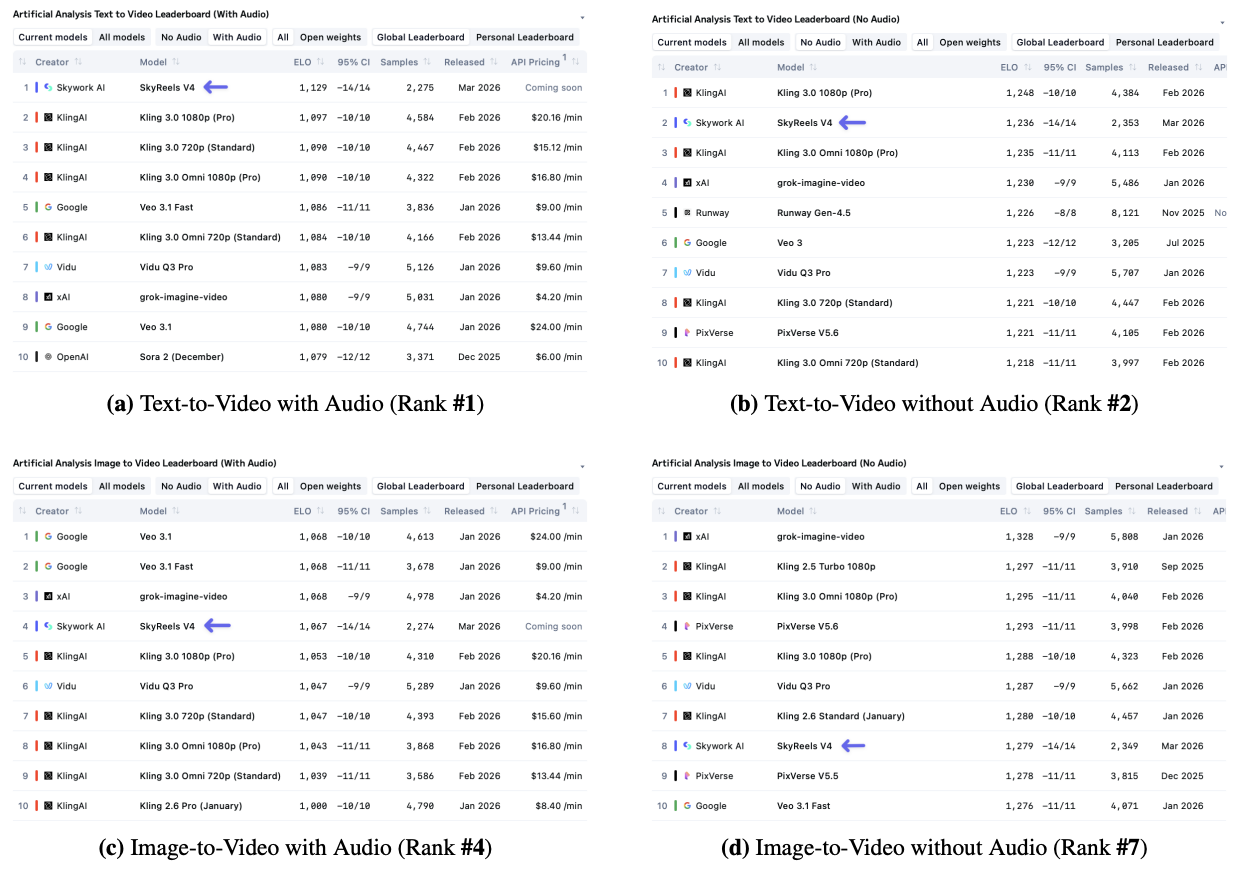
SkyReels V4 Text to Video Capabilities
Let me walk through real use cases to understand the model's capacity. In this section you'll see the prompts and the outputs.
Example 1
Prompt: The video opens with cinematic quality, beginning with an overhead tracking shot: @Actor-1, a slender female snowboarder in a vivid yellow-green suit accented with royal blue stripes, wearing a white helmet and iridescent goggles, races down a broad snow slope. The foreground reveals finely textured snow, the mid-shot captures her focused posture, while in the background, colorful spectators stretch along pine forests and snow-capped peaks to the right. The scene cuts sharply to a low-angle tracking shot: she launches off a white ramp, scattering a mist of snow, as the backdrop opens into a valley ablaze with autumn hues. Instantly, the camera shifts to a frontal close-up — @Actor-1 curls mid-air, golden hair streaming from beneath her helmet. Against the backlight, the sun gilds her outline, casting her silhouette upon the jagged ridgeline. Finally, an abrupt cut to a wide-angle shot: beneath the deep blue sky, a giant heart-shaped burst of snow mist explodes behind her. The camera traces her graceful arc, with high-contrast light and shadow outlining the grandeur of the vast snow-covered mountains.
A snowboarder races downhill, launches off a ramp, spins mid-air, and creates a heart-shaped burst of snow behind her.
As you can see, the model follows the prompt commands really well. The color contrasts like the vivid yellow-green suit are handled accurately throughout the footage. And the detail specified near the end of the prompt, "a giant heart-shaped burst of snow mist explodes behind her." actually appears at the right moment in the video, rendered realistically.
Of course, realism is one of the most important things when generating AI video. What we observe here is that SkyReels V4 takes what's written in the prompt and makes it happen in a believable way.
Example 2
Prompt: The video opens with cinematic visuals: in a wide-angle aerial shot, the city skyline at sunset shows several skyscrapers spewing black smoke and orange flames. The camera tilts down to street level. The scene cuts suddenly to a rubble-strewn street: soldiers in dark tactical gear charge toward the burning zone in a medium shot, with the camera closely tracking their advance. The camera shifts to a medium close-up of @Actor-1 — a woman with wavy brown hair, clad in a black tactical jacket, gripping an assault rifle as she moves through the smoke with a stern expression. Behind her follows @Actor-2, a blond young man. Instantly, the shot moves to a medium view of @Actor-3 — a bald, muscular man with a thick black beard, wearing a tactical vest over a gray hoodie, taking cover behind a dust-covered car with a shattered windshield as he aims his weapon. The camera then cuts to an extreme close-up of his face — he clenches his jaw and pulls the trigger, the shell casing arcing through the air. A hard cut shows @Actor-2 and @Actor-3 firing side by side from behind the damaged vehicle, muzzle flashes piercing the dim haze. Immediately, a towering fireball erupts behind the foreground soldiers, smoke billowing upward. The final shot returns to a wide aerial view of the city: in twilight, multiple fires and smoke columns rise from the urban landscape, the sky stained with an orange-red haze. The handheld camerawork throughout intensifies the battlefield tension.
A city is under attack as soldiers move through burning streets, taking cover and firing weapons while explosions erupt around them.
For AI video models, action scenes with realistic physics are probably the hardest thing to get right. But looking at this example, SkyReels V4 generates this scene without any trouble. No struggling with the physics, no breaking the logic of the environment.
Example 3
Prompt: The video opens with cinematic quality: in a medium-long shot, @Actor-1, dressed in a bright orange one-piece ski suit, a black helmet, and orange-yellow gradient goggles, leaps above the snow ridge, framed by towering peaks and a pale blue sky. The scene cuts to a low-angle tracking shot: @Actor-1 carves through deep snow on a steep slope, the skis throwing up a swirling mist. A medium shot captures their low stance and board control, while a long shot reveals a vast alpine valley. Rapid cuts follow — a close-up of the lower body shows crystalline snow spraying during a sharp turn; a wide-angle side shot tracks the skier crossing the slope from right to left, with dark green pines in the background; in a mid-shot jump, the edge of the ramp and layered ridges form a dramatic composition. The camera shifts to a side-rear close-up: the brown fur trim on the backpack flutters in the wind. At the instant, the black gloves grip the ski poles, snow bursts in the frame. The final frame freezes under the warm sunset: @Actor-1 glides gracefully toward the slope's base, with snow-covered wooden cabins resting quietly in the background. The entire film is woven with rapid editing, layering close-up textures, medium-shot postures, and long-shot landscapes to narrate the journey from alpine backcountry snow to forest cabins.
A skier speeds down a mountain, performing turns and jumps through deep snow, ending with a smooth glide toward quiet cabins at sunset.
We talked about how important realistic physics are in Example 2. This time we're looking at a different skier scene, and it's just as successful. The way the legs tuck during the jump, the snow scattering around the skier, the jump sequences, the body rotation during the turns — all of it follows physics and natural movement rules.
To summarize what SkyReels V4 text to video delivers:
- Generates video that accurately matches the details in the prompt
- Can produce realistic human faces
- Very strong on action scenes. Especially useful for short drama use cases
- Follows physics rules to achieve realism
- Can generate audio
SkyReels V4 Image to Video Capabilities
Let's take a look at what SkyReels V4 image to video can do through real examples.
Example 1
Prompt: In @Picture-1, Optimus Prime's heavy-duty truck charges at extreme speed along the city road. The camera tracks tightly from a low side angle, with the tires kicking up clouds of energy-laden dust. The truck then enters its transformation phase, the camera circling and diving as metal components disassemble and reassemble like a storm, while streams of red-and-blue energy surge and burst throughout. Finally, in @Picture-2, Optimus Prime's robot form is fully revealed. The camera quickly zooms in on his front as he assumes a battle stance, blade in hand and power gathered. Building debris scatters and minor explosions erupt in the background, filling the frame with cinematic, epic battle tension.
Reference image @Picture-1:
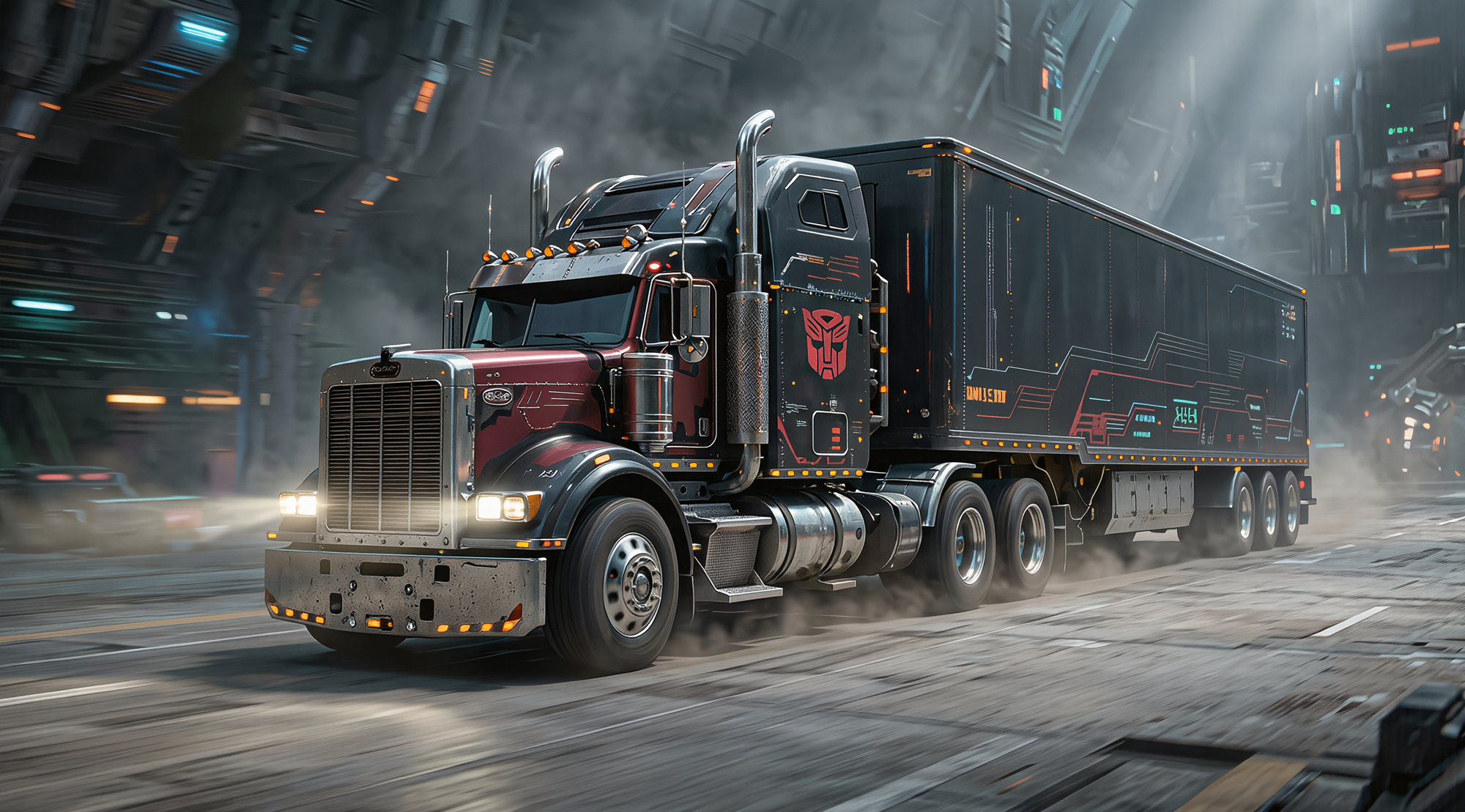
Reference image @Picture-2:
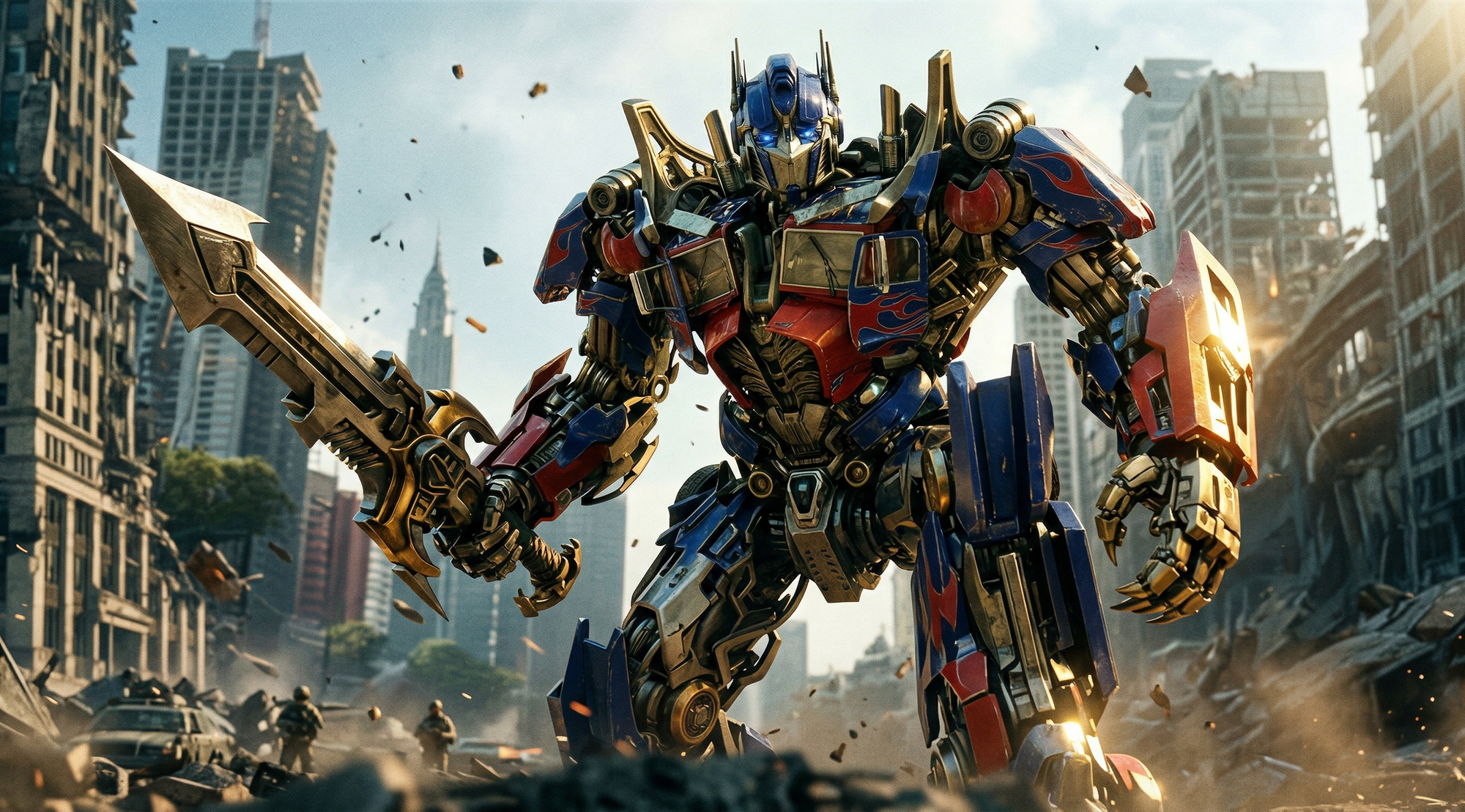
Optimus Prime speeds through the city, transforms mid-motion, and emerges in robot form ready for battle as explosions erupt around him.
The first thing that stands out here is the ability to tag inputs directly in the prompt using the @ symbol. This is a huge convenience when writing prompts, because you can quickly tag a reference and describe a few of its key features, and the model understands it and uses it in the generated video without changing it.
We also see that SkyReels V4 offers a first frame and last frame option, which is really useful. Sometimes the scene you write in the prompt doesn't come out exactly the way you imagined it, but with first frame and last frame you get full scene control. his is how it starts, the middle is driven by the prompt, and this is how it ends. What matters here is that the transitions between scenes feel natural. As we can see in the Optimus Prime example, SkyReels V4 handles this really well.
Example 2
Prompt: In @Picture-1, @Labubu is shown in slow motion from a low angle, leaping high and hovering at the peak above the volleyball net. The scene instantly switches to normal speed, as @Labubu's furry right arm arcs through the air and his palm slams forcefully into the volleyball. The camera smoothly pulls back and tilts slightly downward as @Labubu lands, his brown fur rippling across his body. In the background, the blurred stands erupt with excitement, while the stadium lights intertwine into a dazzling dynamic bokeh, freezing this clean and decisive game-winning moment.
Reference image @Labubu
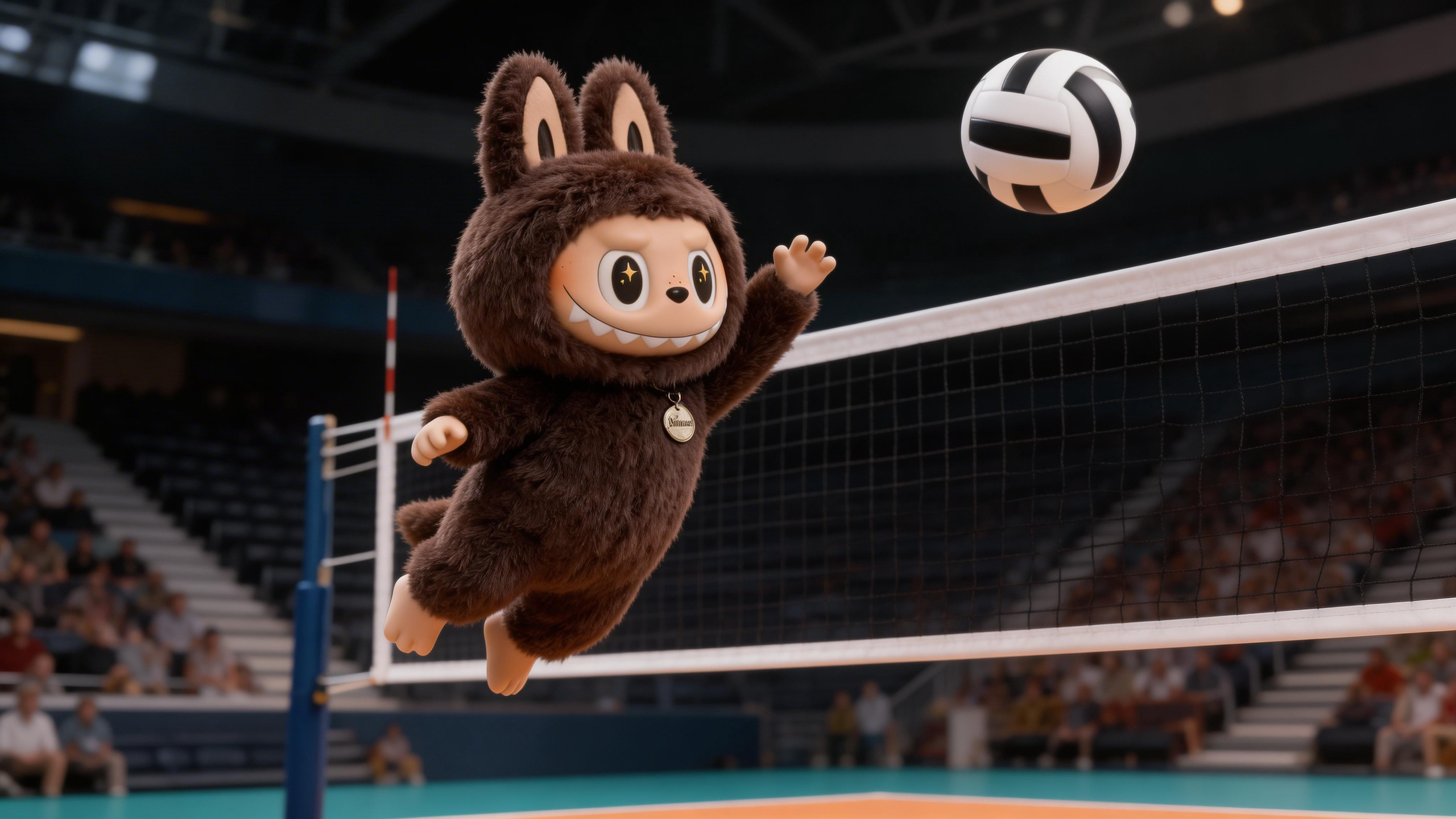
A character leaps above the net, spikes the ball powerfully, and lands as the crowd erupts in a game-winning moment.
Another important thing for image-to-video models is how closely they stick to the details in the reference image. Looking at Labubu, there's a round metal pendant with text on it hanging from his neck, and star-shaped sparkles in his eyes. Looking at the video SkyReels V4 generated, all of those details are preserved. No changes were made. That's a really good result.
To summarize what SkyReels V4 image to video delivers:
- Drives the action and events in a way that matches the prompt
- Stays true to the details in the reference input
- Offers first frame and last frame control
- Handles transitions between frames naturally, following the prompt's flow
- Allows tagging inputs with @ to reference them directly
- Supports multiple image references
SkyReels V4 Text to Video Use Cases
Creative Storytelling and Cinematic Scene Building
If you have a story idea or a specific scene in your head, SkyReels V4 can turn it into footage. You describe the camera angles, the characters, the action, the environment, and the model builds it. This is useful for anyone who wants to visualize a scene before committing to a full production, or who just wants to bring a creative idea to life without a camera crew.
Music Video and Visual Content Production
SkyReels V4 is well-suited for generating visually driven content that needs to feel cinematic and polished. Music video-style footage with dynamic cuts, varied shot compositions, and motion-heavy sequences is exactly the kind of output the model handles well.
Training Data and Synthetic Video Production
For teams that need large volumes of video content for AI training or testing purposes, SkyReels V4 makes it possible to generate diverse, realistic footage at scale. Different environments, different characters, different motion types, all controlled through prompt variations.
SkyReels V4 Image to Video Use Cases
Product Shoot Videos
You can add your product as a reference image and define how the ad film should look. Even the music flow can be specified in the prompt. As we saw in Example 2, Labubu's details were fully preserved in the output. That means your product's details will be preserved too.
Social Media Content
You can create engaging, cinematic scenes for social media using your own reference images. Want to animate a character, a mascot, or a product in a specific scenario? Tag it, prompt it, and SkyReels V4 handles the rest. The 1080p output and 32 FPS frame rate mean the clips will look sharp wherever you post them. And since audio generation is built in, you can define the sound atmosphere of the clip in the same prompt. No need to layer sound separately in post.
Short Drama
Looking at the examples, SkyReels V4 is very good at short drama. Short drama is extremely popular right now. There are entire apps dedicated to it. For studios building short drama content, SkyReels V4 is a great choice. It also supports multiple languages, which definitely makes things easier.
Let's look at a short drama example together.
Example 1
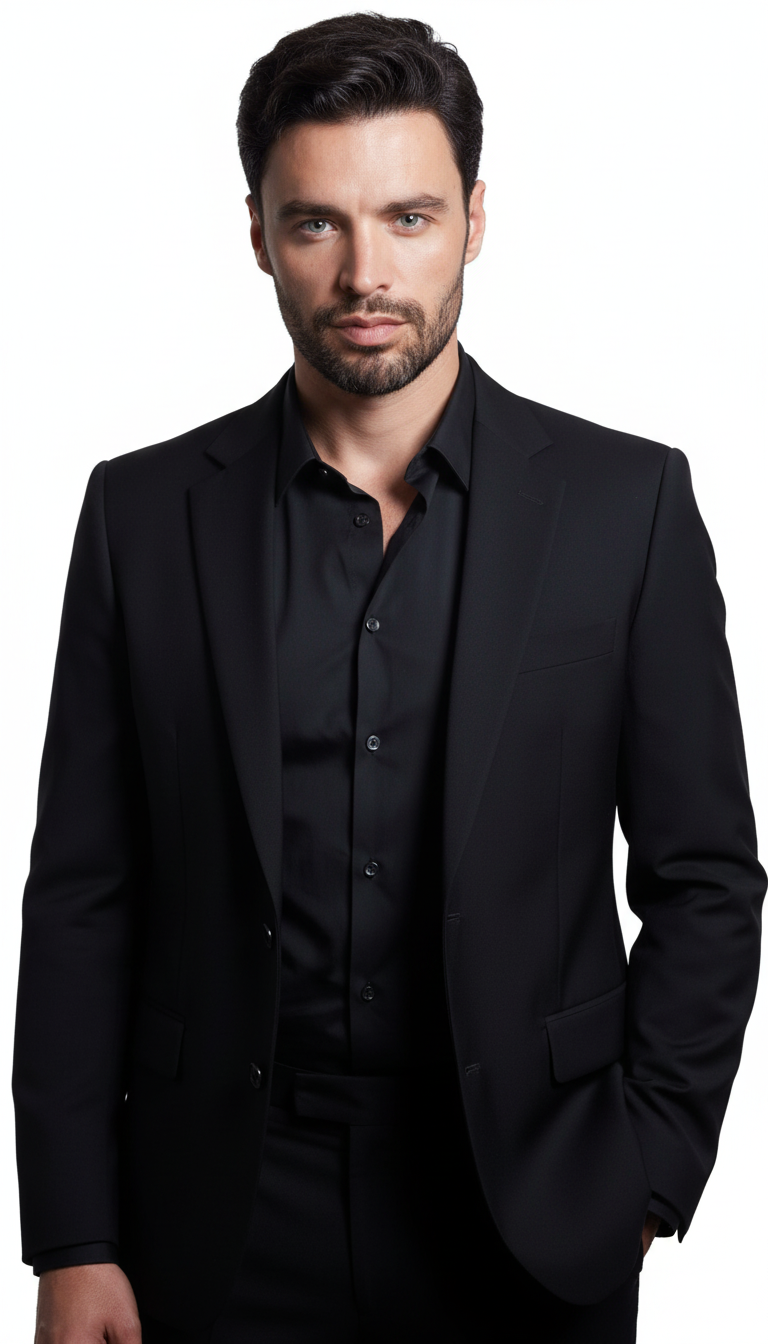
Prompt: Produced at streaming drama standards, the footage presents a clinical interaction within a sterile hospital room. The video establishes a space where #Protagonist_A is captured in a close-up, looking attentively toward a patient off-screen. In the background, a framed landscape painting is softly blurred against a light blue wall. The shot switches to a reverse angle close-up focusing on #Protagonist_B, who lies back against white pillows. In a tired, slightly pleading tone, she looks at the doctor and says<dialogue>Look, I'm feeling much better now. I should probably just go home.</dialogue>Subsequently, the perspective shifts to an over-the-shoulder shot from behind #Protagonist_B's blurred shoulder, showing #Protagonist_A leaning forward. He reaches out a hand to gently touch #Protagonist_B's forearm, speaking in a calm, soothing voice<dialogue>Hey, hey, hey.</dialogue>The frame then cuts to a final reverse angle over #Protagonist_A's shoulder as he places his palm on #Protagonist_B's forehead to check her temperature. Behind #Protagonist_B, a dark electronic monitor is visible on the wall in the background. #Protagonist_B looks up at him with weary, concerned eyes as he states firmly but gently<dialogue>You're burning up. You have a fever.</dialogue>The scene is bathed in bright, even medical lighting, emphasizing the serious atmosphere of the patient's condition.
Reference image #Protagonist_A:
Reference image #Protagonist_B:
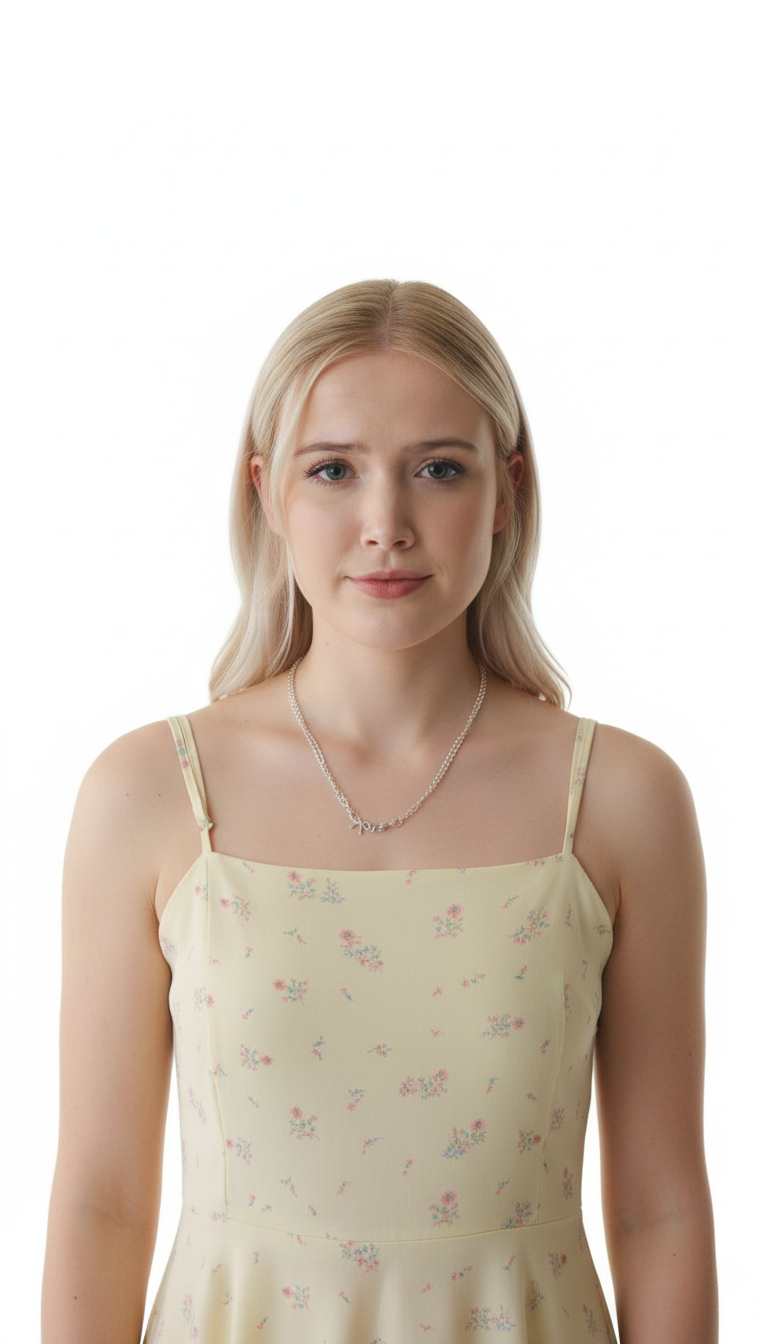
A tired patient insists she’s fine and wants to go home, but is gently stopped as her fever is noticed.
As you can see in this example, the characters from the reference images are fully preserved and the events unfold naturally, just as described in the prompt. Another important thing for image-to-video models is natural-sounding audio. In this example, the voices sound natural and the lip sync is on point.
How to Use SkyReels V4 on Eachlabs
SkyReels V4 is coming to Eachlabs soon. Once it's live, you'll find both text-to-video and image-to-video models on the platform. For text to video, write your prompt and go as detailed as you want with camera directions, character descriptions, action sequences, and environment details. For image to video, upload your reference images, tag them in your prompt using @ or #, and describe the action. If you want to lock the first and last frames, upload those separately and let the prompt control the motion in between.
Tips for Getting the Best Results
Write Camera Directions Explicitly
SkyReels V4 responds to specific camera language. "Low-angle tracking shot," "overhead aerial view," "frontal close-up," "wide-angle side shot" — these aren't just stylistic preferences, they're instructions the model actually follows. The more specific you are about camera behavior, the more cinematic your output will be.
Use the Tagging System for Multi-Character Scenes
When your scene has more than one character or more than one reference image, use the tagging system. @Actor-1, @Actor-2, #Protagonist_A — tag each input and reference those tags in the prompt when describing what each character does. This keeps the model from mixing up references and ensures each character keeps its own visual identity throughout the clip.
Structure Your Prompt Like a Shot List
Don't write everything in one unstructured block. Set up the opening shot, describe the cut, specify the next angle, define the action in each shot, and close with the final frame. The model reads the structure and uses it to time the editing rhythm of the generated video.
Use First Frame / Last Frame for Narrative Scenes
If you know where the scene starts and where it needs to end, use the first-frame and last-frame feature. Upload your opening composition and your closing composition, then let the prompt handle the middle.
In a moody café, two people have a quiet conversation, revealing curiosity and a subtle emotional connection.
Wrapping Up
SkyReels V4 is a genuinely strong model that covers the full video production workflow. Text to video, image to video, synchronized audio, up to 1080p at 32 FPS, multi-language support, and a reference tagging system that makes multi-character work actually manageable. Whether you're producing short drama, product videos, or social media content, SkyReels V4 on Eachlabs gives you the tools to do it without a full production pipeline behind you.
Frequently Asked Questions
What's the difference between SkyReels V4 text to video and image to video?
With text to video, you're generating footage entirely from a written prompt — no reference images needed. You describe the scene, the characters, the camera work, and the model builds it from scratch. With image to video, you supply reference images and tag them in the prompt. The model keeps those references locked visually and uses your prompt to drive the action. Which one you use really depends on what you need. If you have existing characters or products you want to animate, image to video is the right choice. If you're starting from a creative idea with no visual assets, text to video is the way to go.
Can SkyReels V4 generate videos with dialogue?
It can. SkyReels V4 supports synchronized audio generation including speech. You write the dialogue directly in the prompt using the dialogue tag format, and the model generates audio that's timed to the character's mouth movements. In the short drama example above, both characters speak naturally and the lip sync holds up throughout the scene.
How detailed should my prompt be for SkyReels V4?
As detailed as possible. SkyReels V4 performs best with structured, specific prompts that include camera angles, character appearance details, action sequences, lighting conditions, and scene environment. Think of your prompt as a shot list, not a scene description. The more directional information you give the model, the more accurately it executes your creative vision.