HappyHorse 1.0 Models: Complete Guide
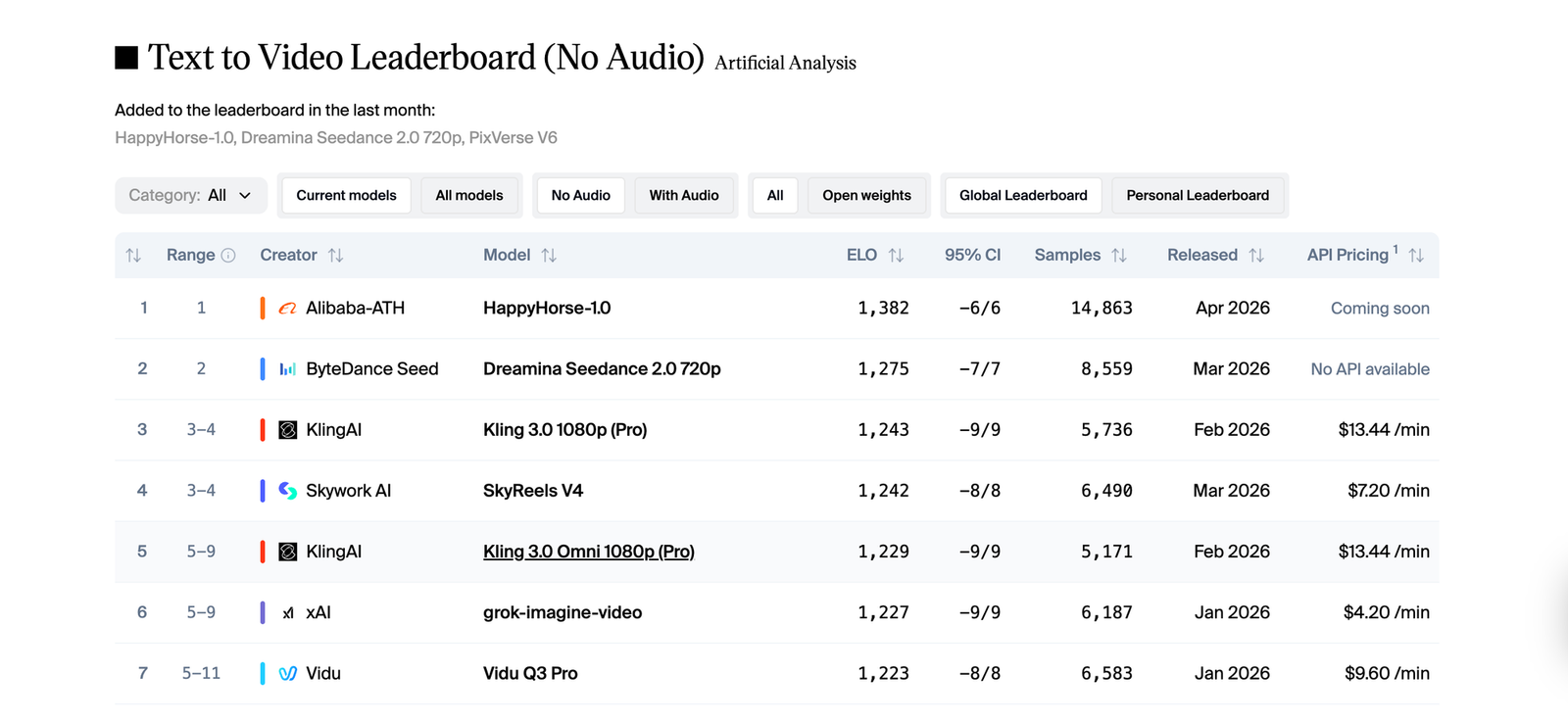
It wasn't long ago that Happy Horse 1.0 entered the Artificial Analysis Video Arena with no announcement and immediately claimed the top spot. Now it's live on Eachlabs, and it's not a single model it's a full suite. Four distinct models, each one built for a different stage of video creation: text to video, image to video, reference to video, and video editing. All of them share the same 15-billion-parameter architecture. All of them generate audio in the same pass as the visuals. This guide co
By Bartu Varol · Apr 27, 2026 · 12 min read
It wasn't long ago that Happy Horse 1.0 entered the Artificial Analysis Video Arena with no announcement and immediately claimed the top spot. Now it's live on Eachlabs, and it's not a single model it's a full suite. Four distinct models, each one built for a different stage of video creation: text to video, image to video, reference to video, and video editing. All of them share the same 15-billion-parameter architecture. All of them generate audio in the same pass as the visuals. This guide covers what each model does, where it excels, and how to get the most out of it on Eachlabs.
What Is Happy Horse 1.0?
Happy Horse 1.0 is Alibaba's most advanced video generation system to date, developed by the Taotian Future Life Lab and the ATH AI Innovation Unit. The name covers a family of four separate models, each built for a different stage of the video creation process.
What ties them together is the architecture. All four models run on the same 15-billion-parameter system that processes text, video, and audio together not in separate stages, but all at once. That's why Happy Horse 1.0 can do something most video tools still can't: generate the visuals and the audio in a single pass, with no separate pipeline for sound.
In practice, this means when a character speaks in a generated clip, the lip movements and the audio come from the same place. They're not synced afterward they're created together, with phoneme-level accuracy across six languages: Chinese, English, Japanese, Korean, German, and French. Dialogue, ambient sound, background noise all of it lands at the same time.
All four models output at up to 1080p, support 9:16, 16:9, and 1:1 aspect ratios, and generate clips between 3 and 15 seconds depending on which model you're using. Fast inference keeps turnaround times short even at full quality. On the Artificial Analysis leaderboard where real users vote blind between clips without knowing which model made them Happy Horse 1.0 scored 1,382 Elo in text-to-video and a record-breaking 1,416 in image-to-video.
How the Happy Horse 1.0 Architecture Works
Most video generation pipelines separate concerns. One system handles visuals, another handles audio, a third tries to align them after the fact. The seams show audio that doesn't quite match the action on screen, lip movements that drift slightly out of sync, ambient sound that feels pasted on rather than part of the scene.
Happy Horse 1.0 encodes everything into one token stream. Every layer of the 40-layer transformer attends to text, video, and audio simultaneously. The model doesn't reconcile separately generated outputs it generates them as a single coherent whole. A door closing and the click of it shutting are the same thing to this architecture, not two separate decisions. Rain on a window produces ambient sound not because you asked for it, but because the model understands what rain sounds like.
This unified approach is also what makes all four Happy Horse 1.0 models unusually strong with human subjects. Faces hold their expressions. Body weight shifts naturally. Eye movement has intent. Speech and lip geometry are matched at the phoneme level rather than the word level. These qualities are hard to engineer and they're where most video models break down the Happy Horse 1.0 family was built with human-centric content as the primary focus, and that shows in every clip.
The Four HappyHorse 1.0 Models on Eachlabs
HappyHorse 1.0 Text to Video
HappyHorse 1.0 Text to Video is the model that builds a video entirely from a written description. You write the scene, the character, the camera angle, the atmosphere, the sound environment and the model generates the full clip, audio included, from scratch.
What sets it apart from other text-to-video tools is how much directorial language it understands. You can describe a four-shot sequence with timing cues, camera movement notes, and sound design details, and the model structures the output accordingly. "Wide shot opening, slow push to mid close-up over three seconds, ambient café sounds, warm window light from the left" gets interpreted at the shot level, not just as a mood suggestion. That kind of prompt granularity is unusual and genuinely useful for creators who think in terms of shots rather than scenes.
The model handles clips from 5 to 10 seconds at up to 1080p. It's strongest with human subjects, speakers, performers, presenters where the native lip-sync and facial performance capabilities show most clearly. For multilingual content, you specify the language in the prompt and the model optimizes its phoneme generation for that language's mouth shapes and rhythm.
This is the model that scored 1,382 Elo in blind voting on the Artificial Analysis leaderboard. If you're starting from a concept with no existing visual assets, this is your entry point.
A cinematic depiction of a miniature LEGO city awakening from darkness into warm light, generated by the Happy Horse 1.0 text-to-video model.
HappyHorse 1.0 Image to Video
HappyHorse 1.0 Image to Video takes a still image and animates it. The input image becomes the exact first frame of the output the model generates forward from there, producing motion that's physically consistent with what the image established.
This is the highest-scoring of the four models: 1,416 Elo in image-to-video, the highest score ever recorded in that category on the Artificial Analysis leaderboard. The community voted, blind, that these animated outputs were better than everything else available. The gap showed up most clearly in portrait animation — expressions held, eyes moved with intention, bodies didn't drift into uncanny territory mid-clip.
The model automatically matches the output aspect ratio to your input image. Duration runs from 3 to 15 seconds. A text prompt is optional but worth including to specify the direction of motion "slowly turns to look over her shoulder" or "camera pulls back to reveal the full room" gives the model motion intent to build around the visual anchor of your image.
If you have a strong source image like a portrait, a product shot, a location photo this model produces high-fidelity animated output faster than building from scratch with text alone.
A cinematic, warm kitchen scene of a middle-aged man cooking in a rustic cottage, generated by Happy Horse 1.0 using image-to-video model.
HappyHorse 1.0 Reference to Video
HappyHorse 1.0 Reference to Video is the most complex of the four. It accepts up to 9 reference images alongside a text prompt and uses those references to anchor visual consistency throughout the generated clip.
The difference from Image to Video is fundamental. HappyHorse 1.0 Image to Video uses one image as the first frame and animates forward from it. HappyHorse 1.0 Reference to Video uses multiple images as visual anchors not starting points, but consistency constraints. You're telling the model: this is what character1 looks like, this is what the product looks like, this is the environment now generate a scene that keeps all of these things visually stable while building motion around them.
That capability matters most in production contexts where consistency is a non-negotiable requirement. A fashion campaign where the same garment needs to appear correctly across ten different clips. A product demo series where the item must read identically in every shot. A character-driven video where costume and appearance need to hold across multiple generations. You label the references in your prompt character1, character2 and the model treats those identities as constraints rather than suggestions.
It generates 1080p clips from 5 to 15 seconds with native audio. Processing time averages around 220 seconds per generation, reflecting the additional coherence work required across multiple references. For marketing teams and localization specialists producing consistent visual assets at scale, this model removes the manual consistency overhead that normally makes that kind of content expensive to produce.
A cinematic fashion editorial of a woman in a royal blue midi dress under a geometric umbrella, generated by Happy Horse 1.0 using reference-to-video model.
HappyHorse 1.0 Video Edit
HappyHorse 1.0 Video Edit is a fundamentally different kind of tool from the other three. The other models generate new video. This one transforms existing footage using natural language instructions.
You provide a source video, a plain-language edit instruction, and optionally up to 5 reference images — and the model applies the edit while preserving the original motion dynamics. Change the background without touching the performer's movement. Swap a costume using a reference image of the target outfit. Apply a global style change while keeping facial performance and lip-sync intact. The model understands what the instruction is asking to change and leaves everything else alone.
Because it runs on the same unified audio-video architecture as the other three models, edits that change visual elements can also update the audio environment in the same pass. Swap the backdrop from a studio to an outdoor space and the ambient sound adjusts with it — no separate audio edit required.
Clips up to 5 to 10 seconds are supported at 1080p output. Processing time averages around 130 seconds. Instructions can target a specific element in the frame or apply globally to the entire visual style. The key to clean results is being explicit in the instruction about both what to change and what to preserve.
Changing the woman’s outfit in the video to the red outfit from the reference image, using the Happy Horse 1.0 video editing model.
Key Features Shared Across All Four Models
Native Audio-Video Co-Generation
Every one of the four Happy Horse 1.0 models generates audio and video in the same inference pass. This isn't an optional add-on it's structural to the architecture. Dialogue, ambient sound, and Foley effects are synthesized alongside visuals rather than layered on afterward. The result is audio that feels like it belongs to the scene, not audio that was matched to it after the fact.
Phoneme-Level Multilingual Lip-Sync
All four models support phoneme-level lip-sync across six languages: Chinese, English, Japanese, Korean, German, and French. For global content production localized campaigns, multilingual social video, international e-commerce this removes the localization bottleneck. Specify the language in your prompt and the model handles synchronization at the phoneme level, not just approximate mouth movement.
1080p Output With Physically Accurate Motion
All four models output at up to 1080p. The physics simulation built into the shared architecture handles how fabric moves, how weight shifts, how camera motion creates parallax. These aren't post-processed effects they're part of how Happy Horse 1.0 understands and renders scenes.
Human-Centric Performance Quality
Across all four models, Happy Horse 1.0 performs best with people in the frame. Facial expressions are stable across the clip duration. Body language feels grounded. Speech coordination holds frame by frame. The entire suite was built with human-centric content as its primary use case, and it shows in the outputs.
Real-World Use Cases
The four Happy Horse 1.0 models together cover most of the professional video production workflow, which is what makes the suite interesting beyond any individual model.
Social content creators building character-driven video have a direct path from concept to publish-ready output using Happy Horse 1.0 Text to Video. Write the scene, generate the clip, iterate. The audio is already embedded. The lip-sync already works. No separate step for either.
Marketing teams producing multilingual campaigns can generate directly in each target language rather than re-recording or dubbing. A product spokesperson clip in English becomes a prompt variation in Japanese same visual intent, different language, native phoneme-level sync built in.
Fashion brands and e-commerce teams needing visual consistency across multiple clips have Happy Horse 1.0 Reference to Video. Provide the reference images, label the subjects, and the model holds those visual identities across as many generations as needed without drift.
Post-production teams who shot footage but need to change something a background, a wardrobe detail, a lighting environment have Happy Horse 1.0 Video Edit. What used to be a reshoot becomes a prompt instruction. The motion stays. The lip-sync stays. Only what you asked to change gets changed.
Developers building video into applications or pipelines get a clean single-file output from all four models: video with audio embedded, ready to serve without additional processing.
A cinematic historical scene depicting the first flight of a fragile wooden biplane at dawn on a 1903 beach, generated by Happy Horse 1.0 using text-to-video model.
How to Use the Happy Horse 1.0 Models on Eachlabs
All four Happy Horse 1.0 models are live on Eachlabs. Each model has its own dedicated page with a playground for testing, full API documentation, and SDK examples.
For Happy Horse 1.0 Text to Video and Image to Video, you can start generating through the Eachlabs playground immediately. Test prompts, adjust resolution and duration, preview results before integrating via API.
For Happy Horse 1.0 Reference to Video, upload your reference images directly through the Eachlabs interface up to 9 per generation. Label your subjects in the prompt using reference tags (character1, character2, and so on) so the model knows which image maps to which element in the scene.
For Happy Horse 1.0 Video Edit, upload your source video and write the edit instruction in plain language. Use reference images when the edit needs to match a specific visual target a costume, a style, an environment. Be explicit about scope: "change only the background to an outdoor terrace" vs. "apply a cinematic grade to the entire clip" give the model very different amounts of latitude.
API access is available for all four models through the standard Eachlabs endpoint. The model slug for each is listed on its respective page.
Tips for Getting the Best Results
Describe Camera Movement, Not Just Scene Content
All four Happy Horse 1.0 models respond to directorial language in prompts. Don't just describe what's in the scene — describe how the camera sees it. "Wide establishing shot, slow push to close-up over four seconds, shallow depth of field" gives the model structured motion intent to work with. Short clips benefit from this kind of specificity more than anything else in the prompt.
Use Clean, High-Resolution Input Images
Whether you're working with Happy Horse 1.0 Image to Video or Reference to Video, input image quality directly determines output quality. Clear subjects, good lighting, high resolution these give the model more to preserve. Blurry or ambiguous inputs produce less stable results. When building a character series with Reference to Video, keep your reference images consistent across generations.
Name the Language Explicitly for Accurate Lip-Sync
If you're generating dialogue content in a specific language, say so in the prompt. "A product spokesperson explains the features in Japanese, natural gestures, medium close-up" triggers phoneme-level optimization for Japanese. Without a language specification, the model defaults to English. The accuracy difference is meaningful, especially for non-Latin phoneme sets.
Test Short Clips Before Committing to Full Duration
Five-second clips generate faster and show you whether a prompt is working before you run a longer generation. Check the scene setup, the motion direction, and the audio environment in a short clip first. Adjust the prompt if needed, then extend the duration for the final output.
In Video Edit, Say What to Keep as Well as What to Change
Happy Horse 1.0 Video Edit needs to know what's protected as much as what's being changed. "Replace the background with a sunset terrace while preserving all performer motion and lip-sync exactly" is a cleaner instruction than "change the background to a sunset terrace." The preservation clause gives the model explicit guidance on what not to touch and that specificity shows in the output.
Wrapping Up
Happy Horse 1.0 arrived as a leaderboard result nobody expected, and what's now live on Eachlabs is something more considered than a single viral model. It's four distinct models Text to Video, Image to Video, Reference to Video, and Video Edit each solving a different problem in the video creation workflow, all built on the same architecture that makes native audio generation and multilingual lip-sync feel like baseline capabilities rather than premium features. For anyone working seriously with video, understanding what each HappyHorse 1.0 model does and where it fits in your process is worth the time.
Frequently Asked Questions
What's the difference between Happy Horse 1.0 Reference to Video and Image to Video?
Happy Horse 1.0 Image to Video uses one image as the exact starting frame and generates motion forward from it the image is the beginning of the clip. Happy Horse 1.0 Reference to Video uses multiple images as visual consistency anchors throughout a generated scene. You're not animating from an image; you're telling the model what specific subjects, objects, or environments should look like and asking it to keep them visually stable while building a scene around them. Use Image to Video when you want to animate a specific still. Use Reference to Video when you need a character or product to appear consistently across a generated clip or a series of clips.
Can Happy Horse 1.0 generate audio automatically, or do I need to add it separately?
Audio is generated automatically across all four Happy Horse 1.0 models no separate step required. The unified architecture synthesizes dialogue, ambient sound, and Foley effects in the same pass as the visuals, so the output file already has audio embedded when you receive it. For accurate multilingual lip-sync, specify the target language in your prompt. For Happy Horse 1.0 Video Edit specifically, you can configure whether the original audio is preserved or regenerated based on the nature of your edit.
Which Happy Horse 1.0 model should I start with on Eachlabs?
It depends entirely on what you're starting from. Working from a concept with no existing assets? Start with Happy Horse 1.0 Text to Video it's the most direct path from idea to output. Have a strong image you want to bring to life? Happy Horse 1.0 Image to Video is the right call, and it's where the suite scored its highest leaderboard result. Need visual consistency across multiple generated clips? That's what Happy Horse 1.0 Reference to Video was built for. Have existing footage that needs changing without a reshoot? Happy Horse 1.0 Video Edit handles exactly that. All four are accessible on Eachlabs with playground and full API access.