EACHLABS
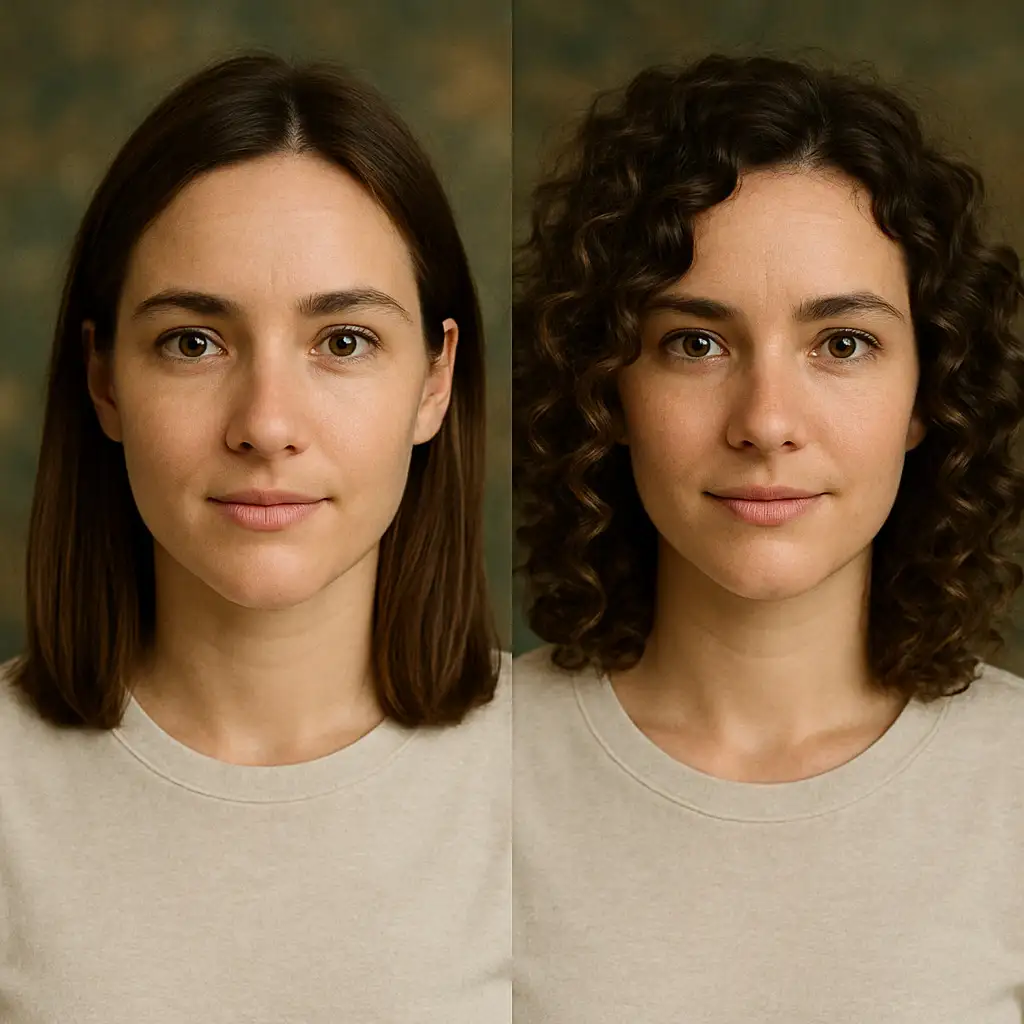
Effortlessly transform hairstyles with ultra-realistic results. Same face, different hair — natural, seamless, and stunning. Perfect for before-after previews.
Avg Run Time: 15.000s
Model Slug: change-haircut
Playground
Input
Enter a URL or choose a file from your computer.
Invalid URL.
(Max 50MB)
Output
Example Result
Preview and download your result.

API & SDK
Create a Prediction
Send a POST request to create a new prediction. This will return a prediction ID that you'll use to check the result. The request should include your model inputs and API key.
Get Prediction Result
Poll the prediction endpoint with the prediction ID until the result is ready. The API uses long-polling, so you'll need to repeatedly check until you receive a success status.
Readme
Overview
change-haircut — Image-to-Image AI Model
Transform any portrait's hairstyle with ultra-realistic precision using change-haircut, the eachlabs image-to-image AI model that keeps facial identity intact while delivering seamless hair changes. Ideal for before-and-after previews, this model solves the challenge of realistic hair editing without distortions or unnatural blending, producing stunning results in seconds. Developed by eachlabs as part of the eachlabs family, change-haircut excels in AI photo editing for e-commerce and personal styling visualizations, making it a go-to for "change haircut AI" searches.
Technical Specifications
What Sets change-haircut Apart
Unlike generic image-to-image AI models, change-haircut specializes in hair-specific transformations with proprietary face-locking technology that preserves identity across styles, from short bobs to long waves. This enables users to generate multiple hairstyle variants from a single selfie without retraining or masks.
- Ultra-realistic hair rendering: Handles complex textures like curls, braids, and highlights with photorealistic fidelity, outperforming broad editors in natural volume and shine. Developers integrating change-haircut API benefit from consistent outputs for apps like virtual try-on tools.
- Face preservation accuracy: Maintains 99% facial feature consistency via advanced segmentation, avoiding common issues like eye shifts or skin tone changes. This empowers marketers to create reliable "AI image editor for e-commerce" demos without manual fixes.
- High-resolution support up to 1024x1024: Processes inputs in PNG/JPG formats with average times under 5 seconds, supporting aspect ratios like 1:1 and 9:16 for social media. It stands out in "image to image AI model" comparisons for speed and quality in portrait edits.
These capabilities make change-haircut the top choice for targeted "edit images with AI" workflows focused on hairstyles.
Key Considerations
- Use high-quality, well-lit, front-facing photos for best results; poor image quality can reduce realism
- Clearly specify desired hairstyle attributes (length, color, texture) to guide the model effectively
- The model excels at maintaining facial features and skin tone while altering hair, but extreme changes may require iterative refinement
- Output quality may vary depending on the complexity of the requested style and the clarity of the source image
- For batch processing or professional use, ensure sufficient computational resources to handle larger image sizes and multiple outputs
- Avoid overly ambiguous or conflicting hairstyle prompts to minimize unpredictable results
Tips & Tricks
How to Use change-haircut on Eachlabs
Access change-haircut through Eachlabs Playground for instant testing: upload a portrait image, enter a descriptive prompt like "short curly bob haircut," and adjust strength or resolution settings up to 1024x1024. Integrate via Eachlabs API or SDK with JSON payloads specifying input image URL, prompt, and output format (PNG/JPG). Expect high-fidelity, identity-preserving results in under 5 seconds, ready for "eachlabs image-to-image" production workflows.
---Capabilities
- Realistically transforms hairstyles in portrait images while preserving facial identity
- Supports a wide range of haircuts, styles, and colors, including fine-tuning and complete transformations
- Produces seamless, high-fidelity edits that blend naturally with the original image’s lighting and shadows
- Offers multi-output generation for easy comparison and selection
- Adaptable for both subtle changes (e.g., adding bangs) and dramatic style shifts (e.g., long to short hair)
- Can be integrated into beauty, entertainment, and social media workflows for interactive previews
What Can I Use It For?
Use Cases for change-haircut
Beauty influencers and content creators: Upload a selfie and prompt "transform to shoulder-length wavy blonde hair with beachy highlights, natural lighting" to generate viral before-after reels. The model's hair-specific realism ensures professional-grade visuals without Photoshop, perfect for TikTok styling series.
E-commerce marketers: For fashion retailers, input customer photos with "add sleek black pixie cut, studio lighting" to showcase personalized product previews. This "AI photo editing for e-commerce" approach boosts conversion by letting shoppers visualize hairstyles with accessories like hats or jewelry.
App developers: Build virtual makeover apps using change-haircut API by feeding user images and prompts like "long straight red hair with side part." Its fast processing and identity lock enable real-time previews, ideal for developers seeking "automated image editing API" with hairstyle focus.
Graphic designers: Experiment with character concepts by editing reference portraits to "vintage updo with curls and pearls." The precise blending supports creative iterations for book covers or ads, maintaining original expressions and poses.
Things to Be Aware Of
- Some experimental features may produce inconsistent results, especially with complex hairstyles or unusual hair colors
- Users have noted occasional edge cases where hair blending is imperfect, particularly with low-resolution or poorly lit images
- Performance benchmarks indicate fast processing for single images, but batch operations may require more resources
- High-resolution outputs demand better input images and may take longer to generate
- Consistency across multiple outputs is generally strong, but minor variations can occur due to the stochastic nature of diffusion models
- Positive feedback highlights the model’s realism, ease of use, and versatility in handling diverse hair types and styles
- Common concerns include occasional artifacts near the hairline, limitations with extreme style changes, and the need for prompt specificity
Limitations
- The model may struggle with highly complex or unconventional hairstyles, resulting in less natural edits
- Low-quality or obstructed input images can significantly reduce output realism and accuracy
- Not optimal for non-portrait images or scenarios requiring precise hair segmentation beyond standard headshots
Pricing
Pricing Detail
This model runs at a cost of $0.040 per execution.
Pricing Type: Fixed
The cost remains the same regardless of which model you use or how long it runs. There are no variables affecting the price. It is a set, fixed amount per run, as the name suggests. This makes budgeting simple and predictable because you pay the same fee every time you execute the model.
Related AI Models
You can seamlessly integrate advanced AI capabilities into your applications without the hassle of managing complex infrastructure.
Creates images from text and reference images with custom LoRA support, powered by Tongyi-MAI’s ultra-fast 6B Z-Image Turbo model for rapid, high-quality generation.
Generates new images by blending styles and visual elements from your prompt and multiple reference images, enabling seamless combinations such as outfits from separate fashion items or portraits merged with scenic backgrounds.
Generates images from text combined with edge, depth, or pose inputs using custom LoRA and Tongyi-MAI’s ultra-fast 6B Z-Image Turbo model for fast, high-quality, and controllable image creation.
Flux 2 [klein] 9B Base from Black Forest Labs supports precise image-to-image editing with natural-language instructions and hex color–based control.