
EACHLABS
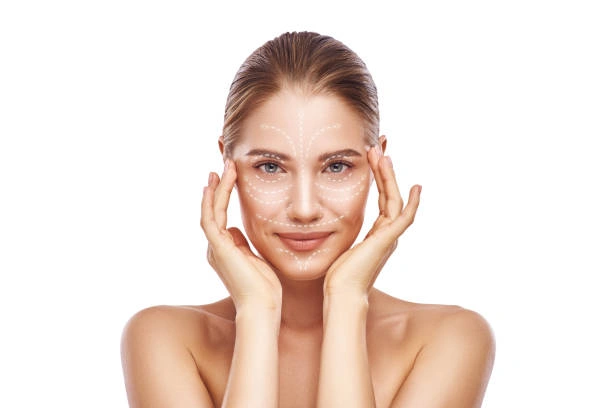
Face Aesthetics is an AI model designed to enhance facial beauty by refining features with natural, balanced, and harmonious adjustments.
Avg Run Time: 5.000s
Model Slug: ai-face-aesthetics
Playground
Input
Enter a URL or choose a file from your computer.
Invalid URL.
(Max 50MB)
Output
Example Result
Preview and download your result.
API & SDK
Create a Prediction
Send a POST request to create a new prediction. This will return a prediction ID that you'll use to check the result. The request should include your model inputs and API key.
Get Prediction Result
Poll the prediction endpoint with the prediction ID until the result is ready. The API uses long-polling, so you'll need to repeatedly check until you receive a success status.
Readme
Overview
AI Face Aesthetics — Image-to-Image AI Model
AI Face Aesthetics, developed by Eachlabs as part of the Eachlabs family, is an advanced image-to-image AI model that enhances facial beauty through natural, balanced refinements to features like symmetry, skin texture, and proportions. This model solves the challenge of subtle yet impactful portrait editing for creators and developers seeking "AI photo editing for e-commerce" or professional headshot improvements without manual retouching. Unlike generic editors, AI Face Aesthetics delivers harmonious adjustments that preserve identity while elevating aesthetics, making it ideal for high-volume workflows on Eachlabs.
Users upload a source image and provide a text prompt to guide refinements, producing outputs optimized for social media, marketing, or personal branding. As an Eachlabs image-to-image solution, it integrates seamlessly into apps via API, supporting efficient batch processing for "edit images with AI" tasks.
Technical Specifications
What Sets AI Face Aesthetics Apart
AI Face Aesthetics stands out in the competitive landscape of image-to-image AI models by focusing exclusively on facial harmony, using proprietary algorithms to detect and subtly enhance key aesthetic elements like golden ratio proportions and micro-expression naturalness—capabilities not emphasized in general-purpose editors.
- Natural facial refinement: Analyzes input portraits to apply balanced adjustments to eyes, nose, lips, and jawline, ensuring outputs look authentically improved rather than artificially altered; this enables photographers to upscale client photos for portfolios in seconds.
- Identity-preserving edits: Maintains core facial identity across refinements with high fidelity, even at high resolutions up to 1024x1024; developers benefit from consistent results in "AI image editor API" integrations for user-generated content apps.
- Efficient processing: Handles standard image formats with average times under 5 seconds per edit on Eachlabs infrastructure; ideal for real-time previews in web apps targeting "automated image editing API" use cases.
These features position AI Face Aesthetics as a specialized tool for precision aesthetics, weaving in support for aspect ratios like 1:1 and 16:9, with PNG/JPG inputs and outputs.
Key Considerations
Enhancement strength values should be adjusted cautiously; very low values (0.1-0.3) provide subtle changes, while high values (0.7-1.0) may produce dramatic transformations.
Image quality has a direct influence over enhancement accuracy, lighting quality, face positioning, and visual clarity.
Results vary depending on input image resolution, face angle, lighting conditions, and enhancement type selection.
Processing time ranges from 2-10 seconds, depending on image size and complexity.
Tips & Tricks
How to Use AI Face Aesthetics on Eachlabs
Access AI Face Aesthetics through Eachlabs Playground for instant testing—upload an image, add a descriptive prompt like "refine jawline and brighten eyes naturally," select resolution, and generate. For production, use the Eachlabs API or SDK with parameters for source image, strength (0.1-1.0), and output format (PNG/JPG), delivering high-quality, identity-safe edits in seconds. Scale effortlessly for apps with "eachlabs image-to-image" integrations.
---Capabilities
Facial Shape Modifications
slim_face - Reduce overall facial width for a slimmer appearance
cut_face - Reshape facial contours and definition
long_face - Elongate facial proportions vertically
cheekbone - Enhance cheekbone prominence and definition
Eye Enhancements
big_eyes - Enlarge eye size for more prominent appearance
eye_angle_1 - Adjust eye angle orientation (primary method)
eye_angle_2 - Adjust eye angle orientation (alternative method)
eye_distance - Modify spacing between eyes
widen_eye_distance - Increase distance between eyes
eye_height - Adjust vertical eye positioning
Nose Refinements
slim_nose - Reduce nose width for refined appearance
nose_wing - Adjust nostril width and flare
nose_length - Modify nose length (primary method)
nose_length_2 - Modify nose length (alternative method)
Chin & Jaw Adjustments
chin_shortening - Reduce chin length vertically
chin_lengthening - Extend chin length vertically
slim_chin - Narrow chin width
slim_jaw - Reduce jawline width
Lip Enhancements
lip_size - Adjust overall lip fullness
lip_width - Modify lip width horizontally
lip_height - Adjust lip height vertically
Advanced Features
human_middle - Adjust overall facial proportion balance
Webhook support for asynchronous processing
Multiple image format support with automatic conversion
Built-in health monitoring and metrics
Comprehensive error handling and logging
What Can I Use It For?
Use Cases for AI Face Aesthetics
Content creators refining selfies: Upload a casual portrait and use AI Face Aesthetics to achieve polished, magazine-ready looks for Instagram or TikTok. For instance, input a prompt like "enhance facial symmetry, smooth skin texture, soft natural lighting on a young woman smiling" paired with a selfie, yielding a harmonious upgrade perfect for influencers building personal brands.
Marketers optimizing e-commerce photos: Teams handling "AI photo editing for e-commerce" can batch-process product model shots, refining faces for consistency across catalogs without hiring retouchers. This saves hours on campaigns, delivering professional visuals that boost conversion rates.
Developers building apps: Integrate the AI Face Aesthetics API into mobile apps for real-time beauty filters, where users upload photos for instant enhancements. It excels in "image to image AI model" pipelines, supporting custom prompts for diverse skin tones and ages.
Designers for professional headshots: Freelance designers use it to elevate LinkedIn profiles or corporate bios by subtly perfecting features while retaining authenticity, streamlining workflows for high-volume client edits via Eachlabs.
Things to Be Aware Of
Ethical Usage
Ensure appropriate consent when modifying facial features of real people. Consider disclosure requirements for enhanced images.
Cultural Sensitivity
Beauty standards vary across cultures and demographics. Use enhancement features responsibly and inclusively.
Privacy and Security
Protect API authentication tokens. Rotate keys regularly. Ensure compliance with data protection regulations (GDPR, CCPA).
Content Guidelines
Respect platform policies when publishing enhanced images. Consider community standards and content moderation requirements.
Quality Expectations
Set realistic expectations about enhancement limitations. Results depend heavily on input image quality and lighting conditions.
Processing Considerations
Service processes one face per image. Multiple faces may produce unpredictable results.
Temporary Storage
Enhanced images are stored temporarily. Download results promptly as storage duration is limited.
Performance Planning
High-volume usage may require rate limiting strategies. Consider webhook implementation for production workflows.
Limitations
Technical Limitations
Maximum image size: 3MB file limit
Supported dimensions: 10x10px to 2000x2000px maximum
Processing time: 2-10 seconds per request depending on complexity
Concurrent processing: Limited by service resource allocation (1GB memory limit)
Network dependency: Requires stable internet connection for image URL processing
Functional Limitations
Single face processing: Optimized for images containing one primary face
Enhancement scope: Limited to 22 predefined modification types
Strength granularity: Enhancement intensity limited to 0.0-1.0 decimal range
No reversal capability: Each enhancement is independent with no undo functionality
No batch processing: Single image processing per API request
Quality Limitations
Input dependency: Output quality directly correlates with input image clarity and resolution
Lighting sensitivity: Poor lighting conditions significantly impact enhancement accuracy
Angle constraints: Works best with front-facing portraits within ±30 degrees optimal range
Age variability: Enhancement effectiveness may vary across different age groups
Facial hair interference: Dense facial hair may affect certain enhancement types
Makeup considerations: Heavy makeup application may impact enhancement precision
Infrastructure Limitations
Internet connectivity: Requires stable connection for image URL download and processing
Storage duration: Enhanced images available temporarily with limited retention period
Service availability: Single instance deployment may have uptime considerations
Regional constraints: Service availability depends on deployment configuration and geographic location
Pricing
Pricing Detail
This model runs at a cost of $0.40 per execution.
Pricing Type: Fixed
The cost remains the same regardless of which model you use or how long it runs. There are no variables affecting the price. It is a set, fixed amount per run, as the name suggests. This makes budgeting simple and predictable because you pay the same fee every time you execute the model.
Related AI Models
You can seamlessly integrate advanced AI capabilities into your applications without the hassle of managing complex infrastructure.
Generates the same scene from different perspectives by adjusting azimuth and elevation, leveraging Qwen Image Edit 2511 with LoRA Multiple Angles for consistent and detailed results.
Alibaba Wan 2.7 Image Edit is the latest Wan-series image editing model by Alibaba, offering improved instruction comprehension and edit precision for a wide range of modifications including style changes, object edits, and scene alterations. Built on the Wan 2.7 architecture, it handles complex natural language edit instructions with greater semantic accuracy than earlier versions. Best suited for product photo editing, creative retouching, and high-volume commercial image transformation pipelines.
Nano Banana 2 Edit enables advanced image-to-image transformations, delivering ultra high quality refinements, seamless edits, and precise control guided by your prompt.
FireRed Image Edit v1.1 introduces improved image editing features and enhanced performance for a smoother editing experience.
Dev questions, real answers.
AI Face Aesthetics is an AI model developed by each::labs that analyzes or enhances facial features in portrait images to improve visual appeal. It applies aesthetically driven adjustments including skin tone balancing, feature refinement, and symmetry enhancement while preserving the subject's natural appearance.
AI Face Aesthetics is accessible via the eachlabs unified API. Submit a portrait image; the model returns an enhanced version with aesthetics-aware facial refinements applied. Billing is pay-as-you-go through eachlabs with no additional setup required.
AI Face Aesthetics is best suited for portrait retouching, social media profile image enhancement, and consumer beauty applications. It is particularly effective for platforms where automated, aesthetics-driven portrait improvement needs to be applied at scale across large volumes of user-submitted images.