
CCSR
CCSR-Powered Image Upscaling Technology
Avg Run Time: 55.000s
Model Slug: ccsr
Playground
Input
Enter a URL or choose a file from your computer.
Invalid URL.
(Max 50MB)
Output
Example Result
Preview and download your result.

API & SDK
Create a Prediction
Send a POST request to create a new prediction. This will return a prediction ID that you'll use to check the result. The request should include your model inputs and API key.
Get Prediction Result
Poll the prediction endpoint with the prediction ID until the result is ready. The API uses long-polling, so you'll need to repeatedly check until you receive a success status.
Readme
Overview
ccsr — Image-to-Image AI Model
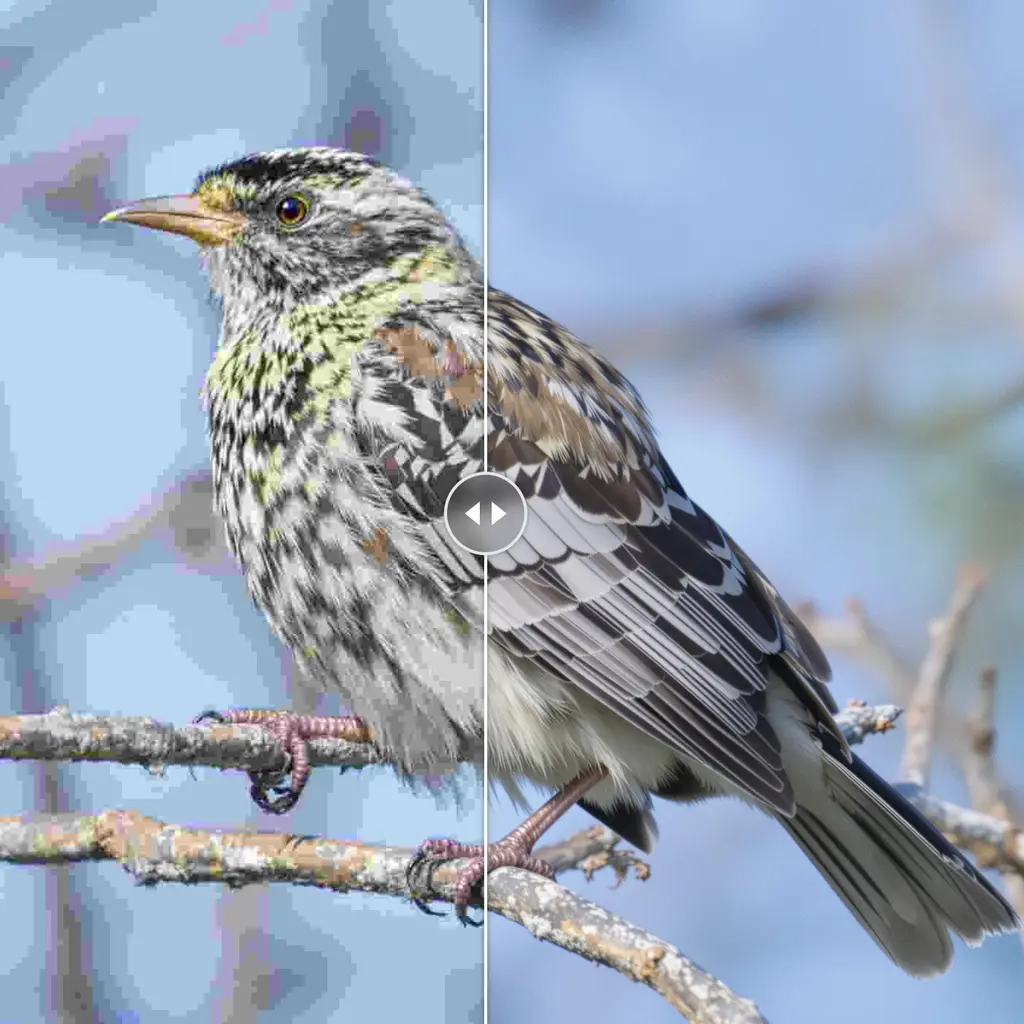
ccsr from Csslc revolutionizes image-to-image workflows with its CCSR-Powered Image Upscaling Technology, enabling developers and creators to transform low-resolution inputs into high-fidelity outputs effortlessly. Part of the ccsr family, this model excels in enhancing details while preserving original composition, solving common challenges in AI photo editing for e-commerce and content production. Whether you're seeking an image-to-image AI model for quick upscaling or advanced edits, ccsr delivers precise results through Csslc's innovative architecture.
Technical Specifications
What Sets ccsr Apart
ccsr stands out in the competitive landscape of image-to-image AI models due to its specialized focus on upscaling, setting it apart from general-purpose editors by leveraging Csslc's proprietary CCSR technology for superior detail recovery.
- Advanced upscaling from low-res to high-res: ccsr uses cutting-edge algorithms to upscale images while reconstructing fine textures and edges, enabling users to convert pixelated photos into print-ready visuals without artifacts.
- Preservation of structural integrity: Unlike standard models, it maintains original aspect ratios and compositions during enhancement, ideal for AI image editor API integrations where consistency is key.
- Efficient processing for batch workflows: Supports common input formats like PNG and JPEG with outputs up to high resolutions, typically processing in seconds, making it suitable for automated image editing API pipelines.
These capabilities make ccsr a top choice for Csslc image-to-image tasks, with support for various aspect ratios and fast turnaround times.
Key Considerations
- Upscaling quality improves with higher megapixel targets but requires more time and memory resources
- Maintaining similar scales between reference images helps blend elements cleanly and preserves consistency
- Moderate step counts in diffusion processes yield tight edits and better structural preservation
- Prompt engineering and reference selection are critical for controlling output fidelity
- Balancing speed and quality is essential; higher fidelity settings may slow down processing
- Avoid excessive upscaling in a single pass to minimize artifacts; iterative refinement is recommended
Tips & Tricks
How to Use ccsr on Eachlabs
Access ccsr through Eachlabs' Playground for instant testing with image uploads and text prompts specifying upscaling levels, or integrate via the ccsr API and SDK for production apps. Provide input images in standard formats, set desired resolution or aspect ratios, and receive enhanced outputs quickly—perfect for scalable image-to-image deployments.
---Capabilities
- High-quality image and video upscaling with strong content consistency
- Effective multi-image merging and editing for complex compositions
- Robust structural preservation during resolution enhancement
- Adaptable to various input types and editing workflows
- Advanced control over output fidelity via adjustable parameters
- Suitable for both professional and creative use cases
What Can I Use It For?
Use Cases for ccsr
E-commerce developers building AI photo editing for e-commerce apps can upload product images and apply upscaling to create crisp, zoomable visuals. For instance, input a blurry smartphone photo of apparel with a prompt like "upscale to 4K with enhanced fabric textures and natural lighting," yielding professional-grade listings without manual retouching.
Content creators handling social media graphics use ccsr to refine low-quality captures into polished assets. Its structure-preserving upscaling ensures logos and text remain sharp, streamlining edit images with AI workflows for Instagram or TikTok campaigns.
Designers in advertising agencies leverage ccsr for automated image editing API integrations, transforming draft mockups into high-res finals. This saves hours on revisions, especially for multi-format outputs needed in print and digital.
Marketers optimizing legacy photo libraries apply ccsr's technology to batch-enhance archives, boosting visual quality for email blasts and websites while integrating seamlessly into custom tools.
Things to Be Aware Of
- Experimental features may behave unpredictably in edge cases, especially with highly diverse input images
- Some users report increased resource usage (memory and processing time) at higher resolution settings
- Consistency is generally strong, but blending artifacts can occur if reference images differ significantly in scale or content
- Fidelity improves with moderate diffusion steps; excessive steps may slow down processing without significant quality gains
- Positive feedback highlights the model’s ability to preserve detail and structure during upscaling
- Common concerns include occasional color shifts and minor artifacts in highly complex edits
- Community discussions emphasize the importance of prompt and reference selection for optimal results
Limitations
- High resource requirements for large-scale upscaling tasks
- May not perform optimally with highly heterogeneous or low-quality input images
- Limited public documentation on parameter count and detailed architecture specifics
Related AI Models
You can seamlessly integrate advanced AI capabilities into your applications without the hassle of managing complex infrastructure.
FireRed Image Edit v1.1 introduces improved image editing features and enhanced performance for a smoother editing experience.
Edit your images with precision using xAI’s Grok Imagine. Make targeted changes, refine details, and transform visuals while preserving the original quality and structure.
Wan 2.6 Image-to-Image transforms input images with precise, high-quality edits while maintaining visual consistency.
FLUX.2 [max] provides state-of-the-art image generation and advanced editing with outstanding realism, precision, and visual consistency.

Dev questions, real answers.
CCSR (Content-Consistent Super Resolution) is an AI image upscaling model by Csslc that enhances image resolution while preserving fine structural details and content consistency. It uses a diffusion-based approach to generate high-resolution output that retains the original image structure without introducing hallucinated detail.
CCSR is accessible via the eachlabs unified API. Submit a low-resolution image; the model returns an upscaled version with preserved detail and structural consistency. Billing is pay-as-you-go through eachlabs no separate account is required.
CCSR is best suited for restoring or enhancing low-resolution images where content fidelity is critical such as archival photo enhancement, AI-generated image upscaling, and document scanning. Its consistency-preserving approach makes it preferable over generative upscalers when structural accuracy outweighs creative enhancement.