Flux 2 | Flex | Edit
Image editing with FLUX-2-FLEX. Ultra-realistic transformations, highly accurate prompt adherence, and smooth native adjustments for complete creative control in visual edits.
- Runtime (p50)
- 20s
- Estimated price
- From $0.0417
Overview
flux-2-flex-edit — Image Editing AI Model
flux-2-flex-edit, Black Forest Labs' specialized FLUX.2 [flex] variant, empowers precise image-to-image editing with unmatched flexibility for typography and detail preservation, solving the challenge of maintaining small elements during complex visual transformations. This image-to-image AI model excels in ultra-realistic edits, supporting up to 10 reference images for consistent style transfer and character fidelity while delivering photorealistic results up to 4 megapixels. Developers and creators seeking an AI image editor API turn to flux-2-flex-edit for its native hex color matching and structured prompting, ensuring smooth adjustments without artifacts.
Capabilities
- High-fidelity image-to-image editing with photorealistic detail and consistent lighting
- Inpainting to replace or fix specific regions (e.g., hands, text areas, background clutter) while preserving surrounding context
- Outpainting to expand the canvas (e.g., turning a portrait into a banner or extending scenery) with natural continuation
- Background swap while keeping the subject intact and realistically integrated into the new environment
- Product cleanup: removing blemishes, dust, or imperfections, and re-lighting for a standardized studio look
- Style and grade adjustments: changing tone, mood, lighting, or material feel (e.g., from matte to glossy, from cool to warm) while maintaining composition
- Advanced retouching for fashion, cosmetics, and “hero” product images with attention to skin texture, fabric, and fine details
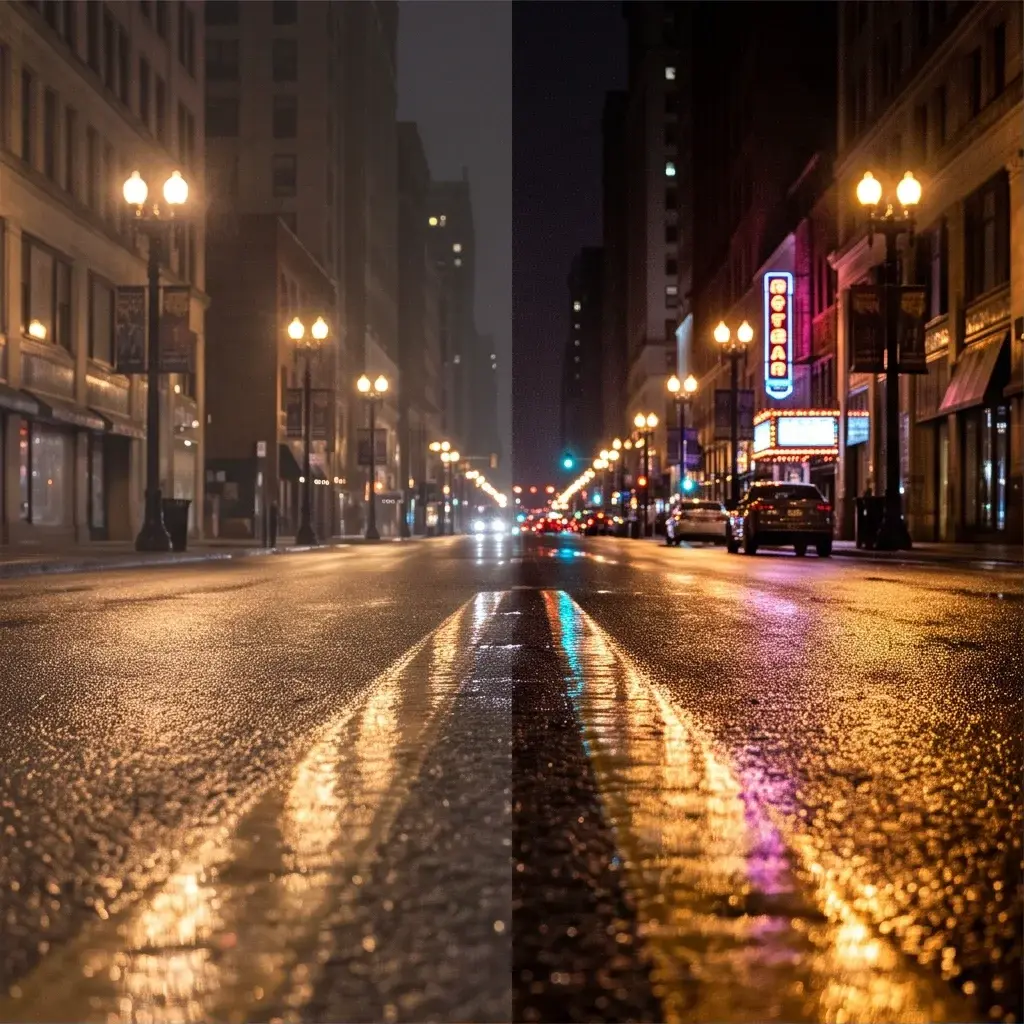
- Lighting redesign (e.g., studio to golden hour, moody neon) with consistent realism across the scene
- Complex scene changes where maintaining coherence and detail is critical
- Multi-reference editing using up to 10 reference images for character, product, or style consistency
- Strong adherence to complex, structured prompts, including multi-part instructions and compositional constraints
- Reliable generation of legible, accurate text in multiple languages, suitable for infographics, UI mockups, and branding
- Native support for flexible input/output aspect ratios and high-resolution outputs up to 4 megapixels
Use cases
Use Cases for flux-2-flex-edit
E-commerce marketers use flux-2-flex-edit to transform catalog photos, feeding an input image with a prompt like "add gold-embossed 'Limited Edition' text in elegant script on the product label, match hex #D4AF37, place on marble background with soft shadows." This generates photorealistic variants ready for marketplaces, preserving fine details like fabric weaves.
UI/UX designers leverage its typography focus for AI photo editing for e-commerce mockups, editing wireframes with multi-reference inputs to insert multilingual text overlays while maintaining pixel-perfect layouts and realistic screen glows—streamlining prototype iterations.
Game developers building image-to-image AI model pipelines apply multi-reference editing to asset libraries, combining character sprites with environment refs for consistent pose adjustments via prompts specifying hex colors and structured JSON, accelerating art production without quality loss.
Advertising creators handle bulk edits for campaigns, using pose guidance and color controls to adapt hero shots across styles, ensuring brand fidelity in high-res outputs for social media and print.
Tips & tricks
How to Use flux-2-flex-edit on Eachlabs
Access flux-2-flex-edit seamlessly on Eachlabs via the Playground for instant testing, API for scalable integrations, or SDK for custom apps. Upload your base image, add up to 10 references, craft detailed prompts with hex codes or structured JSON, and tweak CFG scale (1-20) or steps (1-50) for optimal results—yielding 4MP photorealistic edits in seconds.
---Technical spec
What Sets flux-2-flex-edit Apart
flux-2-flex-edit stands out in the competitive landscape of Black Forest Labs image-to-image tools through its specialization in typography rendering—up to 3x faster than prior models—preserving legible text and intricate details that other editors often distort. This enables users to overlay precise text on product images or infographics without retraining or manual fixes, ideal for high-volume edit images with AI workflows.
Unlike generic models, it supports multi-reference editing with up to 10 input images alongside natural language prompts, maintaining character consistency and spatial reasoning with realistic lighting and shadows. Professionals benefit by composing scenes from multiple sources, such as blending product shots with environmental references for e-commerce visuals.
Key technical specs include output resolutions up to 4 megapixels in any aspect ratio, input starting from 64x64 pixels, hex color matching for exact palette control, and inference times as low as sub-second on optimized hardware—making it the go-to for production-scale automated image editing API applications.
- Typography mastery: Renders accurate text in complex layouts 3x faster, perfect for branded overlays.
- 10-image multi-reference: Ensures identity and style consistency across edits.
- 4MP high-res editing: Preserves geometry and texture without hallucinations.
Things to be aware of
- The model is optimized for quality over speed, so generation times can be noticeably longer, especially for high-resolution or complex edits
- Results are highly dependent on input image quality; blurry, low-resolution, or poorly exposed images can lead to artifacts or inconsistent outputs
- Multi-reference editing requires careful selection of references; mixing very different styles or poses can confuse the model and reduce consistency
- Text rendering, while significantly improved, may still require iteration to achieve perfect alignment, kerning, or font style in complex layouts
- Lighting and material changes work best when the prompt includes specific, realistic cues; vague descriptions can lead to inconsistent or unnatural results
- For very large inpainting or outpainting areas, the model may struggle with global coherence, so staged, incremental edits are recommended
- Some users report that extremely detailed textures (e.g., fine hair, intricate patterns) can occasionally break or become inconsistent under aggressive edits
- Consistency across multiple generations or edits improves when using the same subject description, reference images, and prompt structure
- Positive user feedback frequently highlights the model’s realism, prompt adherence, and ability to handle complex, structured instructions without extensive tuning
- Common concerns include the learning curve for advanced editing workflows and the need for careful prompt structuring to avoid unintended changes to locked elements
Key considerations
- FLUX 2 Flex Edit is quality-first, which often means slower generation times compared to faster, lower-fidelity models; plan for longer iteration cycles when fine-tuning edits
- Best results are achieved with clean, high-quality source images that have sharp subject edges, minimal blur, and decent exposure
- Use clear, structured prompts that explicitly separate what should stay the same versus what should change (e.g., “keep the face and clothing, change the background to a beach at sunset”)
- For complex edits, it’s more effective to make small, incremental changes rather than attempting large transformations in a single step
- When working with text or typography, specify exact wording, font style (if applicable), and color (e.g., HEX codes) to maximize legibility and accuracy
- Multi-reference editing works best when references are consistent in style, pose, or product presentation; avoid mixing highly divergent references
- Always review outputs at 100% zoom to evaluate detail fidelity, texture quality, and text clarity before finalizing
- For demanding tasks like fashion retouching or product photography, many users report better outcomes by first drafting with a faster model and then refining with FLUX 2 Flex Edit for the final polish
Limitations
- Primary technical constraint is computational demand and generation time, making it less suitable for real-time or very high-volume batch editing without sufficient resources
- Main scenarios where it may not be optimal include low-quality input images, extremely large inpainting/outpainting areas, or attempts to drastically change subject identity while preserving all original details
Related models
4 models


About Flux 2 | Flex | Edit
What is FLUX 2 Flex Edit?
FLUX 2 Flex Edit is an image editing model by Black Forest Labs that applies flexible, prompt-guided modifications to existing images. Built on the FLUX 2 architecture, it enables precise edits including object replacement, background changes, and style adjustments while preserving compositional integrity of the source image.